Minecraft version
Back to mods 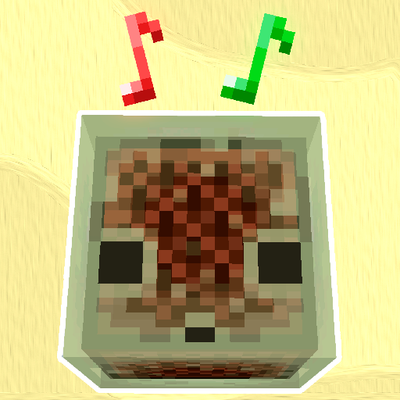
CurseForge · Minecraft mod
Better Sulfur Cubes
More Sulfur Cube archetypes for a better experience! Musical, Solid, Adhesive and more
Choose a version Pick your version below, then grab the matching file.
Quick answer
Which Better Sulfur Cubes release should I use?
Latest stable file Better Sulfur Cubes 1.0.5 - 26.3 [NeoForge]
Game version 26.3
Loader NeoForge
Better Sulfur Cubes 1.0.5 - 26.3 [NeoForge] targets 26.3 with NeoForge. The project page does not say whether this file belongs on the client, dedicated server, or both. No extra mods listed for this file.
Where it goes
Is Better Sulfur Cubes required on the client, server, or both?
The project page does not say whether this file belongs on the client, dedicated server, or both.
Client Source doesn’t say
Dedicated server Source doesn’t say
Loader for this release NeoForge
Required install it here Optional supported, not mandatory Not supported do not install here Source doesn’t say do not assume
The source does not explicitly classify this release as client-only or server-only.
What else does Better Sulfur Cubes 1.0.5 - 26.3 [NeoForge] need?
Better Sulfur Cubes 1.0.5 - 26.3 [NeoForge]. Change the file and its required mods may change too.
This file does not list any required mods. Do not add a library just because a different file uses it.
This file does not list any required or optional mods.
Before you install it
Add Better Sulfur Cubes without breaking your instance.
Built for Better Sulfur Cubes 1.0.5 - 26.3 [NeoForge]. Pick another file and the loader, install side or required mods may change.
- 01
Stick to this file
Use Better Sulfur Cubes 1.0.5 - 26.3 [NeoForge]. It targets 26.3 with NeoForge; another release may have different loader, side or dependency requirements.
- 02
Bring the mods it needs
This file does not list any required mods. Do not add a library just because a different file uses it.
- 03
Put it on the correct side
The project page does not say whether this file belongs on the client, dedicated server, or both.
- 04
Pick the file you checked
Use the “Get this file” button beside Better Sulfur Cubes 1.0.5 - 26.3 [NeoForge]. It opens that exact file at the source.
About this project
What does Better Sulfur Cubes add?
Better Sulfur Cubes
Better Sulfur Cubes adds new custom archetypes to the Sulfur Cube, each triggered by equipping a specific block in its body slot. Each archetype gives the mob a unique behavior that reacts to its surroundings: collisions, surfaces, and the environment.
Archetypes
Adhesive - Honey Block
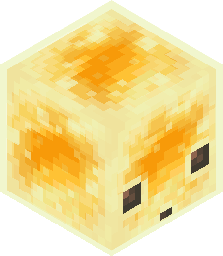
A Sulfur Cube wearing a Honey Block will stick to any wall or ceiling it crashes into.
Unsticks when hit by a player/mob, hooked with a fishing rod, leashed or when the block it was clinging to is broken.
Explosive - TNT
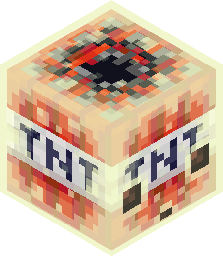
A Sulfur Cube wearing TNT becomes a living bomb. It detonates on hard impact against a wall or the ground, when touching fire or lava, or when struck by a flaming arrow.
On explosion, it splits into two smaller Sulfur Cubes, just like a natural death… but with a bang.
Musical - Note Block
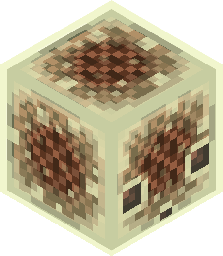
A Sulfur Cube wearing a Note Block turns every collision into music. When it lands on a surface, hits a wall, or bounces off a ceiling, it plays the Note Block instrument of the block it collided with, at a random pitch.
Twinkle - Redstone Lamp / Copper Bulb
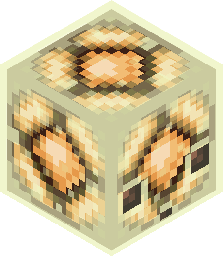
A Sulfur Cube wearing a Redstone Lamp or any Copper Bulb (including oxidized variants) toggles between lit and unlit on every collision. When lit, its texture changes accordingly.
Redstone - Redstone Block
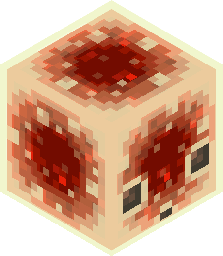
A Sulfur Cube wearing a Redstone Block acts as a mobile power source. It emits a strong Redstone signal to the block it is currently standing on and updates all adjacent neighbors as it moves.
Solid - Purpur Blocks
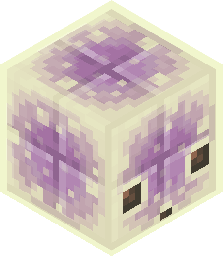
The Sulfur Cube turns completely solid, allowing players to stand and walk on top of it as if it were a real block. The only way to move this Sulfur Cube is by hitting it.
Configuration
All archetypes can be individually enabled or disabled by editing config/better-sulfur-cubes.json directly.
📦 Requirements
- Minecraft +26.2
- Fabric Loader +0.19.3
- Fabric API
🐛 Found a bug?
-> Issues Page
Project description from CurseForge.
Pick your setup
Better Sulfur Cubes by Minecraft version and loader
Choose the version and loader you play, then open the matching release.
Minecraft version
26.2
2 loader buildsCheck the dependencies, then try the file in a copied instance before changing a world you care about.
Recent files
Better Sulfur Cubes versions and loaders
Better Sulfur Cubes 1.0.5 - 26.3 [NeoForge]
better_sulfur_cubes-1.0.5-26.3-neoforge.jar
16 Sept 2026
Client Source doesn’t say Server Source doesn’t say Dependencies No extras listed Listed on Release listing
Check the 26.3 · NeoForge setup NeoForge26.3 release
Better Sulfur Cubes 1.0.5 - 26.3 [Fabric]
better-sulfur-cubes-1.0.5-26.3.jar
16 Sept 2026
Client Source doesn’t say Server Source doesn’t say Dependencies No extras listed Listed on Release listing
Check the 26.3 · Fabric setup Fabric26.3 release
Better Sulfur Cubes 1.0.4 - 26.2 [NeoForge]
better_sulfur_cubes-1.0.4-26.2-neoforge.jar
18 Jun 2026
Client Source doesn’t say Server Source doesn’t say Dependencies No extras listed Listed on Release listing
Check the 26.2 · NeoForge setup NeoForge26.2 release
Better Sulfur Cubes 1.0.4 - 26.2 [Fabric]
better-sulfur-cubes-1.0.4-26.2.jar
18 Jun 2026
Client Source doesn’t say Server Source doesn’t say Dependencies 1 required · 1 unchecked Listed on Release listing
Check the 26.2 · Fabric setup Fabric26.2 release
Looking for an older file? The official CurseForge project page is in Resources.
 mod
CurseForge + Modrinth · Minecraft
Antarchy
Adding 45+ mobs, 8+ bosses, 3 fleshed out dimensions, and more
 mod
CurseForge · Minecraft
Instantly Destroy Tree :Clear Path for Horse Riding
Cut tree fastor than Treecapitator or Lumberjack , efficient terraforming. Like VeinMiner, our Demolish Axe instantly removes trees. It offers fast logging with zero wait. Leaving zero items,Clear Obstacles,Instant Break,Fast Logging
 mod
CurseForge · Minecraft
The Nether was Rubbish
The Nether was rubbish, so we fixed it: a whole new look, far less lava, new mobs, deadly plants, new places and a properly eerie atmosphere.