Minecraft version
Back to mods 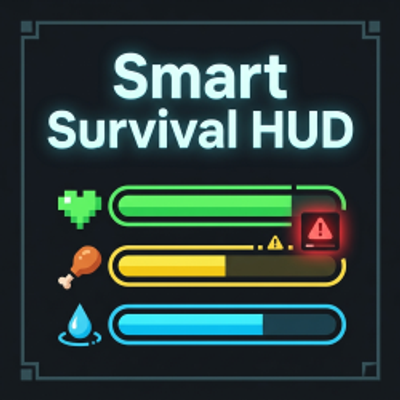
CurseForge · Minecraft mod
Smart Survival HUD
An all-in-one survival HUD that shows hunger, thirst, temperature, and danger — everything you need to survive, in one clean UI.
Choose a version Pick your version below, then grab the matching file.
Quick answer
Which Smart Survival HUD release should I use?
Latest stable file smart-survival-hud-1.0
Game version 1.20.1
Loader Fabric
Smart Survival HUD smart-survival-hud-1.0 targets 1.20.1 with Fabric. The project page does not say whether this file belongs on the client, dedicated server, or both. No extra mods listed for this file.
Where it goes
Is Smart Survival HUD required on the client, server, or both?
The project page does not say whether this file belongs on the client, dedicated server, or both.
Client Source doesn’t say
Dedicated server Source doesn’t say
Loader for this release Fabric
Required install it here Optional supported, not mandatory Not supported do not install here Source doesn’t say do not assume
The source does not explicitly classify this release as client-only or server-only.
What else does Smart Survival HUD smart-survival-hud-1.0 need?
smart-survival-hud-1.0. Change the file and its required mods may change too.
This file does not list any required mods. Do not add a library just because a different file uses it.
This file does not list any required or optional mods.
Before you install it
Add Smart Survival HUD without breaking your instance.
Built for Smart Survival HUD smart-survival-hud-1.0. Pick another file and the loader, install side or required mods may change.
- 01
Stick to this file
Use smart-survival-hud-1.0. It targets 1.20.1 with Fabric; another release may have different loader, side or dependency requirements.
- 02
Bring the mods it needs
This file does not list any required mods. Do not add a library just because a different file uses it.
- 03
Put it on the correct side
The project page does not say whether this file belongs on the client, dedicated server, or both.
- 04
Pick the file you checked
Use the “Get this file” button beside smart-survival-hud-1.0. It opens that exact file at the source.
About this project
What does Smart Survival HUD add?
Smart Survival HUD Smart Survival HUD is a lightweight, client-side utility mod that combines the most useful survival info into one clean interface.
Built for Minecraft 1.20.1 (Fabric), it helps you make faster survival decisions without cluttering your screen.
Features
Advanced Hunger Display
- Exact hunger value (numeric)
- Saturation overlay inspired by AppleSkin
- Quick-read bar + text in one compact row
Temperature Indicator
- Reads current biome temperature
- Shows status: Cold / Normal / Hot
- Smooth color gradient: blue → white → red
Thirst System
- Adds a thirst bar under hunger
- Thirst decreases slowly over time
- Drinking a water bottle restores thirst
- Optional dehydration damage (configurable)
Danger Detection
- Detects hostile mobs around you (default radius: 16 blocks)
- Displays clear risk levels:
- Green: Safe
- Yellow: Few hostiles nearby
- Red: Many hostiles nearby
- Optional warning sound + screen flash on danger appearance
Clean Modern HUD
- Minimal, readable design for everyday play and modpacks
- Bottom-left by default
- Smooth fade in/out transitions
- Toggle anytime with H
- Edit HUD position with J
- Reset HUD position with K
Performance First
- Entity scans run every few ticks (not every frame)
- Lightweight rendering and cached values
- Designed to stay responsive even in busy worlds
Configurable
- Enable/disable each module independently
- Move HUD position (X/Y offset)
- Adjust danger radius, thresholds, and update intervals
- Tune thirst drain/restore values and behavior
Compatibility
- Client-side only (no server install required)
- Works in singleplayer and multiplayer
- Built with Fabric API for Minecraft 1.20.1
If you want a smart, practical survival HUD without extra bloat, this is made for you.
Project description from CurseForge.
Pick your setup
Smart Survival HUD by Minecraft version and loader
Choose the version and loader you play, then open the matching release.
Check the dependencies, then try the file in a copied instance before changing a world you care about.
Recent files
Smart Survival HUD versions and loaders
smart-survival-hud-1.0
smart-survival-hud-1.0.0.jar
12 Apr 2026
Client Source doesn’t say Server Source doesn’t say Dependencies No extras listed Listed on Release listing
Check the 1.20.1 · Fabric setup Fabric1.20.1 release
Looking for an older file? The official CurseForge project page is in Resources.
 mod
mod CurseForge · Minecraft
Trial Sword Altar
An animated sword altar for configurable boss summoning, featuring summon tokens, cross-mod integrations, and a protected arena dimension
 mod
mod CurseForge · Minecraft
AdventurePack: Util
An expansive RPG expansion for Fabric 1.20.1 featuring 6 core attributes, a 150+ spells, passive skill tree, unlockable player titles, 100+ animated 3D GeckoLib mobs, new dimensions.
 mod
mod CurseForge · Minecraft
AdventurePack: Core Engine
A high-performance RPG foundation for Fabric 1.20.1 , 15+ elemental status effects, multiplayer party frames, and core combat mechanics into a single lightweight mod.