Fabric API Needed by analogclock-1.4.0+1.21.1-fabric.jar
requiredMatching file found Matched file: [1.21.1] Fabric API 0.116.18+1.21.1

CurseForge · Minecraft mod
Adds timekeeping accessories like an analog clock that ticks and an amethyst pendulum that chimes. Build a grandfather clock, cuckoo clock, and more with these simple analogue tools!
Quick answer
analogclock-1.4.0+1.21.1-fabric.jar targets 1.21.1 with Fabric, Quilt. The project page does not say whether this file belongs on the client, dedicated server, or both. All 1 required mods have matching files.
Where it goes
The project page does not say whether this file belongs on the client, dedicated server, or both.
The source does not explicitly classify this release as client-only or server-only.
analogclock-1.4.0+1.21.1-fabric.jar. Change the file and its required mods may change too.
Install Fabric API first. We found matching files for this game-version and loader setup.
We only count dependency files that match this setup. A file for another loader does not fill the gap.
Before you install it
Built for analogclock-1.4.0+1.21.1-fabric.jar. Pick another file and the loader, install side or required mods may change.
Use analogclock-1.4.0+1.21.1-fabric.jar. It targets 1.21.1 with Fabric, Quilt; another release may have different loader, side or dependency requirements.
Install Fabric API first. We found matching files for this game-version and loader setup.
The project page does not say whether this file belongs on the client, dedicated server, or both.
Use the “Get this file” button beside analogclock-1.4.0+1.21.1-fabric.jar. It opens that exact file at the source.
About this project

Analog is a simple mod that adds a new, yet familiar, analog clock to decorate your home. Ever felt a little dissatisfied with the clock-in-a-frame being your only option to hang up on the wall? This new clock, made with a brass frame, light faded dial, and bold hands, is sure to revamp the aesthetic and fit right in with your home decor while feeling true to the vanilla style.
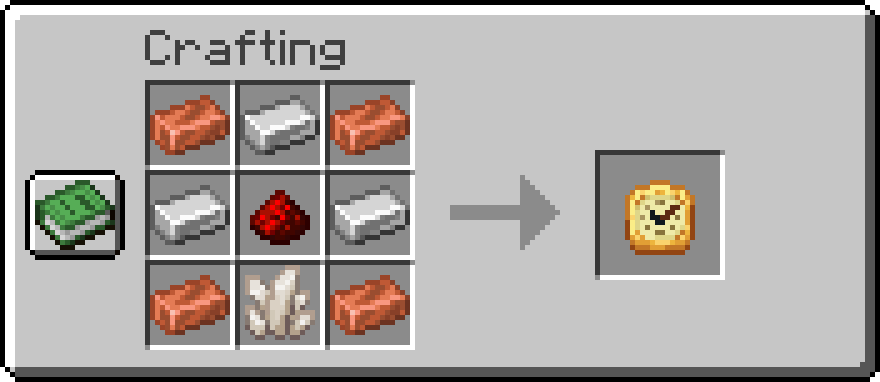
The makeup of the analog clock alludes to the process of making brass, a highly-used metal in clockmaking, by combining copper and iron (in the real world, copper and zinc are used). Combined with a quartz crystal for consistent ticking and redstone dust to power the device, the recipe can be visualized below, and is always available in the recipe book.
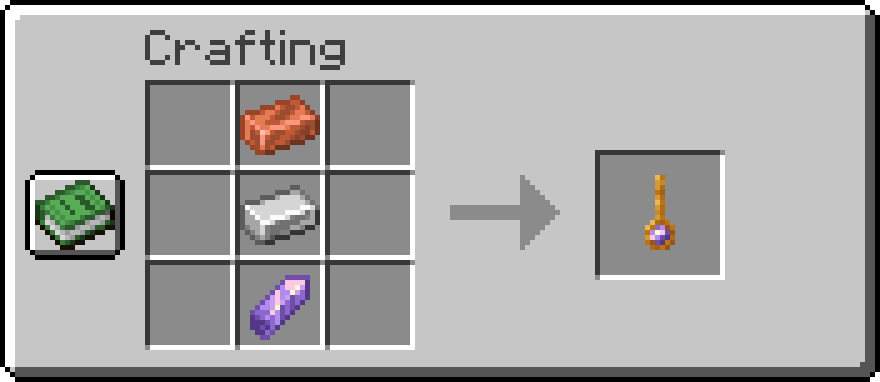
The pendulum is able to catch daylight and ambient light due to the amethyst gemstone, which is also used in items such as tinted glass and the spyglass. With it are combined the copper and iron to form the brass rod that allows the pendulum to swing.
Analog is designed to feel like a natural extension to vanilla Minecraft, which means:
This mod relies on the assumption that a Minecraft day is 20 minutes (24,000 in-game ticks) long. Any mods that change this or alter the times of day may interfere with how the clock tells time. Otherwise, this mod should be 100% compatible with other mods and datapacks, as well as multiplayer servers and realms.
If you would like to see support for a mod that changes aspects of the in-game day or world time, have a suggestion, or encounter any issues with the mod, please reach out on GitHub!
Project description from CurseForge.
Pick your setup
Choose the version and loader you play, then open the matching release.
Check the dependencies, then try the file in a copied instance before changing a world you care about.
Recent files
analogclock-1.5.1-alpha-forge+1.20.1.jar
23 Aug 2026
analogclock-1.5.1-alpha-fabric+1.21.5.jar
23 Aug 2026
analogclock-1.5.1-alpha-fabric+1.21.1.jar
23 Aug 2026
analogclock-1.5.1-alpha-fabric+1.21.11.jar
23 Aug 2026
analogclock-1.5.1-alpha-fabric+1.20.1.jar
23 Aug 2026
analogclock-1.5.1-alpha-neoforge+1.21.11.jar
23 Aug 2026
analogclock-1.5.1-alpha-neoforge+1.21.5.jar
23 Aug 2026
analogclock-1.5.1-alpha-neoforge+1.21.1.jar
23 Aug 2026
analogclock-1.5.1-alpha-fabric+26.1.2.jar
23 Aug 2026
analogclock-1.5.1-alpha-neoforge+26.1.2.jar
23 Aug 2026
analogclock-1.5.0-alpha.1-forge+1.20.1.jar
15 Jun 2026
analogclock-1.5.0-alpha.1-fabric+1.20.1.jar
15 Jun 2026
Looking for an older file? The official CurseForge project page is in Resources.
 mod
A addon mod for Create and Kaleidoscope Tavern to make it easy for players to automate their taverns.
 mod
An add-on for AnvilCraft that expands the mod with more items, blocks, and features.
 mod
A series of light sources have been created to enhance the visual experience of the Sable physics object and CBC Muzzle Flash. The entire project relies on Iris and mostly runs on the GPU