Minecraft version
Back to mods 
CurseForge · Minecraft mod
Kronomancer: Longer Days
This mods sole purpose is to allow the user to elongate the duration of the day/night cycle without conflicting with the vanilla logic. It does this by stopping the cycle at cretain checkpoints, waiting the corresponding time and allowing it to continue.
Choose a version Pick your version below, then grab the matching file.
Quick answer
Which Kronomancer: Longer Days release should I use?
Latest stable file kronomancer-1.0.1-forge-1.20.1.jar
Game version 1.20.1
Loader Forge
Kronomancer: Longer Days kronomancer-1.0.1-forge-1.20.1.jar targets 1.20.1 with Forge. The project page does not say whether this file belongs on the client, dedicated server, or both. No extra mods listed for this file.
Where it goes
Is Kronomancer: Longer Days required on the client, server, or both?
The project page does not say whether this file belongs on the client, dedicated server, or both.
Client Source doesn’t say
Dedicated server Source doesn’t say
Loader for this release Forge
Required install it here Optional supported, not mandatory Not supported do not install here Source doesn’t say do not assume
The source does not explicitly classify this release as client-only or server-only.
What else does Kronomancer: Longer Days kronomancer-1.0.1-forge-1.20.1.jar need?
kronomancer-1.0.1-forge-1.20.1.jar. Change the file and its required mods may change too.
This file does not list any required mods. Do not add a library just because a different file uses it.
This file does not list any required or optional mods.
Before you install it
Add Kronomancer: Longer Days without breaking your instance.
Built for Kronomancer: Longer Days kronomancer-1.0.1-forge-1.20.1.jar. Pick another file and the loader, install side or required mods may change.
- 01
Stick to this file
Use kronomancer-1.0.1-forge-1.20.1.jar. It targets 1.20.1 with Forge; another release may have different loader, side or dependency requirements.
- 02
Bring the mods it needs
This file does not list any required mods. Do not add a library just because a different file uses it.
- 03
Put it on the correct side
The project page does not say whether this file belongs on the client, dedicated server, or both.
- 04
Pick the file you checked
Use the “Get this file” button beside kronomancer-1.0.1-forge-1.20.1.jar. It opens that exact file at the source.
About this project
What does Kronomancer: Longer Days add?
After thorough testing of the other mods that promised to change the day/night cycle duration I was severely disappointed at seeing three recurrent issues.
- Issues when trying to sleep.
- Incompatibility with other mods because how they are coded.
- Jittery visuals for the Sun, Moon and Stars.
So is this disappointment that has led me to develop my own day length changer mod. I specifically coded this mod to avoid the aforementioned issues, this below is how I have done it.
- The mod has its own internal logic to allow the vanilla sleeping system and in some cases other modded systems (Steve's Realistic Sleep for example) to work as they should.
- This mod shouldn't be incompatible with most other mods because it doesn't alter the tick rate or the internal system minecraft uses to keep track of time, exceptuating mods that alter the count of players neccesary for sleeping, as I can´t think of away to make it work without scrapping the already working system. Also there is full compatibility for mods that add sleeping during the day, like Comforts.
- Instead of constantly turning on and off the doDaylightCycle gamerule each few ticks, this mod only does it at 12 checkpints along the whole cycle for a duration taken from a calculation based on the total day cycle duration configured. By doing this all jittery visuals are avoided, keepeng stops seamless and transitions fluid.
Also the mod is ressistant to the "/time set" command, as it recalibrates itself every time it is used. If somehow the cycle still breaks, by changing the cycle length for example (I honestly haven't found any other way to wreck it), both at sunrise and sunset the cycle is recalibrated and fixes itself.
Configuration is done through a single gamerule: dayLength
Write: /gamerule dayLength (Time in ticks)
The default vanilla daylight cycle length is 24000 ticks (20 min), so a 48000 ticks (40 min) cycle length is twice as long as a vanilla cycle. In case day length is set to a number equal or lower than 24000, the day will have the normal vanilla day length.
WARNING: If you are using shaders that sync the clouds to the daylight cycle they will also be stopped at the checkpoints, to avoid this find an option that desyncs them. With Complementary Shaders for example:
Install Euphoria Patches > Settings > Configure Euphoria > World > World Time Animation: True
WARNING: If you have tried another day-elongating mods before mine, they might have left your world's ticking system damaged upon uninstall. Sadly I haven't fount any fix to it other than creating a fresh world. In case you uninstall my mod, the only necessary step to take in case of the day-night cycle being frozen is setting the gamerule doDaylightCycle to True, that should permanently fix it to run the vanilla way normally.
Feel free to use this mod in any modpack you want and comment any issues you find, but I won't probably be checking too often, so please be patient.
Project description from CurseForge.
Pick your setup
Kronomancer: Longer Days by Minecraft version and loader
Choose the version and loader you play, then open the matching release.
Minecraft version
1.21.4
1 loader buildMinecraft version
1.21.1
1 loader buildMinecraft version
1.20.1
1 loader buildCheck the dependencies, then try the file in a copied instance before changing a world you care about.
Recent files
Kronomancer: Longer Days versions and loaders
kronomancer-1.0.1-forge-1.20.1.jar
9 Aug 2026
Client Source doesn’t say Server Source doesn’t say Dependencies No extras listed Listed on Release listing
Check the 1.20.1 · Forge setup 1.20.1Forge release
kronomancer-1.0.1-neoforge-1.21.8.jar
14 May 2026
Client Source doesn’t say Server Source doesn’t say Dependencies No extras listed Listed on Release listing
Check the 1.21.8 · NeoForge setup 1.21.8NeoForge release
kronomancer-1.0.1-neoforge-1.21.4.jar
14 May 2026
Client Source doesn’t say Server Source doesn’t say Dependencies No extras listed Listed on Release listing
Check the 1.21.4 · NeoForge setup 1.21.4NeoForge release
kronomancer-1.0.1-neoforge-1.21.1.jar
14 May 2026
Client Source doesn’t say Server Source doesn’t say Dependencies No extras listed Listed on Release listing
Check the 1.21.1 · NeoForge setup 1.21.1NeoForge release
kronomancer-1.0.0-neoforge-1.21.8.jar
16 Apr 2026
Client Source doesn’t say Server Source doesn’t say Dependencies No extras listed Listed on Release listing
Check the 1.21.8 · NeoForge setup 1.21.8NeoForge beta
kronomancer-1.0.0-neoforge-1.21.4.jar
16 Apr 2026
Client Source doesn’t say Server Source doesn’t say Dependencies No extras listed Listed on Release listing
Check the 1.21.4 · NeoForge setup 1.21.4NeoForge beta
kronomancer-1.0.0-neoforge-1.21.1.jar
16 Apr 2026
Client Source doesn’t say Server Source doesn’t say Dependencies No extras listed Listed on Release listing
Check the 1.21.1 · NeoForge setup 1.21.1NeoForge beta
Looking for an older file? The official CurseForge project page is in Resources.
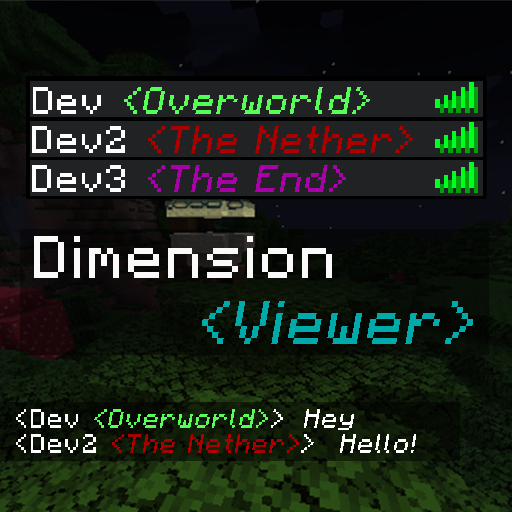 mod
mod CurseForge + Modrinth · Minecraft
Dimension Viewer
A highly customisable server-side mod for viewing which dimension each player is currently in from the tab list.
 mod
mod CurseForge · Minecraft
Ambi (Ambient Sounds)
A lightweight client-side audio mod that dynamically shifts environmental soundscapes based on biomes, weather, time, indoor shelters, and deep caves.
 mod
mod CurseForge · Minecraft
EMI Recipe Hud
EMI addon that adds a list of resources from the Recipe Tree to the HUD.