KubeJS Create Optional for Create ReAutomated createreautomated-0.3.2-mc1.21.1-neoforge.jar
optionalMatching file found Matched file: KubeJS Create NeoForge 2101.3.1-build.18

CurseForge · Minecraft mod
Create ReAutomated adds nodes to extract resources from
Quick answer
Create ReAutomated createreautomated-0.3.2-mc1.21.1-neoforge.jar targets 1.21.1 with NeoForge. The project page does not say whether this file belongs on the client, dedicated server, or both. All 1 required mods have matching files.
Where it goes
The project page does not say whether this file belongs on the client, dedicated server, or both.
The source does not explicitly classify this release as client-only or server-only.
createreautomated-0.3.2-mc1.21.1-neoforge.jar. Change the file and its required mods may change too.
Install Create first. We found matching files for this game-version and loader setup. 2 come through another mod in the chain.
2 extra mods were pulled in by other dependencies. Indented rows show who needs each one. We only count dependency files that match this setup. A file for another loader does not fill the gap.
Before you install it
Built for Create ReAutomated createreautomated-0.3.2-mc1.21.1-neoforge.jar. Pick another file and the loader, install side or required mods may change.
Use createreautomated-0.3.2-mc1.21.1-neoforge.jar. It targets 1.21.1 with NeoForge; another release may have different loader, side or dependency requirements.
Install Create first. We found matching files for this game-version and loader setup. 2 come through another mod in the chain.
The project page does not say whether this file belongs on the client, dedicated server, or both.
Use the “Get this file” button beside createreautomated-0.3.2-mc1.21.1-neoforge.jar. It opens that exact file at the source.
About this project
Port and rework of the original "Create Automated" mod by kotakotik22, updated to Minecraft 1.21.1 with NeoForge.
Create ReAutomated adds an alternative resource extraction system to traditional mining, designed to fit right into Create's automation workflow. What started years ago as a simple update, with kotakotik22's permission, has slowly turned into something fairly different from the original, while still keeping its spirit.

⚠️ Note: This is an initial release. Further balancing will likely be required, and some bugs may still occur.
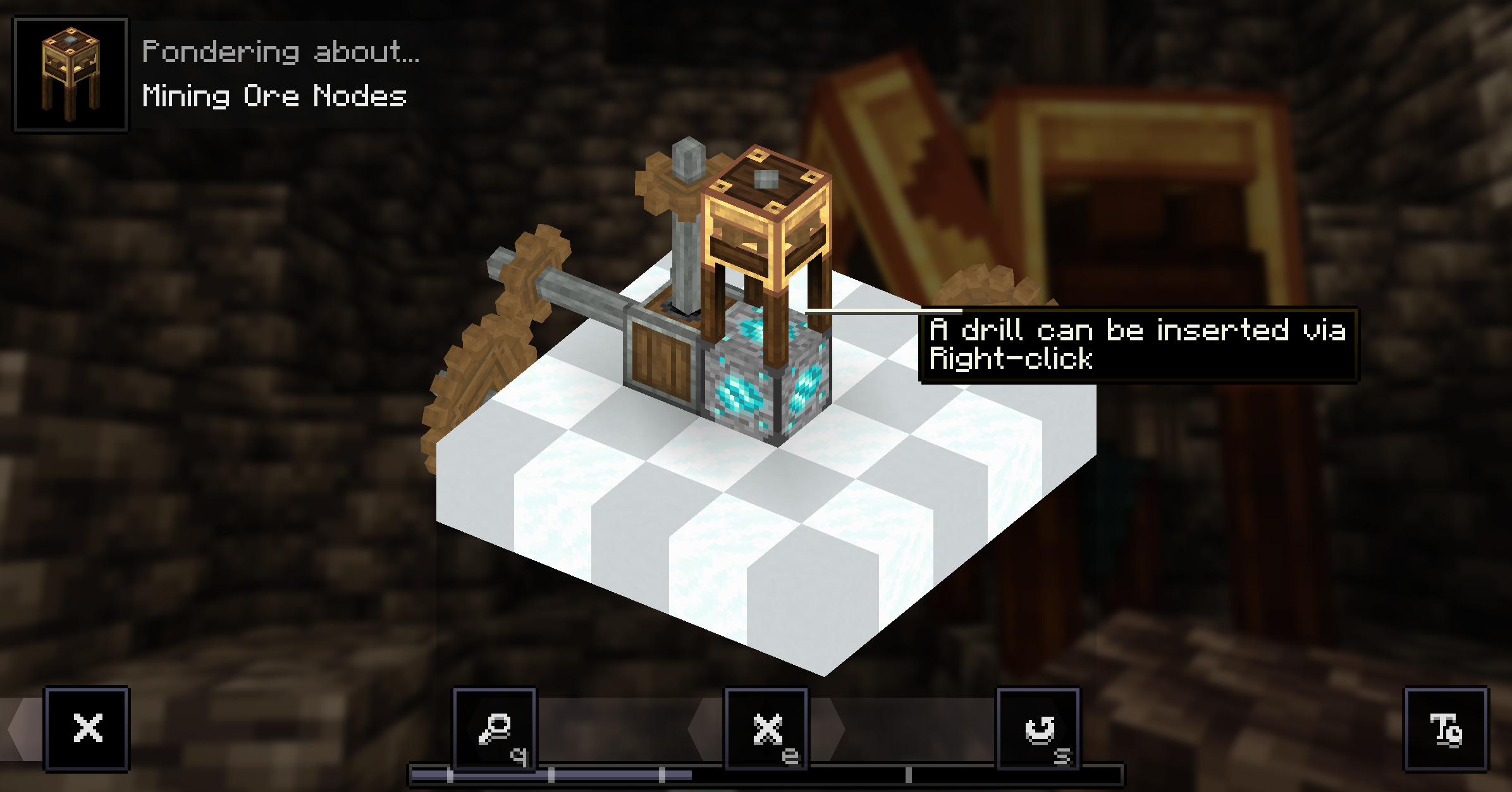
The general loop is straightforward: find a node, set up an Extractor with the right drill, feed it kinetic energy and collect Ore Bits until the node runs dry. Along the way you'll occasionally pick up Node Fragments, which open the door to stabilizing nodes, relocating them into dedicated extraction rooms, and eventually crafting Infinite Nodes for endgame setups.
You can learn how to use the Ore Extractor directly in-game through the ponder mechanic by holding W on it in JEI.
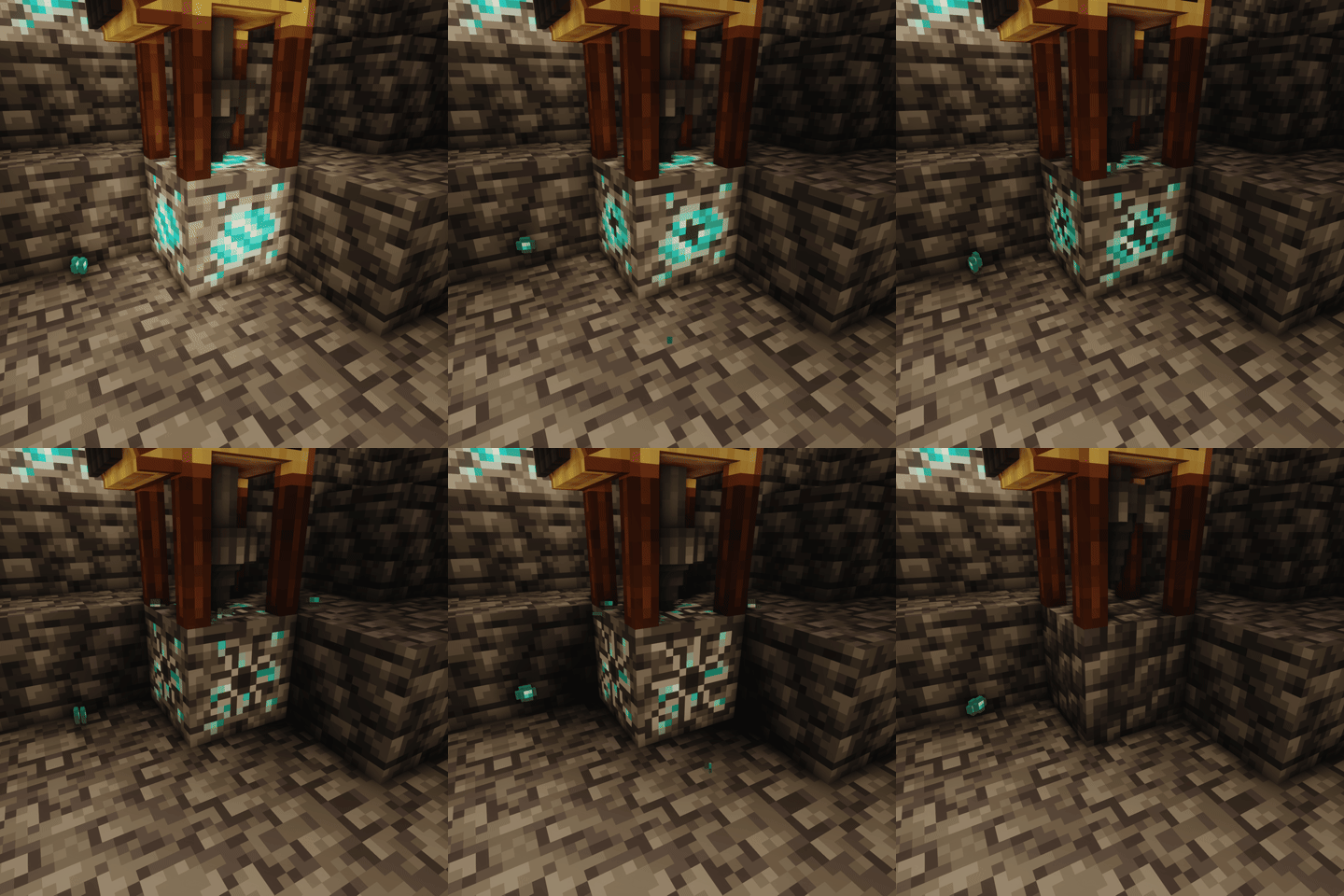
Nodes have a visual representation of the percentage of remaining resources.
In addition to the visual indicator, the light level emitted by the node also changes, the lower the emitted light, the fewer resources remain.
If you don't like the rarity of Nodes (they are currently quite rare), you can use this datapack to make it rarer or more common
Supports JEI for recipe viewing.
Requires the kubejs_create addon. You can:
server_scripts):ServerEvents.recipes(event => {
// output drill nodes
event.recipes.createreautomated.extracting("5x diamond", "kubejs:drill", "kubejs:node")
.processingTime(25600)
.extractionQuantity(2)
.durabilityCost(5)
})
startup_scripts):StartupEvents.registry("block", event => {
event.create("test_node", "createreautomated:ore_node") // ... other kubejs block builder methods
.copyPropertiesFrom("createreautomated:diamond_node") // (optional) copy properties from another node
.withCommonLoot() // uses the default ore node loot table
.yield(100) // max extractions before depletion
.baseStone("minecraft:cobblestone") // block left after depletion
})
startup_scripts):StartupEvents.registry("item", event => {
event.create("drill", "createreautomated:drill") // ... other kubejs item builder methods
.withPartial("createreautomated:partial/diamond_drill") // render model
})
This mod is a port of Create Automated, originally developed by kotakotik22.
All credit for the original concept, design, and implementation goes to him.
If you're interested in the original project or want to learn more, you can check it out here
Special thanks to Facu for updating the mod icon ❤️
For any problems or questions, feel free to join the discord by clicking on the image below

Project description from CurseForge.
Pick your setup
Choose the version and loader you play, then open the matching release.
Check the dependencies, then try the file in a copied instance before changing a world you care about.
Recent files
4 Aug 2026
4 Aug 2026
25 Jun 2026
14 May 2026
26 Apr 2026
17 Apr 2026
Looking for an older file? The official CurseForge project page is in Resources.
 mod
modOffering more tools and methods to automate food processing of other mod in Create.
 mod
modA project can translate you sodium mod into Chinese
 mod
modSuperMartijn642's Core Lib adds lots of basic implementations that allow for similar code between different Minecraft versions!