Fabric API Needed by Cobblemon Radar CobblemonRadar-1.0.5+1.21.1.jar
requiredMatching file found Matched file: [1.21.1] Fabric API 0.116.18+1.21.1
CurseForge · Minecraft mod
Advanced radar for Cobblemon with search, filters, and visual Pokémon tracking.
Quick answer
Cobblemon Radar CobblemonRadar-1.0.5+1.21.1.jar targets 1.21.1 with Fabric. The project page does not say whether this file belongs on the client, dedicated server, or both. All 2 required mods have matching files.
Where it goes
The project page does not say whether this file belongs on the client, dedicated server, or both.
The source does not explicitly classify this release as client-only or server-only.
CobblemonRadar-1.0.5+1.21.1.jar. Change the file and its required mods may change too.
Install Fabric API, Cobblemon first. We found matching files for this game-version and loader setup.
We only count dependency files that match this setup. A file for another loader does not fill the gap.
Before you install it
Built for Cobblemon Radar CobblemonRadar-1.0.5+1.21.1.jar. Pick another file and the loader, install side or required mods may change.
Use CobblemonRadar-1.0.5+1.21.1.jar. It targets 1.21.1 with Fabric; another release may have different loader, side or dependency requirements.
Install Fabric API, Cobblemon first. We found matching files for this game-version and loader setup.
The project page does not say whether this file belongs on the client, dedicated server, or both.
Use the “Get this file” button beside CobblemonRadar-1.0.5+1.21.1.jar. It opens that exact file at the source.
About this project

Find nearby wild Pokémon with customizable tracking lines, readable labels and filters you control.
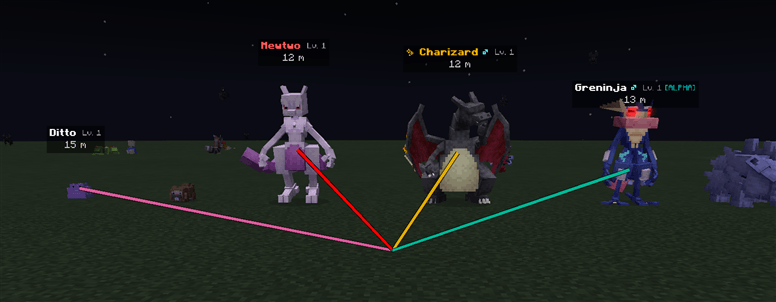
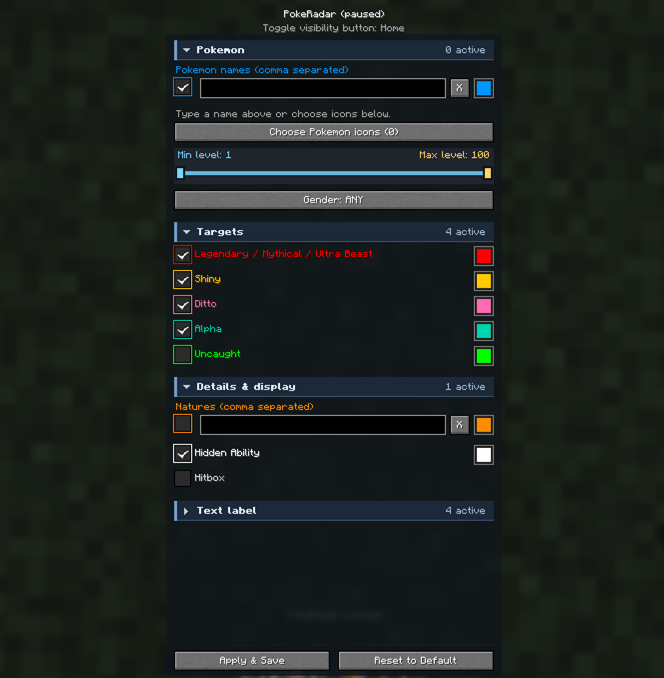
Search for a specific Pokémon, choose your targets from an icon grid, hunt for shinies or find Pokémon and forms missing from your collection. Cobblemon Radar highlights matching Pokémon directly in the world so you can see where to go.
| Option | What it does |
|---|---|
| Pokémon names & icons | Type names, use search suggestions or select Pokémon from a searchable icon grid. |
| Legendary / Mythical / UB | Track all three groups with one filter. |
| Shiny | Track shiny Pokémon, with gold names on their labels. |
| Ditto | Track wild Ditto. |
| Alpha | Track Alpha Pokémon |
| Uncaught | Find Pokémon you have not caught, including alternate forms. |
| Hidden Ability | Track Pokémon with Hidden Abilities when server support is available. |
Narrow your results with a minimum and maximum level and a gender selection. Name searches support multiple entries separated by commas, such as gengar, eevee, dratini.
Looking for a particular nature? Enter it in the Nature field to annotate matching Pokémon already tracked through names or icons, Uncaught, Ditto or Hidden Ability. Nature matching does not create additional radar targets.
| Requirement | Version |
|---|---|
| Minecraft: Java Edition | 1.21.1 |
| Mod loader | Fabric Loader 0.18.4 or newer |
| Java | 21 or newer |
| Required mods | Cobblemon and Fabric API |
| Tested Cobblemon releases | 1.7.3 and 1.8.4, using the same radar JAR |
The Alpha option is automatically hidden on Cobblemon versions without Alpha support. Other Cobblemon releases have not been verified.
The interface supports English, German, French and Spanish, following your Minecraft language setting. Other language settings use the English interface. Pokémon names use Cobblemon's translations.
mods folder and launch the game.| Default key | Action |
|---|---|
| Delete | Open the radar menu |
| Insert | Show or hide the radar |
| Tab / Enter | Accept a search suggestion while suggestions are open |
You can change the radar shortcuts in Minecraft's key bindings under Pokémon Analysis (localized in supported languages).
Most radar features work with the mod installed on your client. Hidden Ability detection and Nature information also need Cobblemon Radar installed on the server. These features work in singleplayer, where the integrated server provides that support.
Radar targets must be nearby, loaded wild Pokémon. Player-owned Pokémon, battle clones and entities marked as NoAI, uncatchable or unbattleable are excluded.
Your client and server still need matching Cobblemon versions and compatible mod sets. The shared radar JAR supports both tested Cobblemon releases independently.
Found a bug or have a suggestion? Leave feedback on CurseForge. For bug reports, include your Minecraft and Cobblemon versions, what happened, and the relevant log or screenshot.
Created by roskavi. Copyright (c) 2026 roskavi. All rights reserved.
Project description from CurseForge.
Pick your setup
Choose the version and loader you play, then open the matching release.
Check the dependencies, then try the file in a copied instance before changing a world you care about.
Recent files
CobblemonRadar-1.0.5-1.21.1.jar
31 Oct 2026
5 May 2026
21 Apr 2026
Looking for an older file? The official CurseForge project page is in Resources.
 mod
Farming automation mod. Planters and raised beds grow your crops and trees for you.
 mod
Compatibility fixes for running Flashback on NeoForge 1.21.1 through Sinytra Connector.
 mod
Client-side building toolkit: select areas, save and load .schem, .litematic and .nbt schematics, and build from ghost-block placements with a material checker.