Minecraft version
Back to mods 
CurseForge · Minecraft mod
Full Brightness (NIGHT VISION)
Night vision toggle button
Choose a version Pick your version below, then grab the matching file.
Quick answer
Which Full Brightness (NIGHT VISION) release should I use?
Latest stable file Night Vision 1.0.0+26.2 - NeoForge - MC 26.2
Game version 26.2
Loader NeoForge
Full Brightness (NIGHT VISION) Night Vision 1.0.0+26.2 - NeoForge - MC 26.2 targets 26.2 with NeoForge. The project page does not say whether this file belongs on the client, dedicated server, or both. No extra mods listed for this file.
Where it goes
Is Full Brightness (NIGHT VISION) required on the client, server, or both?
The project page does not say whether this file belongs on the client, dedicated server, or both.
Client Source doesn’t say
Dedicated server Source doesn’t say
Loader for this release NeoForge
Required install it here Optional supported, not mandatory Not supported do not install here Source doesn’t say do not assume
The source does not explicitly classify this release as client-only or server-only.
What else does Full Brightness (NIGHT VISION) Night Vision 1.0.0+26.2 - NeoForge - MC 26.2 need?
Night Vision 1.0.0+26.2 - NeoForge - MC 26.2. Change the file and its required mods may change too.
This file does not list any required mods. Do not add a library just because a different file uses it.
This file does not list any required or optional mods.
Before you install it
Add Full Brightness (NIGHT VISION) without breaking your instance.
Built for Full Brightness (NIGHT VISION) Night Vision 1.0.0+26.2 - NeoForge - MC 26.2. Pick another file and the loader, install side or required mods may change.
- 01
Stick to this file
Use Night Vision 1.0.0+26.2 - NeoForge - MC 26.2. It targets 26.2 with NeoForge; another release may have different loader, side or dependency requirements.
- 02
Bring the mods it needs
This file does not list any required mods. Do not add a library just because a different file uses it.
- 03
Put it on the correct side
The project page does not say whether this file belongs on the client, dedicated server, or both.
- 04
Pick the file you checked
Use the “Get this file” button beside Night Vision 1.0.0+26.2 - NeoForge - MC 26.2. It opens that exact file at the source.
About this project
What does Full Brightness (NIGHT VISION) add?
✨ FEATURES ✨
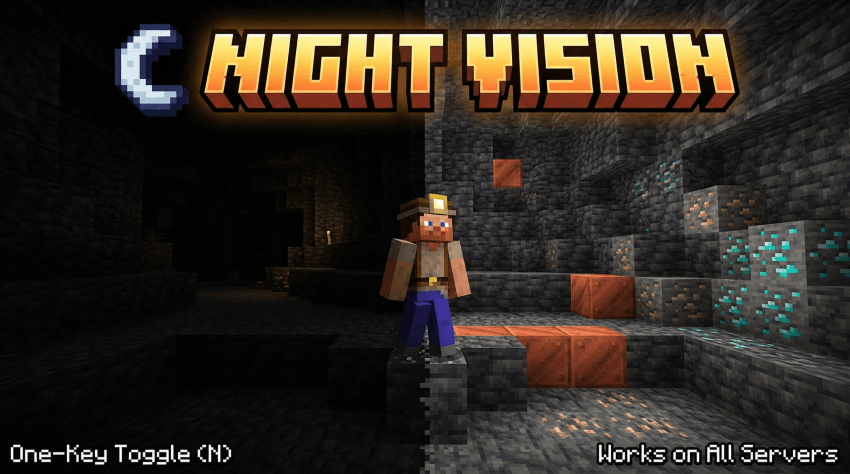
Press N for night vision
Smooth eases over a configurable number of ticks (no jarring flash)
Adjustable brightness from 100% (vanilla cap) all the way to 1600% (true full-bright)
In-game config screen
Hotbar message shows the current state when toggled (can be disabled)
Persistent settings in config/nightvision.json
Full command suite: /nightvision toggle | on | off | status | brightness <100..1600>
❓ FAQ ❓
Will I get banned for using this on a server?
Server side anti cheat can't detect this. That said, follow your server's rules, some ban full bright mods.
Does it work with shader packs?
Sometimes.
Can I rebind the toggle key?
Yes.
Can I add this to my modpack?
Yes.
🐛Where do I report bugs?🐛
Report issues on the GitHub issue tracker. Please include your loader (Fabric / NeoForge), loader version, and a latest.log
Project description from CurseForge.
Pick your setup
Full Brightness (NIGHT VISION) by Minecraft version and loader
Choose the version and loader you play, then open the matching release.
Minecraft version
26.1.2
3 loader buildsMinecraft version
26.1.1
3 loader buildsMinecraft version
26.1
3 loader buildsMinecraft version
1.21.9
3 loader buildsMinecraft version
1.9.4
2 loader buildsMinecraft version
1.9.3
1 loader buildMinecraft version
1.9.2
1 loader buildMinecraft version
1.9.1
1 loader buildMinecraft version
1.9
2 loader buildsMinecraft version
1.8.9
2 loader buildsMinecraft version
1.8.8
2 loader buildsShowing the newest 12 of 29 game versions. Older files are in the list below.
Check the dependencies, then try the file in a copied instance before changing a world you care about.
Recent files
Full Brightness (NIGHT VISION) versions and loaders
Night Vision 1.0.0+26.2 - NeoForge - MC 26.2
nightvision-neoforge+26.2.jar
10 Sept 2026
Client Source doesn’t say Server Source doesn’t say Dependencies No extras listed Listed on Release listing
Check the 26.2 · NeoForge setup NeoForge26.2 release
Night Vision 1.0.0+26.2 - Forge - MC 26.2
nightvision-forge+26.2.jar
10 Sept 2026
Client Source doesn’t say Server Source doesn’t say Dependencies No extras listed Listed on Release listing
Check the 26.2 · Forge setup Forge26.2 release
Night Vision 1.0.0+26.2 - Fabric - MC 26.2
nightvision-fabric+26.2.jar
10 Sept 2026
Client Source doesn’t say Server Source doesn’t say Dependencies 1 required · 1 unchecked Listed on Release listing
Check the 26.2 · Fabric setup Fabric26.2 release
Night Vision 1.0.0+26.1.2 - NeoForge - MC 26.1.2
nightvision-neoforge+26.1.2.jar
10 Sept 2026
Client Source doesn’t say Server Source doesn’t say Dependencies No extras listed Listed on Release listing
Check the 26.1.2 · NeoForge setup NeoForge26.1.2 release
Night Vision 1.0.0+26.1.2 - Forge - MC 26.1.2
nightvision-forge+26.1.2.jar
10 Sept 2026
Client Source doesn’t say Server Source doesn’t say Dependencies No extras listed Listed on Release listing
Check the 26.1.2 · Forge setup Forge26.1.2 release
Night Vision 1.0.0+26.1.2 - Fabric - MC 26.1.2
nightvision-fabric+26.1.2.jar
10 Sept 2026
Client Source doesn’t say Server Source doesn’t say Dependencies 1 required · 1 unchecked Listed on Release listing
Check the 26.1.2 · Fabric setup Fabric26.1.2 release
Night Vision 1.0.0+26.1.1 - NeoForge - MC 26.1.1
nightvision-neoforge+26.1.1.jar
10 Sept 2026
Client Source doesn’t say Server Source doesn’t say Dependencies No extras listed Listed on Release listing
Check the 26.1.1 · NeoForge setup NeoForge26.1.1 release
Night Vision 1.0.0+26.1.1 - Forge - MC 26.1.1
nightvision-forge+26.1.1.jar
10 Sept 2026
Client Source doesn’t say Server Source doesn’t say Dependencies No extras listed Listed on Release listing
Check the 26.1.1 · Forge setup Forge26.1.1 release
Night Vision 1.0.0+26.1.1 - Fabric - MC 26.1.1
nightvision-fabric+26.1.1.jar
10 Sept 2026
Client Source doesn’t say Server Source doesn’t say Dependencies 1 required · 1 unchecked Listed on Release listing
Check the 26.1.1 · Fabric setup Fabric26.1.1 release
Night Vision 1.0.0+26.1 - NeoForge - MC 26.1
nightvision-neoforge+26.1.jar
10 Sept 2026
Client Source doesn’t say Server Source doesn’t say Dependencies No extras listed Listed on Release listing
Check the 26.1 · NeoForge setup NeoForge26.1 release
Night Vision 1.0.0+26.1 - Forge - MC 26.1
nightvision-forge+26.1.jar
10 Sept 2026
Client Source doesn’t say Server Source doesn’t say Dependencies No extras listed Listed on Release listing
Check the 26.1 · Forge setup Forge26.1 release
Night Vision 1.0.0+26.1 - Fabric - MC 26.1
nightvision-fabric+26.1.jar
10 Sept 2026
Client Source doesn’t say Server Source doesn’t say Dependencies 1 required · 1 unchecked Listed on Release listing
Check the 26.1 · Fabric setup Fabric26.1 release
Looking for an older file? The official CurseForge project page is in Resources.
 mod
mod CurseForge + Modrinth · Minecraft
Simple Music Control
Reduced delay between music tracks, next track keybind, now playing widget and more
 mod
mod CurseForge · Minecraft
Steelo's Classes
Choose your starter class.
 mod
mod CurseForge · Minecraft
TechVari
A multifunctional technology block with storage, crafting, fast smelting, item organization, trash disposal, and x4 duplication.