Minecraft version
Back to mods 
CurseForge · Minecraft mod
Fake Blocks - No collision
FakeBlocks adds fake versions of vanilla blocks that look identical but have no collision, letting you walk right through them — perfect for secret passages, traps or fooling friends.
Choose a version Pick your version below, then grab the matching file.
Quick answer
Which Fake Blocks - No collision release should I use?
Latest stable file fakeblocks-3.0.jar
Game version 1.21.1
Loader NeoForge
Fake Blocks - No collision fakeblocks-3.0.jar targets 1.21.1 with NeoForge. The project page does not say whether this file belongs on the client, dedicated server, or both. No extra mods listed for this file.
Where it goes
Is Fake Blocks - No collision required on the client, server, or both?
The project page does not say whether this file belongs on the client, dedicated server, or both.
Client Source doesn’t say
Dedicated server Source doesn’t say
Loader for this release NeoForge
Required install it here Optional supported, not mandatory Not supported do not install here Source doesn’t say do not assume
The source does not explicitly classify this release as client-only or server-only.
What else does Fake Blocks - No collision fakeblocks-3.0.jar need?
fakeblocks-3.0.jar. Change the file and its required mods may change too.
This file does not list any required mods. Do not add a library just because a different file uses it.
This file does not list any required or optional mods.
Before you install it
Add Fake Blocks - No collision without breaking your instance.
Built for Fake Blocks - No collision fakeblocks-3.0.jar. Pick another file and the loader, install side or required mods may change.
- 01
Stick to this file
Use fakeblocks-3.0.jar. It targets 1.21.1 with NeoForge; another release may have different loader, side or dependency requirements.
- 02
Bring the mods it needs
This file does not list any required mods. Do not add a library just because a different file uses it.
- 03
Put it on the correct side
The project page does not say whether this file belongs on the client, dedicated server, or both.
- 04
Pick the file you checked
Use the “Get this file” button beside fakeblocks-3.0.jar. It opens that exact file at the source.
About this project
What does Fake Blocks - No collision add?
FakeBlocks brings a brand new layer of creativity and deception to your Minecraft world. Ever wanted a secret passage hidden behind a bookshelf? A trap disguised as a diamond block floor? FakeBlocks makes it possible.
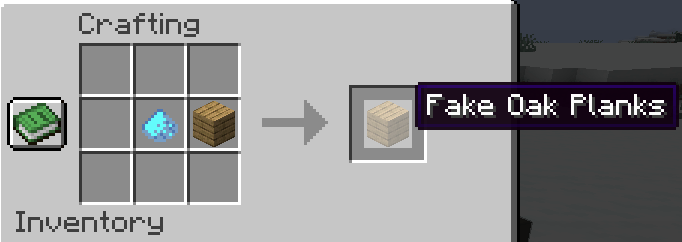
What does it do? FakeBlocks adds phantom versions of vanilla blocks that look completely identical to their real counterparts — but have no collision, meaning players and mobs can walk straight through them. From dirt to netherite blocks, every fake variant is craftable and fully survival-friendly.
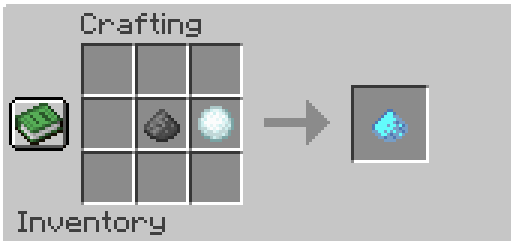
How do you craft them? Simply combine any supported vanilla block with No-Collision Dust in a crafting table to get its fake variant.
Features
- 🧱 Over 150 fake block variants
- 👁️ Visually identical to real blocks — no way to tell them apart
- 🔧 Survival-friendly crafting recipe for every block
Supported Blocks
Stone & Terrain: Dirt, Grass Block, Stone, Granite, Diorite, Andesite, Polished Granite, Polished Diorite, Polished Andesite, Cobblestone, Mossy Cobblestone, Gravel, Sand, Red Sand, Sandstone, Smooth Sandstone, Red Sandstone, Smooth Red Sandstone, Smooth Stone, Bedrock, Obsidian, Crying Obsidian, Clay, Tuff, Polished Tuff, Tuff Bricks, Calcite
Deepslate: Deepslate, Cobbled Deepslate, Polished Deepslate, Deepslate Bricks, Deepslate Tiles, Reinforced Deepslate
Bricks & Masonry: Bricks, Stone Bricks, Mossy Stone Bricks, Chiseled Stone Bricks, Cracked Stone Bricks, Nether Bricks, Red Nether Bricks, Chiseled Nether Bricks, Cracked Nether Bricks, End Stone Bricks, Mud Bricks
Nether & End: Netherrack, Soul Sand, Soul Soil, Magma Block, Blackstone, Polished Blackstone, Gilded Blackstone, Chiseled Polished Blackstone, Polished Blackstone Bricks, Cracked Polished Blackstone Bricks, Basalt, Polished Basalt, Smooth Basalt, End Stone
Wood & Planks: Oak, Spruce, Birch, Jungle, Acacia, Dark Oak, Mangrove, Cherry, Bamboo, Crimson, Warped Planks
Ore Blocks: Coal Ore, Iron Ore, Copper Ore, Gold Ore, Nether Gold Ore, Diamond Ore, Emerald Ore, Lapis Ore, Redstone Ore, Nether Quartz Ore — plus all Deepslate ore variants
Mineral Blocks: Coal, Iron, Copper, Gold, Diamond, Emerald, Netherite, Redstone, Lapis, Amethyst, Ancient Debris
Ice & Snow: Ice, Packed Ice, Blue Ice
Wool (all 16 colors), Terracotta (all 16 colors), Concrete (all 16 colors), Glass (all 16 colors)
Misc: Bookshelf, TNT, Hay Block, Bone Block, Honeycomb Block, Nether Wart Block, Warped Wart Block, Mud, Packed Mud, Sea Lantern, Glowstone, Shroomlight, Quartz Block, Smooth Quartz, Quartz Pillar, Chiseled Quartz Block, Purpur Block, Purpur Pillar, Prismarine, Prismarine Bricks, Dark Prismarine, Magma Block
Feedback and suggestions are welcome!
Requirements
- NeoForge 1.21.1
Project description from CurseForge.
Pick your setup
Fake Blocks - No collision by Minecraft version and loader
Choose the version and loader you play, then open the matching release.
Check the dependencies, then try the file in a copied instance before changing a world you care about.
Recent files
Fake Blocks - No collision versions and loaders
fakeblocks-3.0.jar
13 Sept 2026
Client Source doesn’t say Server Source doesn’t say Dependencies No extras listed Listed on Release listing
Check the 1.21.1 · NeoForge setup 1.21.1NeoForge release
fakeblocks-2.0.jar
8 May 2026
Client Source doesn’t say Server Source doesn’t say Dependencies No extras listed Listed on Release listing
Check the 1.21.1 · NeoForge setup 1.21.1NeoForge release
fakeblocks-1.0.jar
fakeblocks-1.0-SNAPSHOT.jar
23 Apr 2026
Client Source doesn’t say Server Source doesn’t say Dependencies No extras listed Listed on Release listing
Check the 1.21.1 · NeoForge setup 1.21.1NeoForge release
Looking for an older file? The official CurseForge project page is in Resources.
 mod
mod CurseForge + Modrinth · Minecraft
TNTimer
Countdown timer on top of screen to know exactly when that TNT is going to explode without need to see the TNT client-side. Renders a timer over primed TNT (starting from v2.0)
 mod
mod CurseForge · Minecraft
Termal Astra
Thermal energies, wireless logistics and a storage network with autocrafting.
 mod
mod CurseForge · Minecraft
Guard Craft
Protect your base with reinforced blocks, padlocks and keypads for your doors and containers.