Iris Shaders Optional for Shaders + HDR [Fabric 1.20.1] v2.5.0-1.20.1
optionalMatching file found Matched file: Iris 1.7.6 for Minecraft 1.20.1
CurseForge · Minecraft mod
Enable native HDR in Minecraft with Iris shaders
Quick answer
Shaders + HDR [Fabric 1.20.1] v2.5.0-1.20.1 targets 1.20.1 with Fabric. The project page does not say whether this file belongs on the client, dedicated server, or both. All 3 required mods have matching files.
Where it goes
The project page does not say whether this file belongs on the client, dedicated server, or both.
The source does not explicitly classify this release as client-only or server-only.
[Fabric 1.20.1] v2.5.0-1.20.1. Change the file and its required mods may change too.
Install Architectury API, Cloth Config API (Fabric/Forge/NeoForge), Fabric API first. We found matching files for this game-version and loader setup. 1 comes through another mod in the chain.
1 extra mod was pulled in by another dependency. Indented rows show who needs each one. We only count dependency files that match this setup. A file for another loader does not fill the gap.
Before you install it
Built for Shaders + HDR [Fabric 1.20.1] v2.5.0-1.20.1. Pick another file and the loader, install side or required mods may change.
Use [Fabric 1.20.1] v2.5.0-1.20.1. It targets 1.20.1 with Fabric; another release may have different loader, side or dependency requirements.
Install Architectury API, Cloth Config API (Fabric/Forge/NeoForge), Fabric API first. We found matching files for this game-version and loader setup. 1 comes through another mod in the chain.
The project page does not say whether this file belongs on the client, dedicated server, or both.
Use the “Get this file” button beside [Fabric 1.20.1] v2.5.0-1.20.1. It opens that exact file at the source.
About this project
A minecraft mod that enables native HDR on Windows / macOS / Linux with Iris shaders. 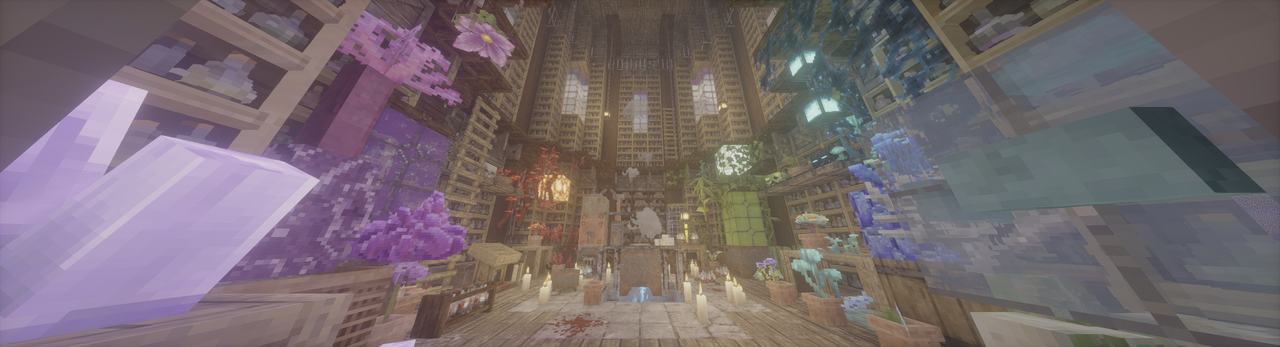 (Photon patched to HDR w/ Patrix, taken by mod's screenshot feature.)
earlyWindowControl in <game folder>/config/fml.tomlexport __GLX_VENDOR_LIBRARY_NAME=mesa
export __EGL_VENDOR_LIBRARY_FILENAMES=/run/opengl-driver/share/glvnd/egl_vendor.d/50_mesa.json
export MESA_LOADER_DRIVER_OVERRIDE=zink
export GALLIUM_DRIVER=zink
HDR_MOD_INSTALLEDHDR_ENABLEDfloat HdrGameMinimumBrightness;float HdrGamePeakBrightness;float HdrGamePaperWhiteBrightness;float HdrUIBrightness;Use these uniforms inside #if HDR_MOD_INSTALLED block.
the output of the shader(aka. what is written to main render target in final pass) should have ext sRGB encoding(Rec.709 primaries, sRGB (for negative numbers use −f(−x)) transfer function), and you should not use RGBA8F for scene color.
The main HDR Mod repo is licensed under MIT. Bundled GLFW from Tom94's/mine fork is licensed under the zlib/libpng license.
Project description from CurseForge.
Pick your setup
Choose the version and loader you play, then open the matching release.
Check the dependencies, then try the file in a copied instance before changing a world you care about.
Recent files
hdr_mod-fabric-2.5.0-1.20.1.jar
29 Aug 2026
hdr_mod-neoforge-2.5.0-1.21.1.jar
28 Aug 2026
hdr_mod-fabric-2.5.0-1.21.1.jar
28 Aug 2026
hdr_mod-neoforge-2.5.0-1.21.10.jar
28 Aug 2026
hdr_mod-fabric-2.5.0-1.21.10.jar
28 Aug 2026
hdr_mod-neoforge-3.2.1-26.2.jar
26 Aug 2026
hdr_mod-fabric-3.2.1-26.2.jar
26 Aug 2026
hdr_mod-neoforge-3.2.0-26.2.jar
24 Aug 2026
hdr_mod-fabric-3.2.0-26.2.jar
24 Aug 2026
hdr_mod-neoforge-2.5.0-1.21.11.jar
24 Aug 2026
hdr_mod-fabric-2.5.0-1.21.11.jar
24 Aug 2026
hdr_mod-neoforge-2.5.0-26.1.jar
24 Aug 2026
Looking for an older file? The official CurseForge project page is in Resources.
 mod
modThis is a Minecraft mod designed to control mob spawners' behaviour.
 mod
modNot just a boring zoom a full kit for your cinematics in Minecraft
 mod
modComplete physical economy system with tiered coins, functional wallets, lottery scratch-offs, and player-to-player auctions.