Minecraft version
Back to mods 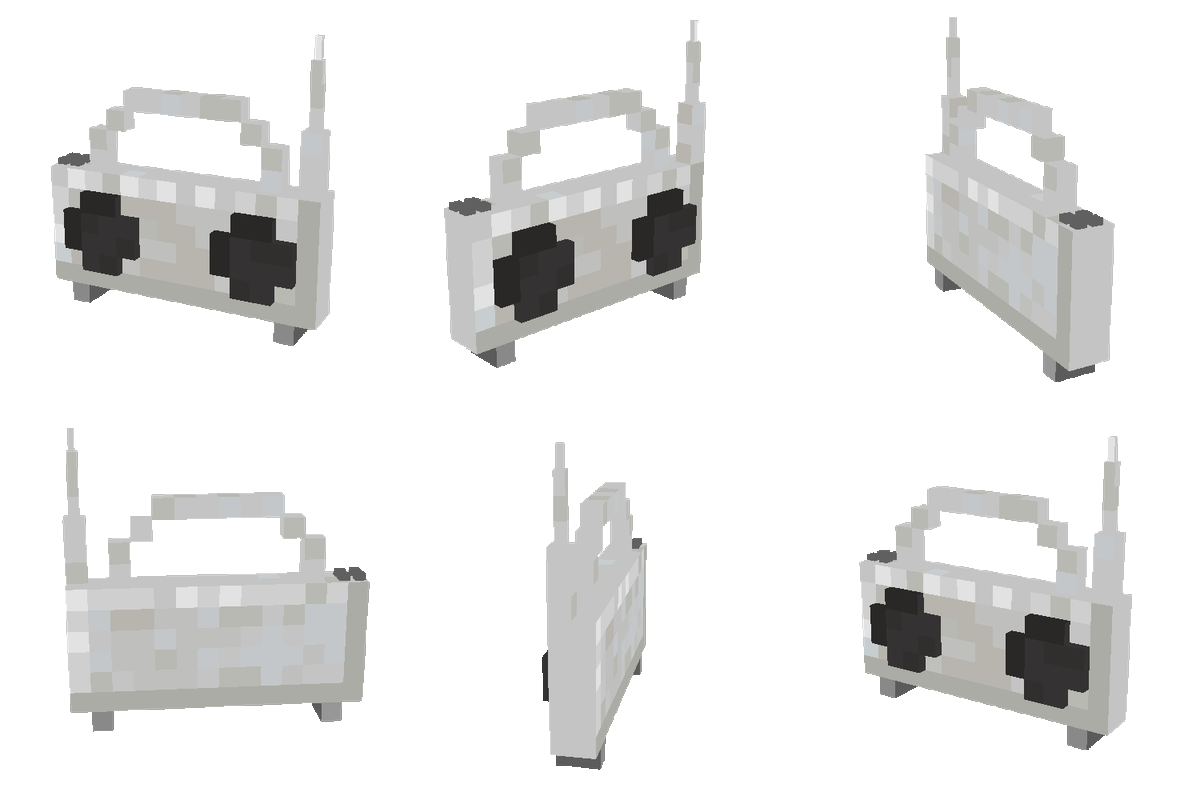
CurseForge · Minecraft mod
Boombox
Adds a boombox to the game that streams internet radio
Choose a version Pick your version below, then grab the matching file.
Quick answer
Which Boombox release should I use?
Latest stable file Boombox-1.21.1-1.1.1.jar
Game version 1.21.1
Loader NeoForge
Boombox-1.21.1-1.1.1.jar targets 1.21.1 with NeoForge. The project page does not say whether this file belongs on the client, dedicated server, or both. No extra mods listed for this file.
Where it goes
Is Boombox required on the client, server, or both?
The project page does not say whether this file belongs on the client, dedicated server, or both.
Client Source doesn’t say
Dedicated server Source doesn’t say
Loader for this release NeoForge
Required install it here Optional supported, not mandatory Not supported do not install here Source doesn’t say do not assume
The source does not explicitly classify this release as client-only or server-only.
What else does Boombox-1.21.1-1.1.1.jar need?
Boombox-1.21.1-1.1.1.jar. Change the file and its required mods may change too.
This file does not list any required mods. Do not add a library just because a different file uses it.
This file does not list any required or optional mods.
Before you install it
Add Boombox without breaking your instance.
Built for Boombox-1.21.1-1.1.1.jar. Pick another file and the loader, install side or required mods may change.
- 01
Stick to this file
Use Boombox-1.21.1-1.1.1.jar. It targets 1.21.1 with NeoForge; another release may have different loader, side or dependency requirements.
- 02
Bring the mods it needs
This file does not list any required mods. Do not add a library just because a different file uses it.
- 03
Put it on the correct side
The project page does not say whether this file belongs on the client, dedicated server, or both.
- 04
Pick the file you checked
Use the “Get this file” button beside Boombox-1.21.1-1.1.1.jar. It opens that exact file at the source.
About this project
What does Boombox add?
Adds a boombox that can play radio stations. The boombox can be right-clicked to reveal a list of radio channels. Upon clicking a channel it will tune into that channel. Holding shift while clicking a channel will favorite that channel, moving it to the top.
This mod is a standalone and updated version of the Ad Astra Radio block.
Project description from CurseForge.
Pick your setup
Boombox by Minecraft version and loader
Choose the version and loader you play, then open the matching release.
Minecraft version
26.1.2
1 loader buildMinecraft version
1.21.1
1 loader buildCheck the dependencies, then try the file in a copied instance before changing a world you care about.
Recent files
Boombox versions and loaders
Boombox-26.2-1.2.1.jar
9 Aug 2026
Client Source doesn’t say Server Source doesn’t say Dependencies No extras listed Listed on Release listing
Check the 26.2 · NeoForge setup NeoForge26.2 beta
1.2.1
Boombox-26.2-1.2.1.jar
9 Aug 2026
Client Optional Server Optional Dependencies No extras listed Listed on Release listing
Check the 26.2 · NeoForge setup 26.2NeoForge beta
1.1.2
Boombox-26.1.2-1.1.2.jar
9 Aug 2026
Client Optional Server Optional Dependencies No extras listed Listed on Release listing
Check the 26.1.2 · NeoForge setup 26.1.2NeoForge beta
Boombox-26.1.2-1.1.2.jar
9 Aug 2026
Client Source doesn’t say Server Source doesn’t say Dependencies No extras listed Listed on Release listing
Check the 26.1.2 · NeoForge setup NeoForge26.1.2 beta
Boombox-26.2-1.2.0.jar
8 Aug 2026
Client Source doesn’t say Server Source doesn’t say Dependencies No extras listed Listed on Release listing
Check the 26.2 · NeoForge setup NeoForge26.2 beta
1.2.0
Boombox-26.2-1.2.0.jar
8 Aug 2026
Client Optional Server Optional Dependencies No extras listed Listed on Release listing
Check the 26.2 · NeoForge setup 26.2NeoForge beta
Boombox-1.21.1-1.1.1.jar
8 Aug 2026
Client Source doesn’t say Server Source doesn’t say Dependencies No extras listed Listed on Release listing
Check the 1.21.1 · NeoForge setup 1.21.1NeoForge release
1.1.1
Boombox-1.21.1-1.1.1.jar
8 Aug 2026
Client Optional Server Optional Dependencies No extras listed Listed on Release listing
Check the 1.21.1 · NeoForge setup 1.21.1NeoForge beta
1.1.1
Boombox-26.1.2-1.1.1.jar
14 May 2026
Client Optional Server Optional Dependencies No extras listed Listed on Release listing
Check the 26.1.2 · NeoForge setup 26.1.2NeoForge beta
Boombox-26.1.2-1.1.1.jar
14 May 2026
Client Source doesn’t say Server Source doesn’t say Dependencies No extras listed Listed on Release listing
Check the 26.1.2 · NeoForge setup NeoForge26.1.2 release
1.1.0
Boombox-26.1.2-1.1.0.jar
14 May 2026
Client Optional Server Optional Dependencies No extras listed Listed on Release listing
Check the 26.1.2 · NeoForge setup 26.1.2NeoForge beta
Boombox-26.1.2-1.1.0.jar
14 May 2026
Client Source doesn’t say Server Source doesn’t say Dependencies No extras listed Listed on Release listing
Check the 26.1.2 · NeoForge setup NeoForge26.1.2 release
Looking for an older file? The official CurseForge project page is in Resources.
 mod
mod CurseForge · Minecraft
Ballistix
Ballistix is a Minecraft Mod that introduces intercontinental ballistic missiles (ICBM's), various explosives, sentries, and weapons to Minecraft.
 mod
mod CurseForge · Minecraft
AnvilCraft: PigsPlus
This mod is an addon for AnvilCraft, with main content including production-friendly machines
 mod
mod CurseForge + Modrinth · Minecraft
EaseGUI
Smoothly animates GUI screens with extensive customization!