Minecraft version
Back to mods 
CurseForge · Minecraft mod
PortraitCraft
A client-side NeoForge mod that adds a vertical portrait play mode for Minecraft, optimized for TikTok, Shorts, Reels, OBS, and content creators.
Choose a version Pick your version below, then grab the matching file.
Quick answer
Which PortraitCraft release should I use?
beta file portraitcraft-0.1.10-neoforge-1.21.1.jar
Game version 1.21.1
Loader NeoForge
portraitcraft-0.1.10-neoforge-1.21.1.jar targets 1.21.1 with NeoForge. The project page does not say whether this file belongs on the client, dedicated server, or both. No extra mods listed for this file.
Where it goes
Is PortraitCraft required on the client, server, or both?
The project page does not say whether this file belongs on the client, dedicated server, or both.
Client Source doesn’t say
Dedicated server Source doesn’t say
Loader for this release NeoForge
Required install it here Optional supported, not mandatory Not supported do not install here Source doesn’t say do not assume
The source does not explicitly classify this release as client-only or server-only.
What else does portraitcraft-0.1.10-neoforge-1.21.1.jar need?
portraitcraft-0.1.10-neoforge-1.21.1.jar. Change the file and its required mods may change too.
This file does not list any required mods. Do not add a library just because a different file uses it.
This file does not list any required or optional mods.
Before you install it
Add PortraitCraft without breaking your instance.
Built for portraitcraft-0.1.10-neoforge-1.21.1.jar. Pick another file and the loader, install side or required mods may change.
- 01
Stick to this file
Use portraitcraft-0.1.10-neoforge-1.21.1.jar. It targets 1.21.1 with NeoForge; another release may have different loader, side or dependency requirements.
- 02
Bring the mods it needs
This file does not list any required mods. Do not add a library just because a different file uses it.
- 03
Put it on the correct side
The project page does not say whether this file belongs on the client, dedicated server, or both.
- 04
Pick the file you checked
Use the “Get this file” button beside portraitcraft-0.1.10-neoforge-1.21.1.jar. It opens that exact file at the source.
About this project
What does PortraitCraft add?
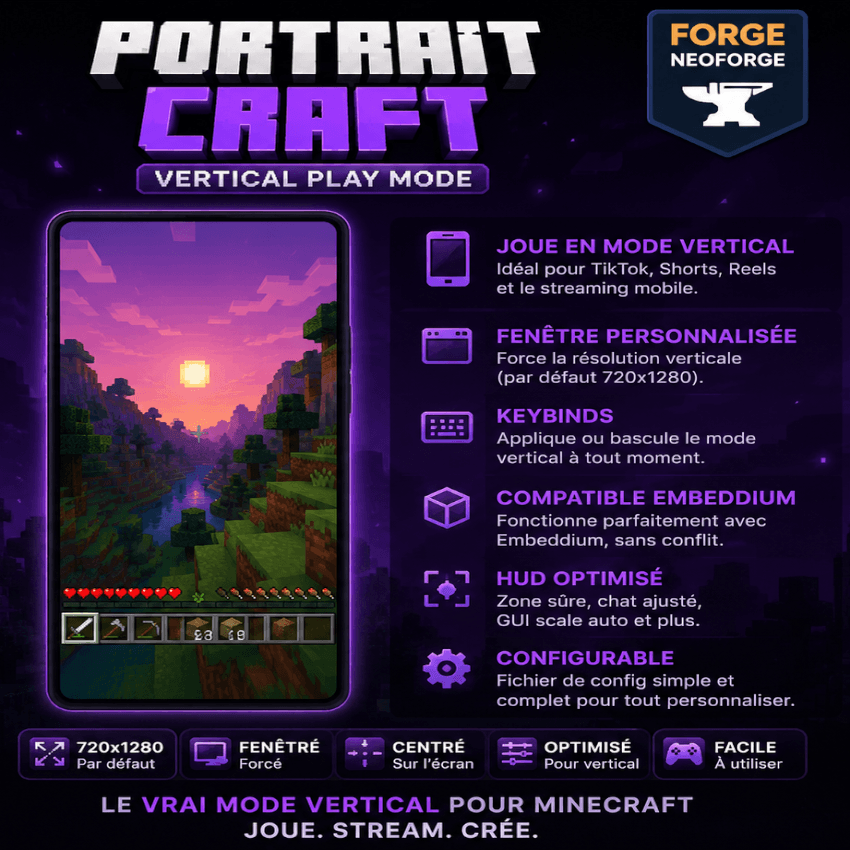 PortraitCraft — Vertical Play Mode
PortraitCraft is a lightweight client-side NeoForge mod that adds a vertical / portrait play mode to Minecraft Java Edition.
It is designed for content creators who want to record, stream, or play Minecraft in a mobile-style vertical format for TikTok, YouTube Shorts, Instagram Reels, OBS, and similar platforms.
Instead of manually resizing the game window every time, PortraitCraft can apply a portrait window preset automatically, such as 720x1280, and includes simple options for windowed mode, centering, GUI scale, and keybind control.
Features
• Vertical portrait window preset Default resolution: 720x1280 Useful for TikTok Live, Shorts, Reels, OBS, and vertical recording.
• Client-side only No server installation required. Works in singleplayer and multiplayer because it only changes the local client window behavior.
• Windowed mode support Can force Minecraft out of fullscreen before applying the vertical resolution. This makes vertical play more reliable on normal horizontal monitors.
• Configurable resolution You can edit the client config to use a different portrait size, such as: 540x960 720x1280 900x1600 1080x1920
• Keybind support Reapply the vertical play mode at any time using a keybind.
• GUI-friendly setup Optional GUI scale adjustment helps keep the interface usable in portrait mode.
• Embeddium compatible PortraitCraft is designed to work alongside Embeddium. It does not depend on Embeddium, does not modify Embeddium internals, and does not replace the rendering pipeline.
Why use PortraitCraft?
Minecraft Java is normally designed for landscape displays. That works well for regular gameplay, but it is not ideal for vertical content creation.
PortraitCraft helps players create a cleaner portrait gameplay setup without needing to crop the game heavily in OBS or manually resize the window every launch.
It is especially useful for:
• TikTok Live • YouTube Shorts • Instagram Reels • OBS vertical scenes • Mobile-style Minecraft videos • Content creator workflows
Default behavior
When enabled, PortraitCraft can:
• Disable fullscreen if needed • Resize the Minecraft window to 720x1280 • Center the window on the monitor • Apply the selected GUI scale • Let the player reapply the preset with a keybind
The mod applies the resize safely after the client window is ready and does not constantly force the window size every frame.
Configuration
The client config file is located at:
config/portraitcraft-client.toml
Main options may include:
enabled width height forceWindowed centerWindow applyOnStartup applyOncePerLaunch autoGuiScale preferredGuiScale debugLogging
Recommended OBS setup
For vertical streaming or recording, a good setup is:
Minecraft window: 720x1280 OBS canvas: 1080x1920 Output format: 9:16 vertical
This gives you space for overlays, chat, webcam, alerts, branding, and other creator elements.
Important note
PortraitCraft uses windowed portrait mode instead of true fullscreen portrait mode.
This is intentional. True fullscreen depends on the display modes supported by your monitor and can be unreliable on standard horizontal screens. Windowed portrait mode is more stable for streaming, recording, and daily use.
Compatibility
Designed for:
Minecraft Java Edition 1.21.1 NeoForge 21.1.x Client-side only
Works with or without Embeddium installed.
Disclaimer
This project is not affiliated with Mojang, Microsoft, CurseForge, NeoForge, or Embeddium. Minecraft is a trademark of Mojang/Microsoft.
Project description from CurseForge.
Pick your setup
PortraitCraft by Minecraft version and loader
Choose the version and loader you play, then open the matching release.
Check the dependencies, then try the file in a copied instance before changing a world you care about.
Recent files
PortraitCraft versions and loaders
portraitcraft-0.1.10-neoforge-1.21.1.jar
7 May 2026
Client Source doesn’t say Server Source doesn’t say Dependencies No extras listed Listed on Release listing
Check the 1.21.1 · NeoForge setup 1.21.1NeoForge beta
Looking for an older file? The official CurseForge project page is in Resources.
 mod
mod CurseForge · Minecraft
Loser Master
This is an add-on for "Touhou Maid". It aims to enrich the maid raising system, improve players' efficiency in raising maids, and increase maids' survival chance in combat.
 mod
mod CurseForge · Minecraft
LUMINOUS: MONSTERS
LUMINOUS: Monsters adds 16 new Zombie / Skeleton variants to the game, each in their own environment! Most of thee 16 variants can be found in my "LUMINOUS : OVERWORLD" mod. but this mod is for those looking to fight these undead foes!
 mod
mod CurseForge + Modrinth · Minecraft
Brute Force Culling Revamped
A modern multiloader port of Brute Force Rendering Culling Revived!