Minecraft version
Back to mods 
CurseForge · Minecraft mod
Currency Neoforge
Adds credit cards, money bills, perfect for servers
Choose a version Pick your version below, then grab the matching file.
Quick answer
Which Currency Neoforge release should I use?
Latest stable file currency-1.21.1-neoforge-1.0.7.jar
Game version 1.21.1
Loader NeoForge
Currency Neoforge currency-1.21.1-neoforge-1.0.7.jar targets 1.21.1 with NeoForge. The project page does not say whether this file belongs on the client, dedicated server, or both. No extra mods listed for this file.
Where it goes
Is Currency Neoforge required on the client, server, or both?
The project page does not say whether this file belongs on the client, dedicated server, or both.
Client Source doesn’t say
Dedicated server Source doesn’t say
Loader for this release NeoForge
Required install it here Optional supported, not mandatory Not supported do not install here Source doesn’t say do not assume
The source does not explicitly classify this release as client-only or server-only.
What else does Currency Neoforge currency-1.21.1-neoforge-1.0.7.jar need?
currency-1.21.1-neoforge-1.0.7.jar. Change the file and its required mods may change too.
This file does not list any required mods. Do not add a library just because a different file uses it.
This file does not list any required or optional mods.
Before you install it
Add Currency Neoforge without breaking your instance.
Built for Currency Neoforge currency-1.21.1-neoforge-1.0.7.jar. Pick another file and the loader, install side or required mods may change.
- 01
Stick to this file
Use currency-1.21.1-neoforge-1.0.7.jar. It targets 1.21.1 with NeoForge; another release may have different loader, side or dependency requirements.
- 02
Bring the mods it needs
This file does not list any required mods. Do not add a library just because a different file uses it.
- 03
Put it on the correct side
The project page does not say whether this file belongs on the client, dedicated server, or both.
- 04
Pick the file you checked
Use the “Get this file” button beside currency-1.21.1-neoforge-1.0.7.jar. It opens that exact file at the source.
About this project
What does Currency Neoforge add?
Recipes: (1.21.1 1.0.6)
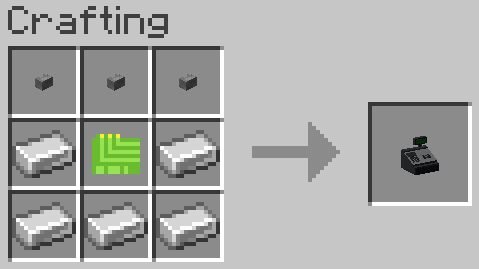
5x Iron Ingot, 3x Stone Button, 1x Circuit Board
Recipes: (1.21.1 1.0.4)
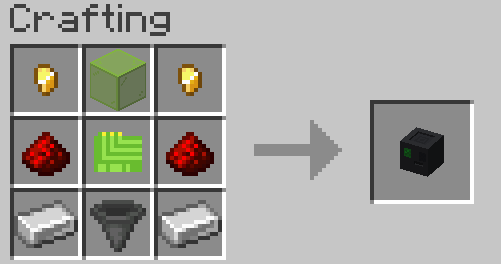
Ore Depot- 2x Gold Nuggets, 1x Lime Glass, 2x Iron Ingots, 1x Hopper, 2x Redstone Dust 1x Circuit Board
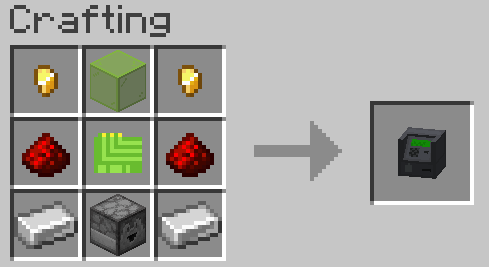
ATM- 2x Gold Nuggets, 1x Lime Glass, 2x Iron Ingots, 1x Dropper, 2x Redstone Dust 1x Circuit Board
Recipes: (1.21.1 1.0.3)
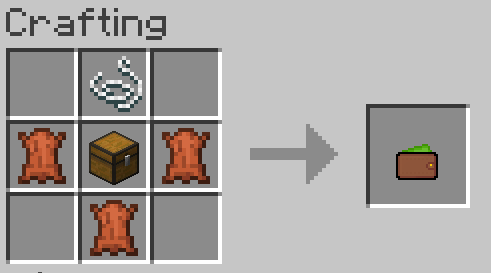
Wallet- 3x Leather, 1x String, 1x Chest
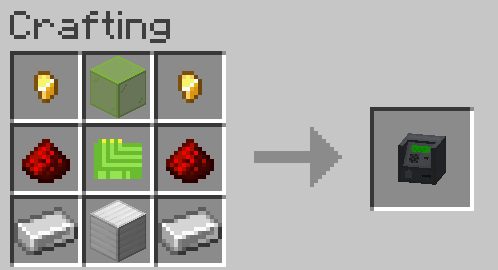
ATM- 2x Gold Nuggets, 1x Lime Glass, 2x Iron Ingots, 1x Iron Block, 2x Redstone Dust 1x Circuit Board
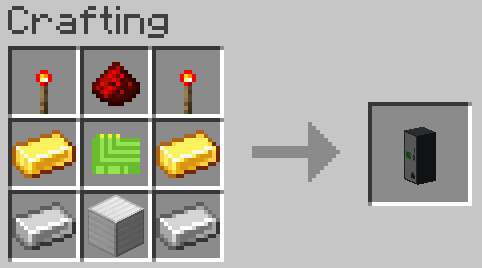
Changer- 2x Redstone Torch, 1x Redstone Dust, 2x Golden Ingot, 1x Circuit Board, 2x Iron Ingot, 1x Iron Block
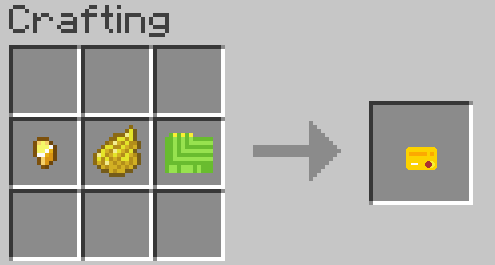
Yellow Credit Card- 1x Gold Nugget, 1x Yellow Dye, 1x Circuit Board
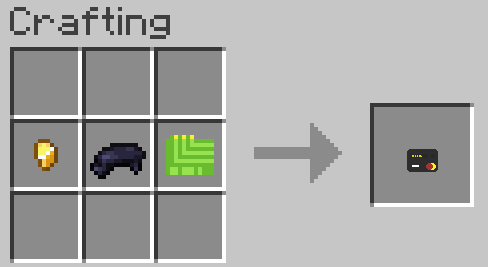
1x Gold Nugget, 1x Black Ink, 1x Circuit Board
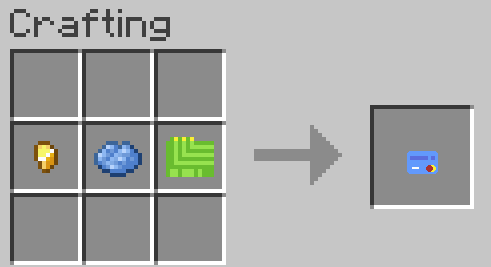
Light Blue Credit Card- 1x Gold Nugget, 1x Light Blue Dye, 1x Circuit Board
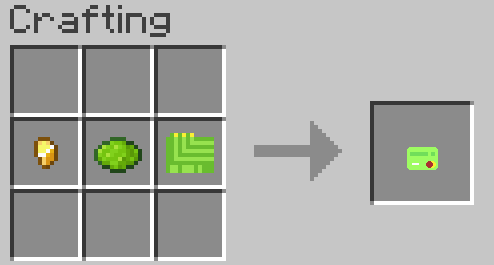
Lime Credit Card- 1x Gold Nugget, 1x Lime Dye, 1x Circuit Board
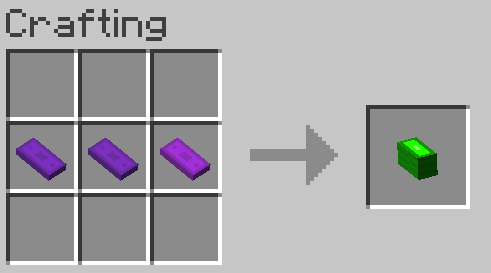
Money Stack- 2x 200 Bill, 1x 100 Bill
Recipes:
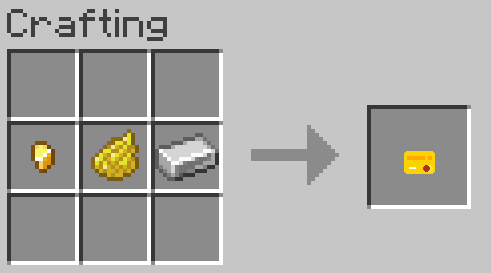
1x Gold Nuggett, 1x Yellow Dye, 1x Iron Ingot
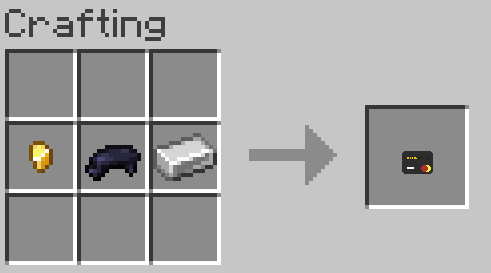
1x Gold Nugget, 1x Black Ink, 1x Iron Ingot
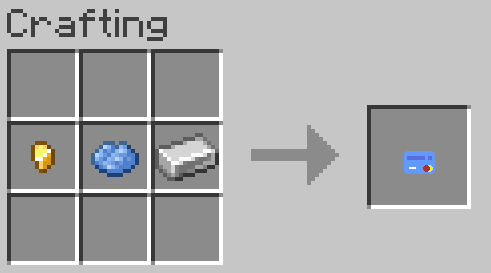
1x Gold Nugget, 1x Light Blue Dye, 1x Iron Ore
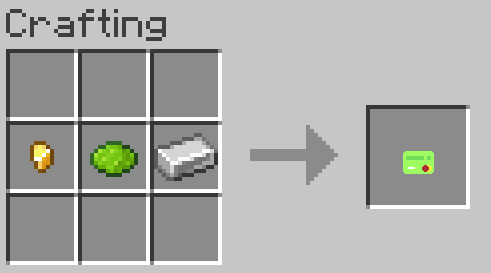
1x Gold Nugget, 1x Lime Dye, 1x Iron Ore
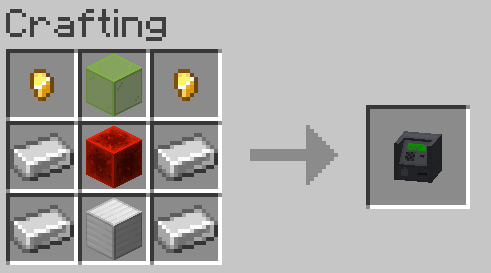
2x Gold Nuggets, 1x Lime Glass, 4x Iron Ingot, 1x Redstone Block, 1x Iron Block
Commands:
/Card add [value] - adds value to card you are holding, permission level 4 needed /Card set [value] - sets value to card you are holding, permission level 4 needed /Card pay [value] {player_name} - sends value to player name, no permission needed /Card stock list - shows value of your stock, no permission needed /Card stock clear - credits money from stock to your card, no permission needed
/Submit - credits money from your hand into your stock, no permission needed
/Convert -(not 1.21.1 1.0.3 version) Shows GUI where you can trade ores [Netherite-400, Emerald - 300, Diamond - 150, Iron - 50, Lapis Lazuli - 10, Redstone - 5, Coal - 5, Copper - 2] into money, no permission needed, /gamerule itemshavevalue has to be TRUE,
/gamerule itemshavevalue true - you can convert items into money /gamerule itemshavevalue false - you cannot convert items into money
How to use ATM:
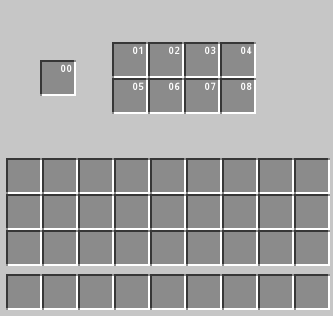
In the slot "0" you can add any of credit cards with value, then you can convert your credit card value into money, in slot "1"-"9" you will be shown what you can take, so if i have more than 200 on my credit card, with i put in slot "0", you can withraw money into all possibale bills, if i have only 150, you can withraw only bills with value 150 or less..
How to use Wallet:
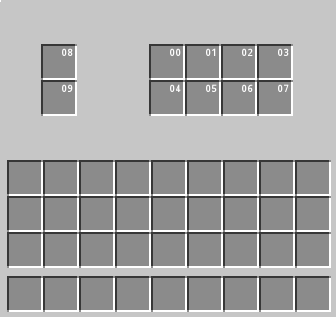
In slots "8"-"9" you can storage credit cards, as in slots "0"-"7" you can storage money bills
How to use Changer:
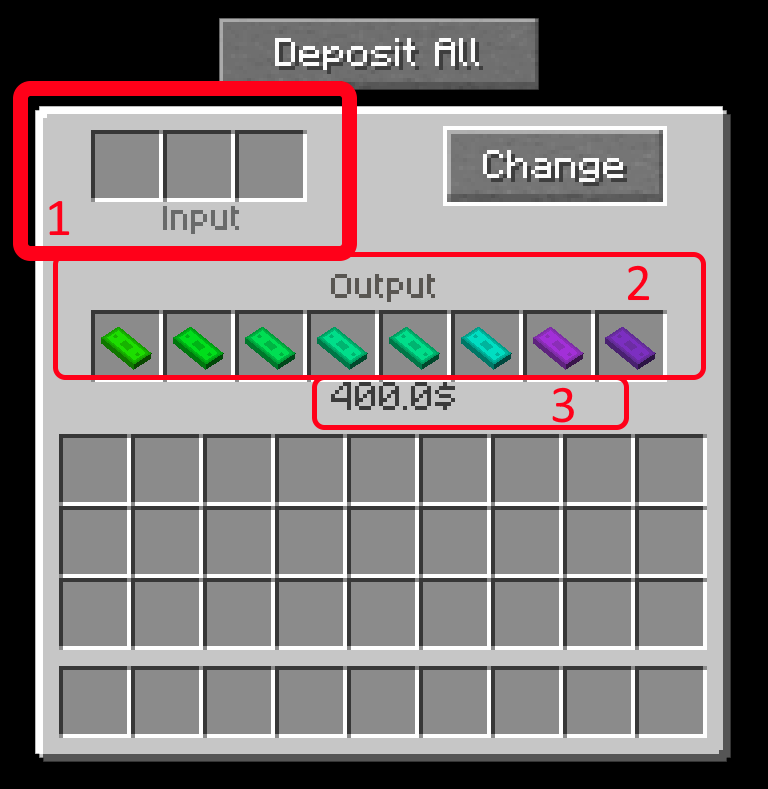 Slots labeled 1 are for money you want to exchange, then click "change" on the right. after that,the number labeled 3 will increase by the total value of the money you inserted. The number labeled 3 shows your current balance in the changer—the amount you can exchange. button labeled "Deposit All" drops all money left, The output slots show which bills you can exchange your balance for. Each time you take a bill from an output slot, its value is subtracted from your balance.
If you have any question or ideas on how to improve this mod, feel free to leave a comment.
I want to thank to all of you who download my mod, i know there are probably a lot of bugs and unfinished things, but im mainly experimenting/learning, ive been making mods for around 7-8 years, and only now im starting to show my work to other people. Again, thank you very much, if you find any bugs or have any ideas, feel free to dm me or leave a comment here :D.
Project description from CurseForge.
Pick your setup
Currency Neoforge by Minecraft version and loader
Choose the version and loader you play, then open the matching release.
Minecraft version
1.21.1
1 loader buildCheck the dependencies, then try the file in a copied instance before changing a world you care about.
Recent files
Currency Neoforge versions and loaders
currency-1.21.1-neoforge-1.0.7.jar
currency-1.0.7-neoforge-1.21.1.jar
30 Jul 2026
Client Source doesn’t say Server Source doesn’t say Dependencies No extras listed Listed on Release listing
Check the 1.21.1 · NeoForge setup 1.21.1NeoForge release
currency-1.21.1-neoforge-1.0.6.jar
currency-1.0.6-neoforge-1.21.1.jar
26 Jul 2026
Client Source doesn’t say Server Source doesn’t say Dependencies No extras listed Listed on Release listing
Check the 1.21.1 · NeoForge setup 1.21.1NeoForge release
currency-1.21.1-neoforge-1.0.5.jar
currency-1.0.5-neoforge-1.21.1.jar
21 Jul 2026
Client Source doesn’t say Server Source doesn’t say Dependencies No extras listed Listed on Release listing
Check the 1.21.1 · NeoForge setup 1.21.1NeoForge release
currency-1.21.1-neoforge-1.0.4.jar
currency-1.0.4-neoforge-1.21.1.jar
19 Jul 2026
Client Source doesn’t say Server Source doesn’t say Dependencies No extras listed Listed on Release listing
Check the 1.21.1 · NeoForge setup 1.21.1NeoForge release
currency-1.21.1-neoforge-1.0.3.jar
currency-1.0.3-neoforge-1.21.1-65.1.25.jar
11 Jul 2026
Client Source doesn’t say Server Source doesn’t say Dependencies No extras listed Listed on Release listing
Check the 1.21.1 · NeoForge setup 1.21.1NeoForge release
currency Neoforge-21.8.31 1.21.8.jar
money1.0.0-neoforge21.8.31-1.21.8.jar
8 May 2026
Client Source doesn’t say Server Source doesn’t say Dependencies No extras listed Listed on Release listing
Check the 1.21.8 · NeoForge setup 1.21.8NeoForge release
currency-1.21.1-neoforge-1.0.1.jar
money-1.0.2-neoforge-1.21.1.jar
7 May 2026
Client Source doesn’t say Server Source doesn’t say Dependencies No extras listed Listed on Release listing
Check the 1.21.1 · NeoForge setup 1.21.1NeoForge release
Looking for an older file? The official CurseForge project page is in Resources.
 mod
CurseForge + Modrinth · Minecraft
Hexalia
Practice folk witchcraft through herbalism, rituals, brewing, enchanted flora, magical tools, and the living forces of nature.
 mod
CurseForge + Modrinth · Minecraft
Jodek's Mob Heads
Mobs can drop their head when killed by a player, easy drop rate config, drop messages, advancement collection and more
 mod
CurseForge + Modrinth · Minecraft
Antarchy
Adding 45+ mobs, 8+ bosses, 3 fleshed out dimensions, and more