Minecraft version
Back to mods 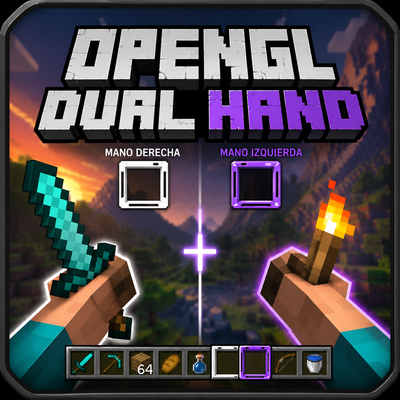
CurseForge · Minecraft mod
DualHandModOV
Is better for PVP and construction
Choose a version Pick your version below, then grab the matching file.
Quick answer
Which DualHandModOV release matches 26.1.2?
Best match for your filters DualHandModOV-Fabric
Game version 26.1.2
Loader Fabric
DualHandModOV-Fabric targets 26.1.2 with Fabric. The project page does not say whether this file belongs on the client, dedicated server, or both. No extra mods listed for this file.
Where it goes
Is DualHandModOV required on the client, server, or both?
The project page does not say whether this file belongs on the client, dedicated server, or both.
Client Source doesn’t say
Dedicated server Source doesn’t say
Loader for this release Fabric
Required install it here Optional supported, not mandatory Not supported do not install here Source doesn’t say do not assume
The source does not explicitly classify this release as client-only or server-only.
What else does DualHandModOV-Fabric need?
DualHandModOV-Fabric on 26.1.2. Every mod below is checked against that same setup.
This file does not list any required mods. Do not add a library just because a different file uses it.
This file does not list any required or optional mods.
Before you install it
Add DualHandModOV without breaking your instance.
Built for DualHandModOV-Fabric on 26.1.2. Pick another file and the loader, install side or required mods may change.
- 01
Stick to this file
Use DualHandModOV-Fabric. It targets 26.1.2 with Fabric; another release may have different loader, side or dependency requirements.
- 02
Bring the mods it needs
This file does not list any required mods. Do not add a library just because a different file uses it.
- 03
Put it on the correct side
The project page does not say whether this file belongs on the client, dedicated server, or both.
- 04
Pick the file you checked
Use the “Get this file” button beside DualHandModOV-Fabric. It opens that exact file at the source.
About this project
What does DualHandModOV add?
English
OpenGL/Vulkan Dual Hand transforms Minecraft’s hand system by adding a fully functional and independent second hand. Instead of relying on the limited vanilla offhand, this mod introduces a new left hand with its own always-visible hotbar selector, allowing it to perform complete actions such as mining, attacking, placing blocks, using items, eating, blocking with shields, and shooting bows.
The hotbar displays two selectors: the vanilla white selector for the right hand and a black selector for the left hand. Each selector works independently, avoids selecting the same slot as the other, and can be controlled with keys, the mouse wheel, and configurable shortcuts.
DualHandModOV keeps the right hand working like normal Minecraft, while the left hand uses the item selected by the black selector. If the black selector is on a bow, food, shield, block, snowball, or tool, the left hand can use that item directly. Visually and functionally, the left hand replaces the vanilla offhand with a more complete and independent system.
Default controls:
- Left-hand attack/destroy:
Button 5— the mouse browser forward button - Left-hand use/place:
Button 4— the mouse browser back button - Change active selector:
F - Swap the white and black selected slots:
R - Quick selector control:
Middle Button— hold it and move the mouse wheel to move the selector
The goal is simple: play Minecraft with two functional hands. Right-click still belongs to the right hand, while Button 4 belongs to the left hand. Each hand has its own actions and animations.
Español
OpenGL/Vulkan Dual Hand transforma el sistema de manos de Minecraft al añadir una segunda mano completamente funcional e independiente. En lugar de depender de la limitada offhand vanilla, este mod introduce una nueva mano izquierda con su propio selector en la hotbar, siempre visible y capaz de realizar acciones completas como minar, atacar, colocar bloques, usar objetos, comer, bloquear con escudo y disparar arco.
La hotbar muestra dos selectores: el selector blanco vanilla para la mano derecha y un selector negro para la mano izquierda. Cada selector funciona de forma independiente, evita seleccionar el mismo slot que el otro y puede controlarse con teclas, la rueda del mouse y atajos configurables.
DualHandModOV mantiene la mano derecha funcionando como en Minecraft normal, mientras que la mano izquierda usa el objeto seleccionado por el selector negro. Si el selector negro está sobre un arco, comida, escudo, bloque, bola de nieve o herramienta, la mano izquierda puede usar ese objeto directamente. Visual y funcionalmente, la mano izquierda reemplaza la offhand vanilla con un sistema más completo e independiente.
Controles por defecto:
- Atacar/romper con la mano izquierda:
Button 5— botón de avanzar del mouse - Usar/colocar con la mano izquierda:
Button 4— botón de retroceder del mouse - Cambiar selector activo:
F - Intercambiar los slots seleccionados por el selector blanco y negro:
R - Selector rápido:
Middle Button— mantenlo presionado y mueve la rueda del mouse para mover el selector
La idea es simple: jugar Minecraft con dos manos funcionales. El click derecho sigue perteneciendo a la mano derecha, mientras que Button 4 pertenece a la mano izquierda. Cada mano tiene sus propias acciones y animaciones.
Project description from CurseForge.
Pick your setup
DualHandModOV by Minecraft version and loader
Choose the version and loader you play, then open the matching release.
Check the dependencies, then try the file in a copied instance before changing a world you care about.
Recent files
DualHandModOV versions and loaders
DualHandModOV-Fabric
DualHandModOV-Fabric-1.0.4.jar
16 May 2026
Client Source doesn’t say Server Source doesn’t say Dependencies No extras listed Listed on Release listing
Check the 26.1.2 · Fabric setup Fabric26.1.2 release
DualHandModOV-NeoForge
DualHandModOV-NeoForge-1.0.4.jar
16 May 2026
Client Source doesn’t say Server Source doesn’t say Dependencies No extras listed Listed on Release listing
Check the 26.1.2 · NeoForge setup NeoForge26.1.2 release
DualHandModOV-Forge
DualHandModOV-Forge-1.0.4.jar
16 May 2026
Client Source doesn’t say Server Source doesn’t say Dependencies No extras listed Listed on Release listing
Check the 26.1.2 · Forge setup Forge26.1.2 release
DualHandModOVFabric
DualHandModOV-Fabric-1.0.4.jar
14 May 2026
Client Source doesn’t say Server Source doesn’t say Dependencies No extras listed Listed on Release listing
Check the 26.1.2 · Fabric setup Fabric26.1.2 release
DualHandModOVNeoForge
DualHandModOV-NeoForge-1.0.4.jar
14 May 2026
Client Source doesn’t say Server Source doesn’t say Dependencies No extras listed Listed on Release listing
Check the 26.1.2 · NeoForge setup NeoForge26.1.2 release
DualHandModOV-NeoForge-1.0.3.jar
14 May 2026
Client Source doesn’t say Server Source doesn’t say Dependencies No extras listed Listed on Release listing
Check the 26.1.2 · Fabric setup Fabric26.1.2 release
DualHandModOV
DualHandModOV-1.0.3.jar
13 May 2026
Client Source doesn’t say Server Source doesn’t say Dependencies No extras listed Listed on Release listing
Check the 26.1.2 · Fabric setup Fabric26.1.2 release
opengl-dualhand-fabric-1.0.0.jar
12 May 2026
Client Source doesn’t say Server Source doesn’t say Dependencies No extras listed Listed on Release listing
Check the 26.1.2 · Fabric setup Fabric26.1.2 release
Looking for an older file? The official CurseForge project page is in Resources.
 mod
CurseForge + Modrinth · Minecraft
ibx Utility
This mod adds an Equipment Forge (select a recipe to craft, materials pulled from your inventory) and a Loot Bag (right-click to open, contents defined by data packs).
 mod
CurseForge · Minecraft
Quiet Please
Mute or turn down any single music track in your modpack. Per-track volume, per-mod toggle, preview.
 mod
CurseForge · Minecraft
Fast New World Button
Adds a 'Create New World' button directly in your pause menu! Great for Roguelike modpacks!