Minecraft version
Back to mods 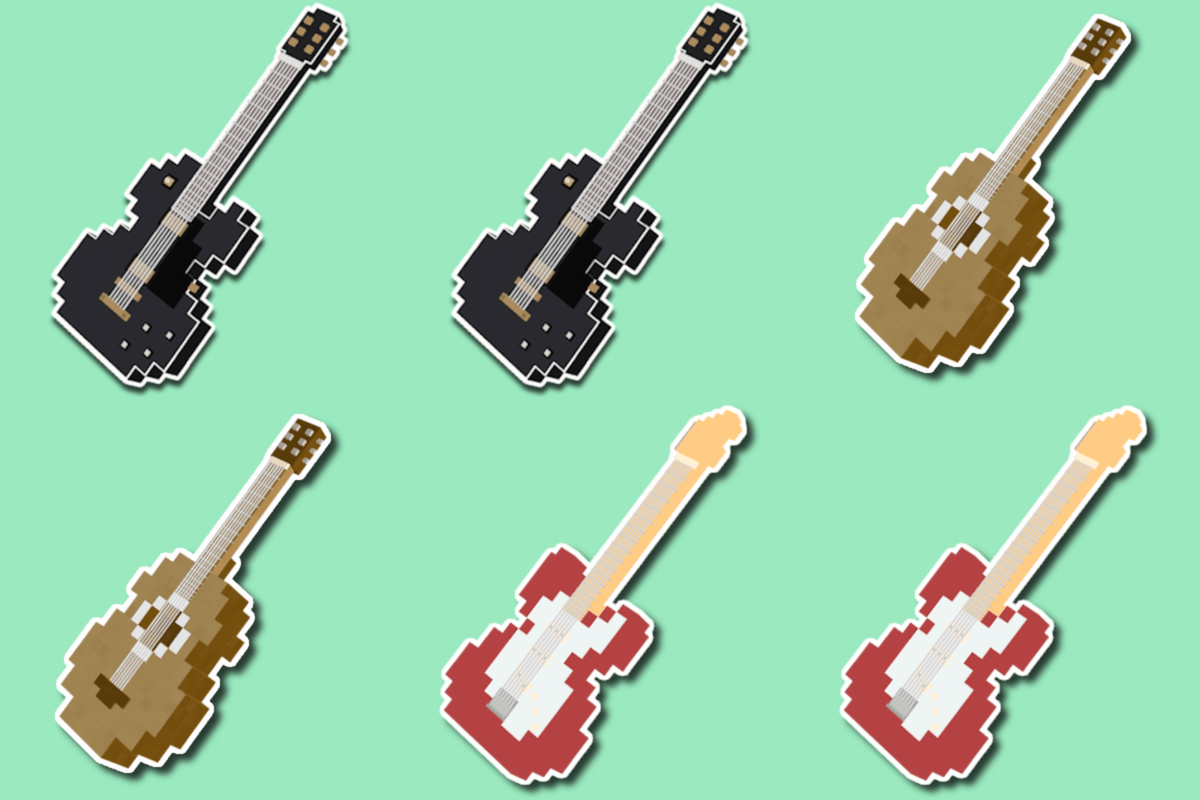
CurseForge · Minecraft mod
Guitars!
Guitars! is a vanilla-friendly mod that adds guitars that are both playable musical instruments and weapons!
Choose a version Pick your version below, then grab the matching file.
Quick answer
Which Guitars! release should I use?
Latest stable file 1.21.1_guitars-v5.0.0-neoforge.jar
Game version 1.21.1
Loader NeoForge
Guitars! 1.21.1_guitars-v5.0.0-neoforge.jar targets 1.21.1 with NeoForge. The project page does not say whether this file belongs on the client, dedicated server, or both. No extra mods listed for this file.
Where it goes
Is Guitars! required on the client, server, or both?
The project page does not say whether this file belongs on the client, dedicated server, or both.
Client Source doesn’t say
Dedicated server Source doesn’t say
Loader for this release NeoForge
Required install it here Optional supported, not mandatory Not supported do not install here Source doesn’t say do not assume
The source does not explicitly classify this release as client-only or server-only.
What else does Guitars! 1.21.1_guitars-v5.0.0-neoforge.jar need?
1.21.1_guitars-v5.0.0-neoforge.jar. Change the file and its required mods may change too.
This file does not list any required mods. Do not add a library just because a different file uses it.
This file does not list any required or optional mods.
Before you install it
Add Guitars! without breaking your instance.
Built for Guitars! 1.21.1_guitars-v5.0.0-neoforge.jar. Pick another file and the loader, install side or required mods may change.
- 01
Stick to this file
Use 1.21.1_guitars-v5.0.0-neoforge.jar. It targets 1.21.1 with NeoForge; another release may have different loader, side or dependency requirements.
- 02
Bring the mods it needs
This file does not list any required mods. Do not add a library just because a different file uses it.
- 03
Put it on the correct side
The project page does not say whether this file belongs on the client, dedicated server, or both.
- 04
Pick the file you checked
Use the “Get this file” button beside 1.21.1_guitars-v5.0.0-neoforge.jar. It opens that exact file at the source.
About this project
What does Guitars! add?
Guitars! is a vanilla-friendly mod that adds many guitar/bass (and related) items! The main instruments introduced are guitars, which can be acoustic and electric, and basses.
The Guitars! menu is accessible through pressing the G key (default keybind) - the Guitars! menu lets you choose your guitar mode, select custom chords, select the scale for attack mode, access the freeplay menu, and change settings and configuration options.
Keybinds:
General Default Keybinds:
- G: open the Guitars! menu
- Z: select previous custom chord
- X: select next custom chord
- C: switch between guitar modes (chords & attack)
- V: opens the chord menu
Freeplay Keybinds:
- Tab: switch fretboard layout
- F3: switch to layout 1
- F4: switch to layout 2
- F5: switch to layout 3
Instruments:
Guitars:
- Acoustic guitars: inexpensive to craft but deal less damage than electric guitars and are less durable
- Electric guitars: more expesive and REQUIRE an amp or portable amp for power, but deal more damage and have more durability compared to an acoustic guitar.
- There are two types of electric guitars: ST (Clean sound) and LP (Overdriven sound)
- LP guitars convert every chord to power chords
Electric Basses:
- Electric Basses deal the same amount of damage as electric guitars --> convert every chord to a single bass note
Freeplay Menu:
The freeplay menu allows players to play individual notes on each instrument type. Notes can be played with the keyboard or the mouse. Electric instruments require an amp connection or a portable amp in your inventory
Guitar/Bass Modes:
Instruments have two main modes, which are attack mode and chords mode
- Attack mode: allows the player to shoot music-note projectiles based on the notes available in the player note-counter
- Chords mode: allows the player to strum up to 5 custom chords selected from the chord selection menu
Enchantments (Guide Books):
Guitar/Bass enchantments can be obtained through the Luthier villager, which can obtain this role by being next to a Luthier Workbench. The Luthier has a chance to offer six different guidebooks, which can be combined with a guitar in a Luthier Workbench to enchant the instrument.
Project description from CurseForge.
Pick your setup
Guitars! by Minecraft version and loader
Choose the version and loader you play, then open the matching release.
Check the dependencies, then try the file in a copied instance before changing a world you care about.
Recent files
Guitars! versions and loaders
1.21.1_guitars-v5.0.0-neoforge.jar
25 Oct 2026
Client Source doesn’t say Server Source doesn’t say Dependencies No extras listed Listed on Release listing
Check the 1.21.1 · NeoForge setup 1.21.1NeoForge release
1.21.1_guitars-v4.3.0-neoforge.jar
8 Aug 2026
Client Source doesn’t say Server Source doesn’t say Dependencies No extras listed Listed on Release listing
Check the 1.21.1 · NeoForge setup 1.21.1NeoForge release
1.21.1_guitars-v4.2.0-neoforge.jar
28 Jul 2026
Client Source doesn’t say Server Source doesn’t say Dependencies No extras listed Listed on Release listing
Check the 1.21.1 · NeoForge setup 1.21.1NeoForge release
1.21.1_guitars-v4.1.0-neoforge.jar
24 Jul 2026
Client Source doesn’t say Server Source doesn’t say Dependencies No extras listed Listed on Release listing
Check the 1.21.1 · NeoForge setup 1.21.1NeoForge release
1.21.1_guitars-v4.0.0-neoforge.jar
24 Jul 2026
Client Source doesn’t say Server Source doesn’t say Dependencies No extras listed Listed on Release listing
Check the 1.21.1 · NeoForge setup 1.21.1NeoForge release
1.21.1_guitars-v3.2.0-neoforge.jar
10 Jun 2026
Client Source doesn’t say Server Source doesn’t say Dependencies No extras listed Listed on Release listing
Check the 1.21.1 · NeoForge setup 1.21.1NeoForge release
1.21.1_guitars-v3.1.0-neoforge.jar
30 May 2026
Client Source doesn’t say Server Source doesn’t say Dependencies No extras listed Listed on Release listing
Check the 1.21.1 · NeoForge setup 1.21.1NeoForge release
1.21.1_guitars-v3.0.0-neoforge.jar
30 May 2026
Client Source doesn’t say Server Source doesn’t say Dependencies No extras listed Listed on Release listing
Check the 1.21.1 · NeoForge setup 1.21.1NeoForge release
1.21.1_guitars-v2.0.0-neoforge.jar
23 May 2026
Client Source doesn’t say Server Source doesn’t say Dependencies No extras listed Listed on Release listing
Check the 1.21.1 · NeoForge setup 1.21.1NeoForge release
1.21.1_guitars-v1.1.0-neoforge.jar
14 May 2026
Client Source doesn’t say Server Source doesn’t say Dependencies No extras listed Listed on Release listing
Check the 1.21.1 · NeoForge setup 1.21.1NeoForge release
Looking for an older file? The official CurseForge project page is in Resources.
 mod
mod CurseForge · Minecraft
Crafting Unbound
Crafting Unbound completely overhauls traditional Minecraft progression by introducing deep, realistic mechanics for processing vanilla resources through specialized (and not only) workstations. Main idea of the mod - less HUD, more real work.
 mod
mod CurseForge · Minecraft
Fantasy/RPG Style Armory | Weapons
Fantasy Weapons adds 25 legendary weapons. Each has its own 3D model, animations, ability tree and effects. Your weapon grows with you from level 1 to 100, unlocking abilities as it levels.
 mod
mod CurseForge · Minecraft
Base Metals
Adds many common metals and alloys to Minecraft, such as copper, silver, and steel.