Jade 🔍 Optional for Caloric Flux caloricflux-neoforge-1.21.1-2.0.0-beta.jar
optionalMatching file found Matched file: [NeoForge 1.21.1] 15.10.6
CurseForge · Minecraft mod
Technology, Energy
Quick answer
Caloric Flux caloricflux-neoforge-1.21.1-2.0.0-beta.jar targets 1.21.1 with NeoForge. The project page does not say whether this file belongs on the client, dedicated server, or both. All 1 required mods have matching files.
Where it goes
The project page does not say whether this file belongs on the client, dedicated server, or both.
The source does not explicitly classify this release as client-only or server-only.
caloricflux-neoforge-1.21.1-2.0.0-beta.jar. Change the file and its required mods may change too.
Install GeckoLib first. We found matching files for this game-version and loader setup. 2 come through another mod in the chain.
2 extra mods were pulled in by other dependencies. Indented rows show who needs each one. We only count dependency files that match this setup. A file for another loader does not fill the gap.
Before you install it
Built for Caloric Flux caloricflux-neoforge-1.21.1-2.0.0-beta.jar. Pick another file and the loader, install side or required mods may change.
Use caloricflux-neoforge-1.21.1-2.0.0-beta.jar. It targets 1.21.1 with NeoForge; another release may have different loader, side or dependency requirements.
Install GeckoLib first. We found matching files for this game-version and loader setup. 2 come through another mod in the chain.
The project page does not say whether this file belongs on the client, dedicated server, or both.
Use the “Get this file” button beside caloricflux-neoforge-1.21.1-2.0.0-beta.jar. It opens that exact file at the source.
About this project
Caloric Flux is a technical energy generation mod for Minecraft 1.21.1 / NeoForge that turns temperature differences into FE.
The mod is in beta. Please report bugs in the comments.
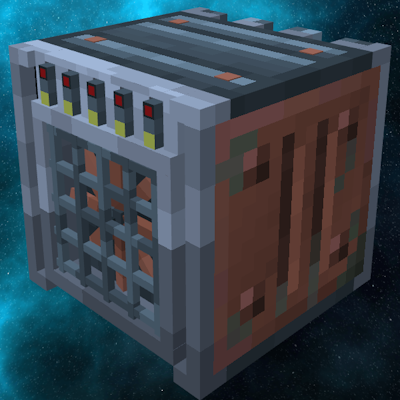
The Thermal Difference Generator stores heat on its left and right sides. Place a hot source on one side and a cold source on the other: heat flowing through the machine produces energy. Source conductivity affects how quickly heat transfers, so temperature alone does not determine your output.
A side without an active source exchanges heat with the surrounding air, which defaults to a configurable 25 °C.
Thermal sources and housing assembly are configurable through datapacks.
Place source profiles in data/<namespace>/thermal_sources/*.json. Example for a torch source:
{
  "blocks": ["minecraft:torch", "minecraft:wall_torch"],
  "temperature": 200,
  "conductivity": 40,
  "exhaustion": {
    "heat_budget": 300000,
    "result": { "block": "minecraft:air" },
    "drop": "minecraft:stick",
    "effect": "smoke"
  }
}
blocks / fluid: Specify exactly one. Accepts an ID, a #tag, or a list of IDs and tags.temperature: Source temperature in °C.conductivity: How quickly heat transfers between the source and the generator.active_when (optional): Required block-state properties. For example, "active_when": { "lit": "true" } makes a source work only while lit.exhaustion: Use "none" for a source that does not deplete, or an object containing heat_budget and result. The budget is consumed by heat exchanged, including cooling, rather than elapsed time.result: Use { "block": "minecraft:water" } to replace the source, or { "set": { "lit": "false" } } to change properties of a block source. Fluid results must replace the block.drop (optional, inside exhaustion): Item ID to drop on depletion.effect (optional, inside exhaustion): hiss, smoke, ice_crack, steam or none. If omitted, the effect is selected from the source temperature relative to ambient.For a furnace that works only while burning without depleting:
{
  "blocks": "minecraft:furnace",
  "active_when": { "lit": "true" },
  "temperature": 200,
  "conductivity": 20,
  "exhaustion": "none"
}
Fluid profiles can also include flowing:
{
  "fluid": "#minecraft:lava",
  "temperature": 1000,
  "conductivity": 100,
  "exhaustion": {
    "heat_budget": 5000000,
    "result": { "block": "minecraft:magma_block" }
  },
  "flowing": {
    "conductivity_scale": 0.5,
    "budget_scale": 0.25,
    "result": { "block": "minecraft:cobblestone" }
  }
}
The flowing scales multiply the base conductivity and reserve, then both are multiplied by the fluid amount divided by 8. Scales default to 1 and must be greater than 0 and no greater than 1. A flowing result defaults to the main depletion result. Omit flowing to accept only source fluids; budget_scale and a flowing result require a depleting profile.
caloricflux:housing_assembly)Place recipes in data/<namespace>/recipe/*.json. Example for the initial construction step:
{
  "type": "caloricflux:housing_assembly",
  "stage": 0,
  "ingredient": { "item": "minecraft:iron_ingot" },
  "base_block": "caloricflux:thermalloy_block",
  "result_block": "caloricflux:thermalloy_housing",
  "reverse_tool": { "tag": "minecraft:axes" },
  "reverse_drop": "minecraft:iron_ingot"
}
stage: Current construction step index; 0 starts construction on the base block.ingredient: Item or tool used to advance construction.base_block / result_block (optional): Blocks used for the construction transition.reverse_tool / reverse_drop (optional): Tool used for disassembly and the item returned.Housing stages run from 1 to 10. Custom recipes do not extend that range.
Project description from CurseForge.
Pick your setup
Choose the version and loader you play, then open the matching release.
Check the dependencies, then try the file in a copied instance before changing a world you care about.
Recent files
9 Nov 2026
caloricflux-neoforge-1.21.1-1.1.2-beta.jar
26 May 2026
caloricflux-neoforge-1.21.1-1.1.1-beta.jar
24 May 2026
caloricflux-neoforge-1.21.1-1.1.0-beta.jar
24 May 2026
caloricflux-neoforge-1.21.1-1.0.1-beta.jar
16 May 2026
caloricflux-neoforge-1.21.1-1.0.0-beta.jar
13 May 2026
Looking for an older file? The official CurseForge project page is in Resources.
 mod
Base Power is a base library for Base Steam and Base Electric, which add machines to the Base Metals Mod. It is a continuation of Dr Cyano's Advantage series and is fully backwards compatible with worlds saved with those mods.
 mod
A tech mod with a realistic electrical grid (voltage, current and cable losses), oil deposits, refineries and 40+ industrial machines.
 mod
Adds many common metals and alloys to Minecraft, such as copper, silver, and steel.