ATO - All the Ores Optional for Hephaestus Forge hephaestus-neoforge-26.1.2-1.0.19
optionalMatching file found Matched file: alltheores-4.0.4.jar

CurseForge · Minecraft mod
A complete forge mod that allows you to melt down ores and equipment.
Quick answer
Hephaestus Forge hephaestus-neoforge-26.1.2-1.0.19 targets 26.1.2 with NeoForge. The project page does not say whether this file belongs on the client, dedicated server, or both. All 1 required mods have matching files.
Where it goes
The project page does not say whether this file belongs on the client, dedicated server, or both.
The source does not explicitly classify this release as client-only or server-only.
hephaestus-neoforge-26.1.2-1.0.19. Change the file and its required mods may change too.
Install Athena first. We found matching files for this game-version and loader setup. 1 comes through another mod in the chain.
1 extra mod was pulled in by another dependency. Indented rows show who needs each one. We only count dependency files that match this setup. A file for another loader does not fill the gap.
Before you install it
Built for Hephaestus Forge hephaestus-neoforge-26.1.2-1.0.19. Pick another file and the loader, install side or required mods may change.
Use hephaestus-neoforge-26.1.2-1.0.19. It targets 26.1.2 with NeoForge; another release may have different loader, side or dependency requirements.
Install Athena first. We found matching files for this game-version and loader setup. 1 comes through another mod in the chain.
The project page does not say whether this file belongs on the client, dedicated server, or both.
Use the “Get this file” button beside hephaestus-neoforge-26.1.2-1.0.19. It opens that exact file at the source.
About this project
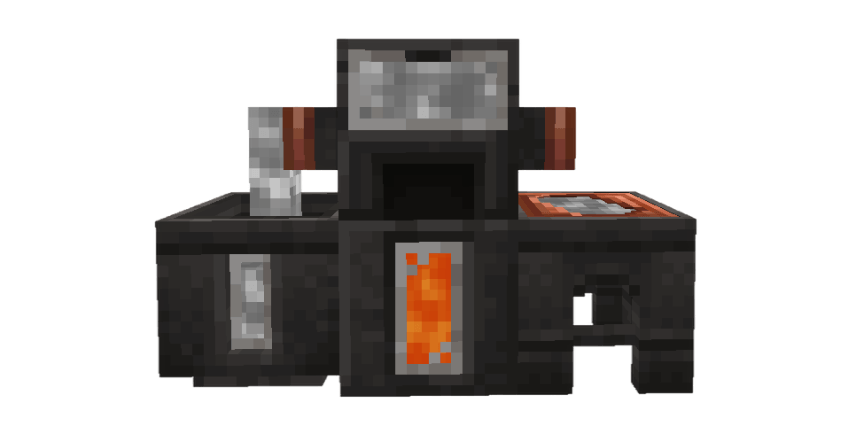
Turn raw ores into molten metal and bring your forge to life.
Hephaestus Forge adds new blocks, ores, and machines for an immersive metalworking experience. Process ores, melt down precious metals, and build a workshop around the forging system.

Hephaestus Forge integrates with AllTheOres and FTB Materials, allowing their ores and alloys to be processed through the Hephaestus system.
Some names and models are inspired by Tinkers’ Construct. Credit for these inspirations goes to its creators.
Hephaestus Forge is an independent project and is not affiliated with Hephaestus (Fabric). Despite similar concepts, the two mods are developed separately.
The mod is still in development. Future updates may introduce new blocks, machines, and changes to existing systems.
Always back up your world before updating and read the changelog for changes between versions.
Project description from CurseForge.
Pick your setup
Choose the version and loader you play, then open the matching release.
Check the dependencies, then try the file in a copied instance before changing a world you care about.
Recent files
hephaestus-neoforge-26.1.2-1.0.19.jar
22 Oct 2026
hephaestus-neoforge-26.1.2-1.0.18.jar
21 Oct 2026
hephaestus-neoforge-26.1.2-1.0.17.jar
18 Oct 2026
hephaestus-neoforge-26.1.2-1.0.16.jar
14 Oct 2026
hephaestus-neoforge-26.1.2-1.0.15.jar
9 Oct 2026
hephaestus-neoforge-26.1.2-1.0.14.jar
7 Oct 2026
hephaestus-neoforge-26.1.2-1.0.12.jar
5 Oct 2026
hephaestus-neoforge-26.1.2-1.0.11.jar
5 Oct 2026
hephaestus-neoforge-1.21.1-1.0.12.jar
4 Oct 2026
hephaestus-neoforge-26.1.2-1.0.10.jar
2 Oct 2026
hephaestus-neoforge-1.21.1-1.0.11.jar
20 Sept 2026
hephaestus-neoforge-26.1.2-1.0.9.jar
20 Sept 2026
Looking for an older file? The official CurseForge project page is in Resources.
 mod
modYet another quarry mod to gather resources, this one, however, uses its own separate virtual dimension and seed to mine in, causing zero damage to your Overworld or existing dimensions.
 mod
modA mod to the create mod to improve trains
 mod
modAnimal herds, coordinated predators, new pets, mechanics, and reworked monsters bring Minecraft's ecosystems to life.