Minecraft version
Back to mods 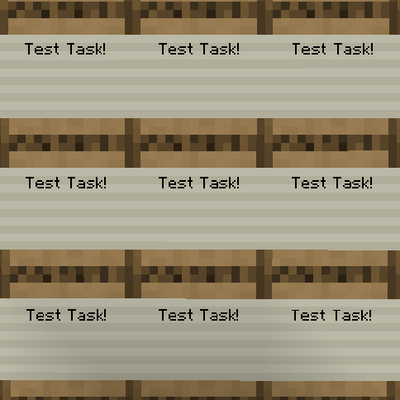
CurseForge · Minecraft mod
Project Boards
Adds new ways to track projects using intuitive blocks and items
Choose a version Pick your version below, then grab the matching file.
Quick answer
Which Project Boards release should I use?
Latest stable file projectboards-1.21.1-v0.1.jar
Game version 1.21.1
Loader NeoForge
Project Boards projectboards-1.21.1-v0.1.jar targets 1.21.1 with NeoForge. The project page does not say whether this file belongs on the client, dedicated server, or both. No extra mods listed for this file.
Where it goes
Is Project Boards required on the client, server, or both?
The project page does not say whether this file belongs on the client, dedicated server, or both.
Client Source doesn’t say
Dedicated server Source doesn’t say
Loader for this release NeoForge
Required install it here Optional supported, not mandatory Not supported do not install here Source doesn’t say do not assume
The source does not explicitly classify this release as client-only or server-only.
What else does Project Boards projectboards-1.21.1-v0.1.jar need?
projectboards-1.21.1-v0.1.jar. Change the file and its required mods may change too.
This file does not list any required mods. Do not add a library just because a different file uses it.
This file does not list any required or optional mods.
Before you install it
Add Project Boards without breaking your instance.
Built for Project Boards projectboards-1.21.1-v0.1.jar. Pick another file and the loader, install side or required mods may change.
- 01
Stick to this file
Use projectboards-1.21.1-v0.1.jar. It targets 1.21.1 with NeoForge; another release may have different loader, side or dependency requirements.
- 02
Bring the mods it needs
This file does not list any required mods. Do not add a library just because a different file uses it.
- 03
Put it on the correct side
The project page does not say whether this file belongs on the client, dedicated server, or both.
- 04
Pick the file you checked
Use the “Get this file” button beside projectboards-1.21.1-v0.1.jar. It opens that exact file at the source.
About this project
What does Project Boards add?
Project Boards
A Project Management mod for Minecraft
Summary
Project Boards is a mod that lets you organize projects by planning, starting, and finishing tasks using collections of Task Boards.
Task Boards
You can place down Task Boards which let you display text in the world. These work a lot like Signs, but the text is stored in an item called a Task Slip.
The name of the Task Slip item is what is shown on the Task Board. You can right-click the task board with a Task Slip to swap it for the slip inside. When you interact with an empty Task Board with a slip in your hand it gets inserted and the text appears. You can shift right-click a Task Board to take out the Task Slip inside. When you break a Task Board, the Task Slip inside will disappear. This is intentional, since Task Boards create new slips during use.
Task Owner
You can right-click the space above the task's text on a Task Board to put your name down as the owner. You can shift right-click the same spot to remove the owner (whether it was you or another player).
Task Status
You can right-click the space below the task's text on a Task Board to advance its status from Planned to Started, or from Started to Completed. You can shift right-click the same spot to move the status backwards instead.
Project description from CurseForge.
Pick your setup
Project Boards by Minecraft version and loader
Choose the version and loader you play, then open the matching release.
Check the dependencies, then try the file in a copied instance before changing a world you care about.
Recent files
Project Boards versions and loaders
projectboards-1.21.1-v0.1.jar
25 May 2026
Client Source doesn’t say Server Source doesn’t say Dependencies No extras listed Listed on Release listing
Check the 1.21.1 · NeoForge setup 1.21.1NeoForge release
Looking for an older file? The official CurseForge project page is in Resources.
 mod
mod CurseForge + Modrinth · Minecraft
Chef's Workbench
Build a functional Minecraft kitchen to cook, fry, bake, steam, and boil food with specialized cooking stations.
 mod
mod CurseForge · Minecraft
Bundled Not Siloed
Changes the players inventory to base based on capacity rather than geometry.
 mod
mod CurseForge · Minecraft
Improved Inventory Tabs
Adds tabs to access nearby chests, blocks, and workstations. Updated for 1.20.1, 1.21.1, 26.2