Minecraft version
Back to mods 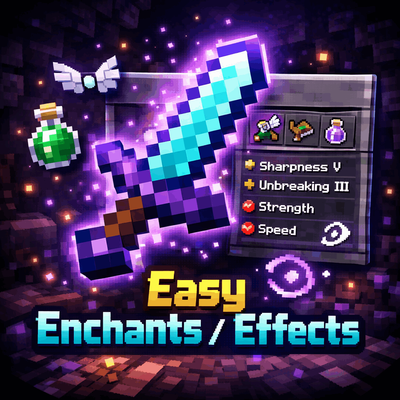
CurseForge · Minecraft mod
Easy Enchants/Effects
This powerful and convenient mod adds a custom menu for enchanting items and applying effects to the game. Forget about limited enchantment options - now you can apply any enchantment and effect at any level!
Choose a version Pick your version below, then grab the matching file.
Quick answer
Which Easy Enchants/Effects release should I use?
Latest stable file Easy Enchants and Effects 1.1.0
Game version 1.21.1
Loader Fabric
Easy Enchants/Effects Easy Enchants and Effects 1.1.0 targets 1.21.1 with Fabric. The project page does not say whether this file belongs on the client, dedicated server, or both. No extra mods listed for this file.
Where it goes
Is Easy Enchants/Effects required on the client, server, or both?
The project page does not say whether this file belongs on the client, dedicated server, or both.
Client Source doesn’t say
Dedicated server Source doesn’t say
Loader for this release Fabric
Required install it here Optional supported, not mandatory Not supported do not install here Source doesn’t say do not assume
The source does not explicitly classify this release as client-only or server-only.
What else does Easy Enchants/Effects Easy Enchants and Effects 1.1.0 need?
Easy Enchants and Effects 1.1.0. Change the file and its required mods may change too.
This file does not list any required mods. Do not add a library just because a different file uses it.
This file does not list any required or optional mods.
Before you install it
Add Easy Enchants/Effects without breaking your instance.
Built for Easy Enchants/Effects Easy Enchants and Effects 1.1.0. Pick another file and the loader, install side or required mods may change.
- 01
Stick to this file
Use Easy Enchants and Effects 1.1.0. It targets 1.21.1 with Fabric; another release may have different loader, side or dependency requirements.
- 02
Bring the mods it needs
This file does not list any required mods. Do not add a library just because a different file uses it.
- 03
Put it on the correct side
The project page does not say whether this file belongs on the client, dedicated server, or both.
- 04
Pick the file you checked
Use the “Get this file” button beside Easy Enchants and Effects 1.1.0. It opens that exact file at the source.
About this project
What does Easy Enchants/Effects add?
Easy Enchants/Effects - This powerful and convenient mod adds a custom menu for enchanting items and applying effects to the game. Forget about limited enchantment options - now you can apply any enchantment and effect at any level!
✨Features:
🔮Enchantments Tab
Enchant any item with any available enchantment
- Level up to 255 - no limits!
- Automatic filtering - only enchantments suitable for the item in hand are shown
- Item preview - see what you're enchanting
💊Effects Tab
- Apply any effect to a player
- Adjustable level (1-255)
- Adjustable duration (from 1 second to 1 week!)
- Automatic replacement - the old effect is removed before applying a new one
🎨Interface
- Semi-transparent background (67% transparency) - the game is visible through the menu
- Two tabs - quickly switch between enchantments and effects
- Smart navigation - click an element to select
- Selected highlight - green highlight of the current item
- Tooltips - hover to view the title
- List scrolling - up/down buttons for navigation
🎮 How to use
- Press V (default) to open the menu
- If you have an item in your hand, the enchantment tab will open
- If your hand is empty, the effects tab will open
- Select an item from the list by clicking the mouse
- Enter the level (and duration for effects)
- Click Apply to apply
- Click Close to close the menu
Project description from CurseForge.
Pick your setup
Easy Enchants/Effects by Minecraft version and loader
Choose the version and loader you play, then open the matching release.
Check the dependencies, then try the file in a copied instance before changing a world you care about.
Recent files
Easy Enchants/Effects versions and loaders
Easy Enchants and Effects 1.1.0
Easy Enchants-Effects1.1.0.jar
26 May 2026
Client Source doesn’t say Server Source doesn’t say Dependencies No extras listed Listed on Release listing
Check the 1.21.1 · Fabric setup Fabric1.21.1 release
Looking for an older file? The official CurseForge project page is in Resources.
 mod
mod CurseForge · Minecraft
Iron & Nouveau
Unofficial mod bring Iron’s Spells ’n Spellbooks into Ars Nouveau with 95 composable glyphs, native spell effects, and configurable progression.
 mod
mod CurseForge · Minecraft
SCC: Calculated Farming
SCC add-on: farms without fields - crops, trees and bees grow under a star-glass dome and harvest their real drops into SCC storage.
 mod
mod CurseForge · Minecraft
SCC: Calculated Mobs
SCC add-on: mob loot without laggy mob farms - simulated fights roll the real loot of every mob in your pack into SCC storage.