Minecraft version
Back to mods 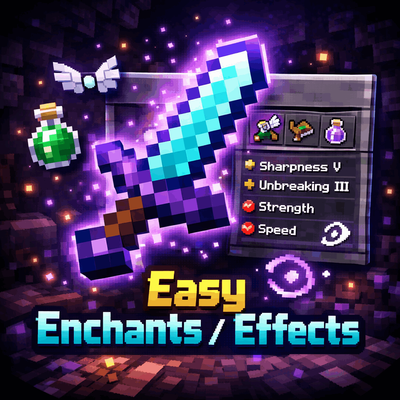
CurseForge · Minecraft mod
Easy Enchants/Effects
This powerful and convenient mod adds a custom menu for enchanting items and applying effects to the game. Forget about limited enchantment options - now you can apply any enchantment and effect at any level!
Choose a version Pick your version below, then grab the matching file.
Quick answer
Which Easy Enchants/Effects release matches 26.1?
Best match for your filters enchantmenu-2.0.0+26.1-26.3.jar
Game version 26.1, 26.1.1, 26.1.2
Loader Fabric
Easy Enchants/Effects enchantmenu-2.0.0+26.1-26.3.jar targets 26.1, 26.1.1, 26.1.2 with Fabric. The project page does not say whether this file belongs on the client, dedicated server, or both. No extra mods listed for this file.
Where it goes
Is Easy Enchants/Effects required on the client, server, or both?
The project page does not say whether this file belongs on the client, dedicated server, or both.
Client Source doesn’t say
Dedicated server Source doesn’t say
Loader for this release Fabric
Required install it here Optional supported, not mandatory Not supported do not install here Source doesn’t say do not assume
The source does not explicitly classify this release as client-only or server-only.
What else does Easy Enchants/Effects enchantmenu-2.0.0+26.1-26.3.jar need?
enchantmenu-2.0.0+26.1-26.3.jar on 26.1. Every mod below is checked against that same setup.
This file does not list any required mods. Do not add a library just because a different file uses it.
This file does not list any required or optional mods.
Before you install it
Add Easy Enchants/Effects without breaking your instance.
Built for Easy Enchants/Effects enchantmenu-2.0.0+26.1-26.3.jar on 26.1. Pick another file and the loader, install side or required mods may change.
- 01
Stick to this file
Use enchantmenu-2.0.0+26.1-26.3.jar. It targets 26.1, 26.1.1, 26.1.2 with Fabric; another release may have different loader, side or dependency requirements.
- 02
Bring the mods it needs
This file does not list any required mods. Do not add a library just because a different file uses it.
- 03
Put it on the correct side
The project page does not say whether this file belongs on the client, dedicated server, or both.
- 04
Pick the file you checked
Use the “Get this file” button beside enchantmenu-2.0.0+26.1-26.3.jar. It opens that exact file at the source.
About this project
What does Easy Enchants/Effects add?
Easy Enchants/Effects
A client-side Fabric mod for Minecraft 26.3 that gives you full control over enchantments and status effects: enchant any item, and remove enchantments one by one or all at once. No enchanting table, no books, no XP required — everything happens in a single menu.
The mod name is Easy Enchants/Effects. Mod ID:
enchantmenu.
What it does
Open the menu (default key: V) and you can:
- apply any enchantment to the item in your hand — including items that normally cannot have it (a stick with Sharpness V? Easy);
- remove any enchantment from an item individually, or clear the item completely;
- give yourself any status effect with the level and duration you want.
Everything runs on the client and needs no world edits or data packs.
Features
⚔️ Enchants tab
- Full list of enchantments from the game and mod registries.
- Available for every item by default (the
canEnchantfilter can be re-enabled in the settings). - Level range 1–255.
- Applies to the item in your main or off hand.
🗑️ Remove tab
- Shows the current enchantments of the item in your hand.
- Remove — take off the selected enchantment.
- Remove all — clear every enchantment from the item at once.
- The list refreshes automatically after each action.
✨ Effects tab
- Every effect from the registry, including modded ones.
- Level 1–255, duration 1–604,800 seconds (up to 7 days).
- Applied to yourself.
🔎 Polished interface
- Search by name and ID.
- Mouse-wheel scrolling and an entry counter.
- Translucent UI with a blurred world background.
- Tooltips (ID, level, amplifier) and status messages.
- Localization: English and Russian.
How to use
- Hold an item in your hand (or keep your hand empty — the menu will open on the Effects tab).
- Press V (rebindable under Controls → Easy Enchants/Effects).
- Pick a tab:
- Enchants — search for an enchantment, set the level, press Apply;
- Remove — select an enchantment and press Remove, or press Remove all;
- Effects — pick an effect, set the level and duration, press Apply.
- Done. If
keepOpenAfterApplyis enabled, the menu stays open, so you can stack several enchantments in a row.
Configuration
Use Mod Menu → Configure or edit config/enchantmenu.json:
{
  "allowAnyItem": true,
  "keepOpenAfterApply": true,
  "defaultLevel": 1,
  "defaultDuration": 60
}
| Option | Default | Description |
|---|---|---|
allowAnyItem |
true |
Show every enchantment for every item, not only the ones it normally accepts |
keepOpenAfterApply |
true |
Keep the menu open after applying an enchantment or effect |
defaultLevel |
1 |
Level pre-filled in the menu |
defaultDuration |
60 |
Default effect duration in seconds |
Values are validated and clamped to their allowed ranges automatically.
Requirements
| Component | Version |
|---|---|
| Minecraft | 26.3 |
| Fabric Loader | 0.19.5+ |
| Fabric API | 0.161.0+26.3 |
| Java | 25 |
| Mod Menu | 21.0.0+ (optional) |
Installation
- Install Fabric Loader for Minecraft 26.3.
- Put these files into your
modsfolder:fabric-api;enchantmenu-1.2.0+26.3.jar;- optionally
modmenu— for the Configure button.
- Launch the game.
Compatibility and limitations
- The mod is client-side; on servers it may not work or may violate the server rules — use it responsibly.
- Removal works with the
ENCHANTMENTScomponent, i.e. regular item enchantments. Enchanted books store their enchantments inSTORED_ENCHANTMENTSand do not appear in the Remove list. - Enchantments and effects come straight from the registry, so modded ones are available too.
Links
- Discord (bugs and suggestions): https://discord.gg/7qzAw5Cckx
Project description from CurseForge.
Pick your setup
Easy Enchants/Effects by Minecraft version and loader
Choose the version and loader you play, then open the matching release.
Minecraft version
26.2
1 loader buildMinecraft version
26.1.2
1 loader buildMinecraft version
26.1.1
1 loader buildMinecraft version
26.1
1 loader buildMinecraft version
1.21.11
1 loader buildMinecraft version
1.21.10
1 loader buildMinecraft version
1.21.9
1 loader buildMinecraft version
1.21.8
1 loader buildMinecraft version
1.21.7
1 loader buildMinecraft version
1.21.6
1 loader buildMinecraft version
1.21.5
1 loader buildShowing the newest 12 of 16 game versions. Older files are in the list below.
Check the dependencies, then try the file in a copied instance before changing a world you care about.
Recent files
Easy Enchants/Effects versions and loaders
enchantmenu-2.0.0+26.1-26.3.jar
enchantmenu-2.0.0-26.1-26.3.jar
8 Nov 2026
Client Source doesn’t say Server Source doesn’t say Dependencies No extras listed Listed on Release listing
Check the 26.1 · Fabric setup Fabric26.126.1.126.1.2 release
Looking for an older file? The official CurseForge project page is in Resources.
 mod
CurseForge · Minecraft
White Clover
A minecraft mod inspirated on Black Clover Anime, where you can keep your grimoire, choose from four classes, and cast spells using a wand
 mod
Modrinth · Minecraft
clock-in
a mod that adds a clock widget that lets you view the time easily in the hud
 mod
Modrinth · Minecraft
Concurrent Chunk Management Engine (Fabric)
A Fabric mod designed to improve the chunk performance of Minecraft.