Minecraft version
Back to mods 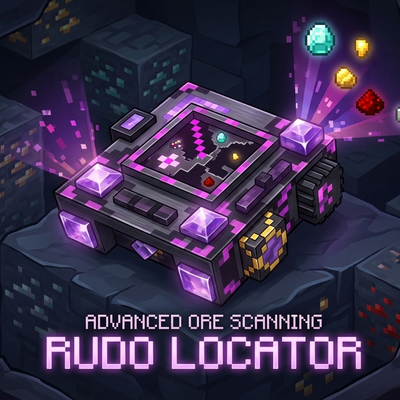
CurseForge · Minecraft mod
Rudo Locator
Advanced ore locator with fully customizable RGB filters and an intuitive interface.
Choose a version Pick your version below, then grab the matching file.
Quick answer
Which Rudo Locator release should I use?
Latest stable file rudolocator-1.1.0.jar
Game version 1.21.1
Loader NeoForge
Rudo Locator rudolocator-1.1.0.jar targets 1.21.1 with NeoForge. The project page does not say whether this file belongs on the client, dedicated server, or both. No extra mods listed for this file.
Where it goes
Is Rudo Locator required on the client, server, or both?
The project page does not say whether this file belongs on the client, dedicated server, or both.
Client Source doesn’t say
Dedicated server Source doesn’t say
Loader for this release NeoForge
Required install it here Optional supported, not mandatory Not supported do not install here Source doesn’t say do not assume
The source does not explicitly classify this release as client-only or server-only.
What else does Rudo Locator rudolocator-1.1.0.jar need?
rudolocator-1.1.0.jar. Change the file and its required mods may change too.
This file does not list any required mods. Do not add a library just because a different file uses it.
This file does not list any required or optional mods.
Before you install it
Add Rudo Locator without breaking your instance.
Built for Rudo Locator rudolocator-1.1.0.jar. Pick another file and the loader, install side or required mods may change.
- 01
Stick to this file
Use rudolocator-1.1.0.jar. It targets 1.21.1 with NeoForge; another release may have different loader, side or dependency requirements.
- 02
Bring the mods it needs
This file does not list any required mods. Do not add a library just because a different file uses it.
- 03
Put it on the correct side
The project page does not say whether this file belongs on the client, dedicated server, or both.
- 04
Pick the file you checked
Use the “Get this file” button beside rudolocator-1.1.0.jar. It opens that exact file at the source.
About this project
What does Rudo Locator add?
English
Advanced ore and block locator for Minecraft with deep customization!
Features:
- 🧩 Universal Mod Support: Automatically detects and works with any custom ores from other modifications! No configuration files needed.
- 🎯 Precise Tracking: Highlights target ores and blocks in real-time.
- 🎨 Full RGB Customization: Use built-in sliders to set any color for any specific ore.
- ⚙️ Polished GUI: Clean interface with locking frames for comfortable tweaking.
Tier System & Progression
Forget about a one-size-fits-all tool — the locator evolves right along with you! The mod features 5 technological tiers, each increasing your detection range:
- Copper Locator — your first basic device for tracking simple resources at a short range.
- Iron Locator — expands your scanning radius for more efficient mining.
- Golden Locator — further increases the detection range to spot rare materials earlier.
- Diamond Locator — a powerful tool built for deep mining with a massive coverage area.
- Netherite Locator — the ultimate pinnacle of technology. Maximum scanning radius and complete immunity to fire and lava!
💾 Sharing Your Configurations
You can easily share your custom ore colors and filter settings with friends! No game restart required.
- Find the config file: Go to your Minecraft folder, open "config", then "orelocator". Path:"....minecraft\config\orelocator*filter.json*"
- Copy and Share: Send this "filter.json" file to your friend via Discord, Telegram, or any other way.
- Apply: Your friend just needs to place this file into their own "*config\orelocator*" folder (replacing the old one if prompted).
Done! The changes will apply instantly when they open their world.
⚙️ How to Change the Maximum Scan Radius
Server owners and players can fully customize the scanning limits for each tier in the common config file:
- Open the "....minecraft\config" folder and open "orelocator-common.toml" with any text editor (like Notepad).
- Locate the tier variables you want to change, for example, for the Netherite tier: "netherite_max_radius = 64" "netherite_current_radius = 64"
- Change the values to your liking (e.g., change both to "128" to increase the limit).
- Save the file and restart the game (or rejoin the world) to apply the new limits.
You can customize limits for all tiers using their respective lines: copper_max_radius, iron_max_radius, gold_max_radius, diamond_max_radius, and netherite_max_radius.
⚠️ Important Note: To open the settings interface, you must hold the locator in your main hand! Press "R" to open settings in-game. If you are not holding the device, the menu will not open.
Русский
Продвинутый локатор руд и блоков с полной кастомизацией!
Особенности:
- 🧩 Поддержка любых модов: Автоматически находит и работает с кастомными рудами из любых других модификаций! Никаких сложных настроек.
- 🎯 Точный поиск: Подсвечивает нужные руды в реальном времени.
- 🎨 RGB-кастомизация: Кастомные слайдеры позволяют настроить любой цвет подсветки для каждой руды отдельно.
- ⚙️ Продуманный GUI: Стильный интерфейс с аккуратными рамками-фиксаторами.
Система уровней и прогрессия
Забудьте об одном универсальном устройстве — локатор развивается вместе с вами! Мод предлагает 5 технологических тиров, каждый из которых увеличивает радиус вашего поиска:
Медный локатор — ваше первое базовое устройство для поиска ресурсов на небольшом расстоянии.
Железный локатор — расширяет радиус сканирования для более эффективных раскопок.
Золотой локатор — ещё больше увеличивает дистанцию обнаружения, помогая находить редкие материалы раньше.
Алмазный локатор — мощный инструмент для глубоких шахт с огромной зоной покрытия.
Незеритовый локатор — абсолютный пик технологий. Максимальный радиус сканирования и полная неуязвимость к огню и лаве!
💾 Как поделиться настройками цветов и фильтров Вы можете легко передать свои кастомные цвета руд и настройки фильтров другу! Перезапуск игры не требуется.
- Найдите файл настроек: Откройте папку с игрой, перейдите в "config", а затем в "orelocator". Путь: "....minecraft\config\orelocator*filter.json"*
- Скопируйте и отправьте: Скиньте файл "filter.json" другу через Discord, Telegram или любым удобным способом.
- Установка: Другу достаточно положить этот файл в свою папку "*config\orelocator*" (с заменой, если файл уже существует).
Готово! Все настройки подхватятся автоматически прямо в игре, как только друг зайдет в мир.
⚙️ Как изменить максимальный радиус сканирования
Вы можете вручную настроить лимиты расстояния для каждого уровня локаторов под баланс своей сборки:
- Откройте папку "....minecraft\config" и откройте файл "orelocator-common.toml" через любой текстовый редактор (например, Блокнот).
- Найдите строки нужного вам локатора (например, незеритового): "netherite_max_radius = 64" "netherite_current_radius = 64"
- Измените значения на желаемые (например, укажите "128" в обеих строках, чтобы увеличить предел).
- Сохраните файл и перезагрузите игру (или перезайдите в мир), чтобы новые лимиты вступили в силу.
Точно так же можно настроить радиус для остальных тиров, изменяя строки: "copper_max_radius", "iron_max_radius", "gold_max_radius", "diamond_max_radius" и "netherite_max_radius".
⚠️ Важное примечание: Чтобы открыть интерфейс настроек, вам обязательно нужно держать рудолокатор в руке! Нажмите кнопку "R", чтобы открыть настройки в игре. Если устройство не выбрано, меню не откроется.
Project description from CurseForge.
Pick your setup
Rudo Locator by Minecraft version and loader
Choose the version and loader you play, then open the matching release.
Minecraft version
1.20.1
2 loader buildsMinecraft version
1.19.2
1 loader buildCheck the dependencies, then try the file in a copied instance before changing a world you care about.
Recent files
Rudo Locator versions and loaders
rudolocator-1.1.0.jar
rudolocator-1.1.0(1.21.1).jar
4 Sept 2026
Client Source doesn’t say Server Source doesn’t say Dependencies No extras listed Listed on Release listing
Check the 1.21.1 · NeoForge setup 1.21.1NeoForge release
orelocator-1.1.1.jar (patch)
orelocator-1.1.1(1.19.2).jar
31 Aug 2026
Client Source doesn’t say Server Source doesn’t say Dependencies No extras listed Listed on Release listing
Check the 1.19.2 · Forge setup Forge1.19.2 release
orelocator-1.1.0.jar
orelocator-1.1.0(1.19.2).jar
30 Aug 2026
Client Source doesn’t say Server Source doesn’t say Dependencies No extras listed Listed on Release listing
Check the 1.19.2 · Forge setup Forge1.19.2 release
rudo-locator-1.1.2.jar (patch)
rudo-locator-1.1.2.jar
13 Aug 2026
Client Source doesn’t say Server Source doesn’t say Dependencies No extras listed Listed on Release listing
Check the 1.20.1 · Fabric setup Fabric1.20.1 release
rudo-locator-1.1.0.jar
13 Aug 2026
Client Source doesn’t say Server Source doesn’t say Dependencies No extras listed Listed on Release listing
Check the 1.21.1 · Fabric setup Fabric1.21.1 release
rudo-locator-1.1.1.jar (patch)
rudo-locator-1.1.1.jar
2 Aug 2026
Client Source doesn’t say Server Source doesn’t say Dependencies No extras listed Listed on Release listing
Check the 1.20.1 · Fabric setup Fabric1.20.1 release
rudo-locator-1.1.0.jar
31 Jul 2026
Client Source doesn’t say Server Source doesn’t say Dependencies No extras listed Listed on Release listing
Check the 1.20.1 · Fabric setup Fabric1.20.1 release
orelocator-1.1.0.jar
11 Jul 2026
Client Source doesn’t say Server Source doesn’t say Dependencies No extras listed Listed on Release listing
Check the 1.20.1 · Forge setup 1.20.1Forge release
orelocator-1.0.0.jar
4 Jun 2026
Client Source doesn’t say Server Source doesn’t say Dependencies No extras listed Listed on Release listing
Check the 1.20.1 · Forge setup 1.20.1Forge release
Looking for an older file? The official CurseForge project page is in Resources.
 mod
mod CurseForge · Minecraft
Visceral: Ragdoll & Gore
Ragdolls, real blade-path cutting and gore for Forge 1.20.1. Every hit leaves a mark.
 mod
mod CurseForge · Minecraft
Mythiclegends
Mythic Legends is a Minecraft mod inspired by myths, folklore, and legendary beings from around the world — from Brazilian folklore to Japanese, Norse, Egyptian, Chinese, Greek, and other traditions.
 mod
mod CurseForge + Modrinth · Minecraft
Databank
A library mod facilitating the creation of the bold and experimental, primarily made for the Aberrant Shores project.