Minecraft version
Back to mods 
CurseForge · Minecraft mod
Tutorial Worlds Legacy Console Edition
Adds a “Tutorial Worlds” button with a built-in browser for Legacy Console Edition tutorial worlds.
Choose a version Pick your version below, then grab the matching file.
Quick answer
Which Tutorial Worlds Legacy Console Edition release should I use?
Latest stable file tutorial-worlds-legacy-console-edition-1.0.1+fabric 26.1.2.jar
Game version 26.1.2
Loader Fabric
Tutorial Worlds Legacy Console Edition tutorial-worlds-legacy-console-edition-1.0.1+fabric 26.1.2.jar targets 26.1.2 with Fabric. The project page does not say whether this file belongs on the client, dedicated server, or both. No extra mods listed for this file.
Where it goes
Is Tutorial Worlds Legacy Console Edition required on the client, server, or both?
The project page does not say whether this file belongs on the client, dedicated server, or both.
Client Source doesn’t say
Dedicated server Source doesn’t say
Loader for this release Fabric
Required install it here Optional supported, not mandatory Not supported do not install here Source doesn’t say do not assume
The source does not explicitly classify this release as client-only or server-only.
What else does Tutorial Worlds Legacy Console Edition tutorial-worlds-legacy-console-edition-1.0.1+fabric 26.1.2.jar need?
tutorial-worlds-legacy-console-edition-1.0.1+fabric 26.1.2.jar. Change the file and its required mods may change too.
This file does not list any required mods. Do not add a library just because a different file uses it.
This file does not list any required or optional mods.
Before you install it
Add Tutorial Worlds Legacy Console Edition without breaking your instance.
Built for Tutorial Worlds Legacy Console Edition tutorial-worlds-legacy-console-edition-1.0.1+fabric 26.1.2.jar. Pick another file and the loader, install side or required mods may change.
- 01
Stick to this file
Use tutorial-worlds-legacy-console-edition-1.0.1+fabric 26.1.2.jar. It targets 26.1.2 with Fabric; another release may have different loader, side or dependency requirements.
- 02
Bring the mods it needs
This file does not list any required mods. Do not add a library just because a different file uses it.
- 03
Put it on the correct side
The project page does not say whether this file belongs on the client, dedicated server, or both.
- 04
Pick the file you checked
Use the “Get this file” button beside tutorial-worlds-legacy-console-edition-1.0.1+fabric 26.1.2.jar. It opens that exact file at the source.
About this project
What does Tutorial Worlds Legacy Console Edition add?
🌍 Tutorial Worlds Legacy Console Edition
Relive the nostalgia of Minecraft Legacy Console Edition directly inside Java Edition!
Tutorial Worlds Legacy Console Edition is a client-side Minecraft mod by Team SmartStreamLabs that adds a fully integrated Tutorial Worlds Browser to the Minecraft main menu, allowing players to browse, explore, and create playable copies of classic Legacy Console Edition tutorial worlds.
Whether you want to revisit the iconic tutorial maps from Xbox 360, PlayStation 3, Wii U, Xbox One, or PlayStation 4, this mod provides an easy and polished way to experience these worlds again in modern Minecraft.
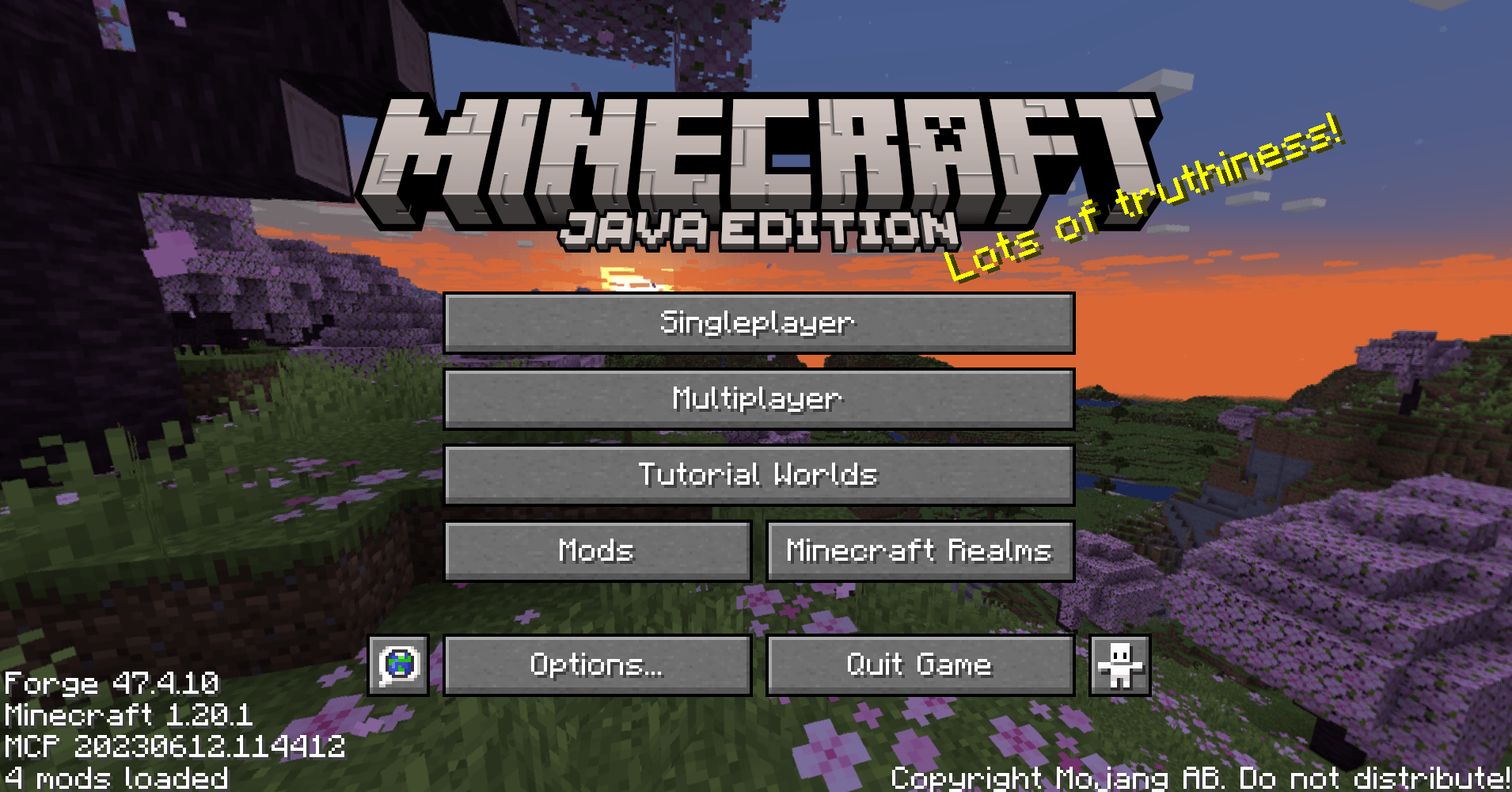
✨ Features
🏠 Built-In Tutorial Worlds Browser
A new "Tutorial Worlds" button is added directly to the Minecraft main menu beneath Multiplayer, maintaining a clean vanilla-style layout.
The browser includes:
Large preview screenshots
World descriptions
Legacy Console Edition version information
Platform information
Release year
Update number (TU)
World size information
Additional metadata for each tutorial world
The interface is inspired by the original Legacy Console Edition world selection screens for an authentic nostalgic experience.
📚 Included Tutorial Worlds
The mod currently includes multiple classic tutorial worlds, including:
Pre-TU1
TU1
TU3
TU5
TU7
TU9
TU12
TU14
TU19
TU31
TU46
TU69
Each world contains its own preview image and detailed information.

⚠️ First-Time Disclaimer Screen
Before accessing the Tutorial Worlds Browser for the first time, players are presented with a disclaimer explaining ownership and project information.
Players must accept the disclaimer before continuing.
🌎 One-Click World Creation
Creating a tutorial world is simple:
Open the Tutorial Worlds Browser.
Select a tutorial world.
Click Create World.
The mod automatically:
Extracts the selected world archive
Creates a unique save folder
Prevents overwriting existing worlds
Places the world into your Minecraft saves folder
Launches the newly created world automatically
🛡️ Safe World Handling
Tutorial Worlds Legacy Console Edition includes multiple safety systems:
Never modifies the original world archives
Never overwrites existing worlds
Handles missing files safely
Logs loading and copy errors
Supports development archives from
.minecraft/tutorial_worlds/Includes compatibility and migration logic for older tutorial world formats
Migration support includes:
Legacy world data updates
Legacy dimension folder fixes
Old item stack conversion
Chunk preparation
Entity data preparation
Point-of-interest data preparation
This helps older tutorial worlds load more reliably in modern Minecraft versions.
📦 Client-Side Only
This mod is completely client-side.
✔ No server installation required
✔ No multiplayer features
✔ No new blocks or items
✔ No gameplay changes
✔ No commands or progression systems
The sole purpose of this mod is to provide a polished browser for Legacy Console Edition tutorial worlds and allow players to create playable singleplayer copies.
❤️ Made for Nostalgia & Preservation
Tutorial Worlds Legacy Console Edition was created to help preserve and celebrate the iconic tutorial worlds that introduced millions of players to Minecraft.
Whether you're revisiting childhood memories or exploring these maps for the first time, this mod makes the experience simple and accessible within modern Java Edition.
Disclaimer
This project is an unofficial fan-made mod.
Minecraft®, Mojang®, Microsoft®, and the original Legacy Console Edition tutorial world maps are the property of Mojang Studios and Microsoft.
This mod is not affiliated with, endorsed by, sponsored by, or approved by Mojang Studios or Microsoft.
The mod code created by Team SmartStreamLabs is released into the Public Domain.
The included tutorial world maps and their associated assets remain the property of Mojang Studios and Microsoft.

Created with IntelliJ
Project description from CurseForge.
Pick your setup
Tutorial Worlds Legacy Console Edition by Minecraft version and loader
Choose the version and loader you play, then open the matching release.
Minecraft version
26.1.2
2 loader buildsMinecraft version
26.1.1
2 loader buildsMinecraft version
26.1
2 loader buildsMinecraft version
1.21.11
2 loader buildsMinecraft version
1.21.1
2 loader buildsMinecraft version
1.20.1
3 loader buildsForge tutorial-worlds-legacy-console-edition-1.0.0+forge-1.20.1.jar 1
stable file
· 1 total · 4 Jun 2026Fabric tutorial-worlds-legacy-console-edition-1.0.0+fabric-1.20.1.jar 1
stable file
· 1 total · 4 Jun 2026NeoForge tutorial-worlds-legacy-console-edition-1.0.0+forge-1.20.1.jar 1
stable file
· 1 total · 4 Jun 2026
Check the dependencies, then try the file in a copied instance before changing a world you care about.
Recent files
Tutorial Worlds Legacy Console Edition versions and loaders
tutorial-worlds-legacy-console-edition-1.0.1+fabric 26.1.2.jar
24 Aug 2026
Client Source doesn’t say Server Source doesn’t say Dependencies No extras listed Listed on Release listing
Check the 26.1.2 · Fabric setup Fabric26.1.2 release
tutorial-worlds-legacy-console-edition-1.0.0+fabric-26.2.jar
18 Jun 2026
Client Source doesn’t say Server Source doesn’t say Dependencies No extras listed Listed on Release listing
Check the 26.2 · Fabric setup Fabric26.2 release
tutorial-worlds-legacy-console-edition-1.0.0+neoforge-26.2.jar
18 Jun 2026
Client Source doesn’t say Server Source doesn’t say Dependencies No extras listed Listed on Release listing
Check the 26.2 · NeoForge setup NeoForge26.2 release
tutorial-worlds-legacy-console-edition-1.0.0+neoforge-26.1.2.jar
4 Jun 2026
Client Source doesn’t say Server Source doesn’t say Dependencies No extras listed Listed on Release listing
Check the 26.1.2 · NeoForge setup NeoForge26.1.2 release
tutorial-worlds-legacy-console-edition-1.0.0+neoforge-26.1.1.jar
4 Jun 2026
Client Source doesn’t say Server Source doesn’t say Dependencies No extras listed Listed on Release listing
Check the 26.1.1 · NeoForge setup NeoForge26.1.1 release
tutorial-worlds-legacy-console-edition-1.0.0+neoforge-26.1.jar
4 Jun 2026
Client Source doesn’t say Server Source doesn’t say Dependencies No extras listed Listed on Release listing
Check the 26.1 · NeoForge setup NeoForge26.1 release
tutorial-worlds-legacy-console-edition-1.0.0+neoforge-1.21.11.jar
4 Jun 2026
Client Source doesn’t say Server Source doesn’t say Dependencies No extras listed Listed on Release listing
Check the 1.21.11 · NeoForge setup NeoForge1.21.11 release
tutorial-worlds-legacy-console-edition-1.0.0+neoforge-1.21.1.jar
4 Jun 2026
Client Source doesn’t say Server Source doesn’t say Dependencies No extras listed Listed on Release listing
Check the 1.21.1 · NeoForge setup 1.21.1NeoForge release
tutorial-worlds-legacy-console-edition-1.0.0+26.1.2.jar
4 Jun 2026
Client Source doesn’t say Server Source doesn’t say Dependencies No extras listed Listed on Release listing
Check the 26.1.2 · Fabric setup Fabric26.1.2 release
tutorial-worlds-legacy-console-edition-1.0.0+26.1.1.jar
4 Jun 2026
Client Source doesn’t say Server Source doesn’t say Dependencies No extras listed Listed on Release listing
Check the 26.1.1 · Fabric setup Fabric26.1.1 release
tutorial-worlds-legacy-console-edition-1.0.0+26.1.jar
4 Jun 2026
Client Source doesn’t say Server Source doesn’t say Dependencies No extras listed Listed on Release listing
Check the 26.1 · Fabric setup Fabric26.1 release
tutorial-worlds-legacy-console-edition-1.0.0+1.21.11.jar
4 Jun 2026
Client Source doesn’t say Server Source doesn’t say Dependencies No extras listed Listed on Release listing
Check the 1.21.11 · Fabric setup Fabric1.21.11 release
Looking for an older file? The official CurseForge project page is in Resources.
 mod
mod CurseForge + Modrinth · Minecraft
U-API
A lightweight core API library for mods built around the U-API ecosystem.
 mod
mod CurseForge + Modrinth · Minecraft
Better Flames
Reduces the flame texture size on burning arrows and mobs.
 mod
mod CurseForge + Modrinth · Minecraft
OBS Recording Monitor
Shows a warning in-game when OBS is not recording.