Fabric API Needed by Tab Info 0.2.0
requiredMatching file found Matched file: [26.2] Fabric API 0.160.0+26.2
CurseForge · Minecraft mod
Shows useful player stats like deaths, kills, playtime, position, and current dimension to everyone through a compact, configurable readout in the player list.
Quick answer
Tab Info 0.2.0 targets 1.21.2-Snapshot, 1.21, 1.21.6-snapshot with Fabric, Forge, NeoForge. The project page does not say whether this file belongs on the client, dedicated server, or both. All 1 required mods have matching files.
Where it goes
The project page does not say whether this file belongs on the client, dedicated server, or both.
The source does not explicitly classify this release as client-only or server-only.
Tab Info 0.2.0. Change the file and its required mods may change too.
Install Fabric API first. We found matching files for this game-version and loader setup.
We only count dependency files that match this setup. A file for another loader does not fill the gap.
Before you install it
Built for Tab Info 0.2.0. Pick another file and the loader, install side or required mods may change.
Use Tab Info 0.2.0. It targets 1.21.2-Snapshot, 1.21, 1.21.6-snapshot with Fabric, Forge, NeoForge; another release may have different loader, side or dependency requirements.
Install Fabric API first. We found matching files for this game-version and loader setup.
The project page does not say whether this file belongs on the client, dedicated server, or both.
Use the “Get this file” button beside Tab Info 0.2.0. It opens that exact file at the source.
About this project
➜ The data pack version of this mod can be found here
Shows useful player stats like deaths, kills, playtime, position, and current dimension to everyone through a compact, configurable readout in the player list.
The readout rotates every 2 seconds, works in multiplayer and singleplayer, and is fully server-side, so players do not need to install anything.
Perfect for PvP servers, local worlds with friends, and more.

After adding the data pack/mod to your world or server, you should be able to open the about panel, which is fully controllable with the mouse:
/function tab_info:about
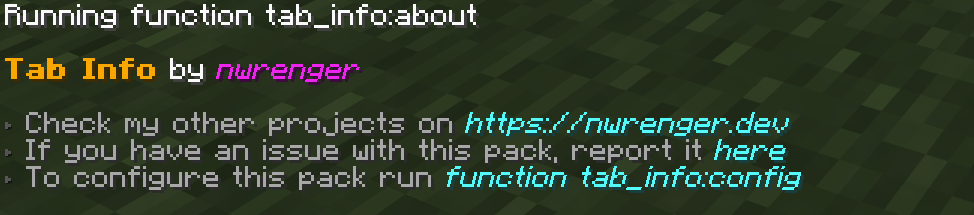
Open the configuration panel by the following command:
/function tab_info:config
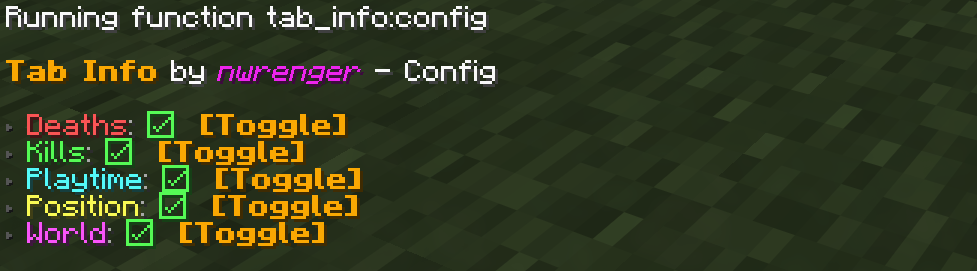
From here, you can toggle each info entry on or off. If every entry is disabled, Tab Info is hidden from the player list.
To remove the vacant entry inside the player list after disabling/removing the data pack/mod, run the following command:
/scoreboard objectives setdisplay list
I warmly welcome:
Please open issues or PRs on GitHub.
This project is licensed under the LGPLv3 License. See LICENSE for details.
Project description from CurseForge.
Pick your setup
Choose the version and loader you play, then open the matching release.
Showing the newest 12 of 150 game versions. Older files are in the list below.
Check the dependencies, then try the file in a copied instance before changing a world you care about.
Recent files
tab-info-0.2.0+mod.jar
17 Jun 2026
tab-info-0.2.0.zip
17 Jun 2026
tab-info-0.1.0+mod.jar
4 Jun 2026
tab-info-0.1.0.zip
4 Jun 2026
Looking for an older file? The official CurseForge project page is in Resources.
 mod
modThis mod adds blacklist functionality to the TrashSlot mod, allowing to autotrash useless items.
 mod
modExtraction survival for Minecraft: carry your kit into hostile raid worlds, fight for loot, and survive the extraction channel to bring it home — or die and drop it all. Build a home base, squad up, and risk it for one more chest.
 mod
modCore of the Spell Changes in the Warborn Modpack