Minecraft version
Back to mods 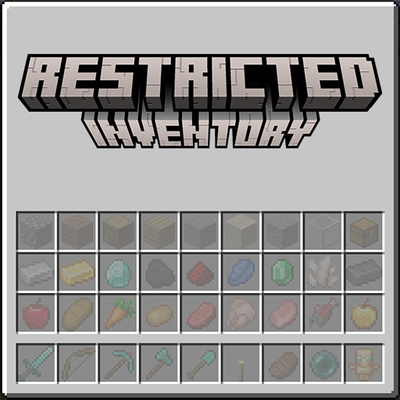
CurseForge · Minecraft mod
Restricted Inventory
Restrict player inventory slots to specific items or item tags. Configure which slots accept which items via JSON config — server-wide or per-client. Restricted slots display a visual preview of what belongs there.
Choose a version Pick your version below, then grab the matching file.
Quick answer
Which Restricted Inventory release should I use?
beta file restrictedinventory-26.2.0.4+26.2-fabric
Game version 26.2
Loader Fabric
Restricted Inventory restrictedinventory-26.2.0.4+26.2-fabric targets 26.2 with Fabric. The project page does not say whether this file belongs on the client, dedicated server, or both. No extra mods listed for this file.
Where it goes
Is Restricted Inventory required on the client, server, or both?
The project page does not say whether this file belongs on the client, dedicated server, or both.
Client Source doesn’t say
Dedicated server Source doesn’t say
Loader for this release Fabric
Required install it here Optional supported, not mandatory Not supported do not install here Source doesn’t say do not assume
The source does not explicitly classify this release as client-only or server-only.
What else does Restricted Inventory restrictedinventory-26.2.0.4+26.2-fabric need?
restrictedinventory-26.2.0.4+26.2-fabric. Change the file and its required mods may change too.
This file does not list any required mods. Do not add a library just because a different file uses it.
This file does not list any required or optional mods.
Before you install it
Add Restricted Inventory without breaking your instance.
Built for Restricted Inventory restrictedinventory-26.2.0.4+26.2-fabric. Pick another file and the loader, install side or required mods may change.
- 01
Stick to this file
Use restrictedinventory-26.2.0.4+26.2-fabric. It targets 26.2 with Fabric; another release may have different loader, side or dependency requirements.
- 02
Bring the mods it needs
This file does not list any required mods. Do not add a library just because a different file uses it.
- 03
Put it on the correct side
The project page does not say whether this file belongs on the client, dedicated server, or both.
- 04
Pick the file you checked
Use the “Get this file” button beside restrictedinventory-26.2.0.4+26.2-fabric. It opens that exact file at the source.
About this project
What does Restricted Inventory add?
Restricted Inventory
Lock player inventory slots to specific items or item tags.
Ever wanted to keep a dedicated slot for your sword, always have slot 0 as your torch, or enforce item organization across your server? Restricted Inventory lets you do exactly that — configure any inventory slot (0–35) to only accept a specific item or item tag, server-wide or per player.
Features
- Slot restrictions — Lock any hotbar or inventory slot to a specific item (e.g.
minecraft:torch) or an entire item tag (e.g.#minecraft:swords) - Server or per-client mode — Apply the same rules to all players from the server config, or let each player define their own restrictions in their client config
- Visual feedback — Restricted slots display a ghost preview of the required item so players always know what goes where
- Slot index overlay — Hold Tab in any inventory screen to reveal each slot's index number, making config setup a breeze
- Smart item routing — Picked-up items automatically go to their designated slots first before filling unrestricted ones
Commands
All commands use the /restrictedinventory prefix.
| Command | Description | Permission |
|---|---|---|
/restrictedinventory config |
Opens the Restriction Config Screen | Admin (OP level 4), or any player when useClientRestriction is enabled |
Permission rules
- When
useClientRestrictionis false (server-wide mode): only server operators (OP level 4) can open the config screen. - When
useClientRestrictionis true (per-client mode): every player can open their own config screen.
Restriction Config Screen
The config screen is the in-game GUI for editing slot restrictions. Open it with /restrictedinventory config.
Item / Tag picker (top panel)
- Items tab — lists every registered item at ¾ scale. Hover for the item name and registry ID. Click to select.
- Tags tab — lists every registered item tag. Each tag cycles through its members as a live preview. Hover for the tag ID. Click to select.
- Scroll with the mouse wheel or drag the scrollbar on the right.
Slot grid (middle panel)
- Displays all 36 player inventory slots (0–35) laid out in the standard inventory arrangement.
- Each slot shows a cycling preview of its current restriction, or is empty if unrestricted.
- Left-Click a slot to select it (highlighted in white). The selected slot will receive the item or tag chosen in the picker.
- Right-Click a slot to remove the item or tag chosen.
- Hover a slot to see its current restriction value as a tooltip.
Configuration
Restrictions are defined in a simple JSON config file. Both specific items and item tags are supported.
{
  "useClientRestriction": false,
  "restrictedSlots": {
    "0": "minecraft:torch",
    "1": "#minecraft:swords",
    "8": "minecraft:totem_of_undying"
  }
}
| Slot range | Location |
|---|---|
| 0–8 | Hotbar (survival mode only) |
| 9–35 | Main inventory |
Note: Slot indices 0–8 correspond to the hotbar in survival mode. In creative mode, the hotbar uses a different inventory layout and slot restrictions will not apply there.
Compatibility Note
This mod hooks into vanilla's slot placement and item pickup logic via Mixin. Mods or block entities that insert items directly into the player inventory (bypassing standard slot logic) may not respect the restrictions. Mods that also modify Slot, Inventory, or AbstractContainerScreen may conflict.
Project description from CurseForge.
Pick your setup
Restricted Inventory by Minecraft version and loader
Choose the version and loader you play, then open the matching release.
Minecraft version
26.1.2
2 loader buildsMinecraft version
1.21.1
2 loader buildsMinecraft version
1.20.1
2 loader buildsCheck the dependencies, then try the file in a copied instance before changing a world you care about.
Recent files
Restricted Inventory versions and loaders
restrictedinventory-26.2.0.4+26.2-fabric
restrictedinventory-fabric-26.2-26.2.0.4.jar
9 Aug 2026
Client Source doesn’t say Server Source doesn’t say Dependencies No extras listed Listed on Release listing
Check the 26.2 · Fabric setup Fabric26.2 beta
restrictedinventory-26.2.0.4+26.2-neoforge
restrictedinventory-neoforge-26.2-26.2.0.4.jar
9 Aug 2026
Client Source doesn’t say Server Source doesn’t say Dependencies No extras listed Listed on Release listing
Check the 26.2 · NeoForge setup NeoForge26.2 beta
restrictedinventory-26.1.2.4+26.1.2-fabric
restrictedinventory-fabric-26.1.2-26.1.2.4.jar
9 Aug 2026
Client Source doesn’t say Server Source doesn’t say Dependencies No extras listed Listed on Release listing
Check the 26.1.2 · Fabric setup Fabric26.1.2 beta
restrictedinventory-26.1.2.4+26.1.2-neoforge
restrictedinventory-neoforge-26.1.2-26.1.2.4.jar
9 Aug 2026
Client Source doesn’t say Server Source doesn’t say Dependencies No extras listed Listed on Release listing
Check the 26.1.2 · NeoForge setup NeoForge26.1.2 beta
restrictedinventory-20.1.5+1.20.1-fabric
restrictedinventory-fabric-1.20.1-20.1.5.jar
8 Aug 2026
Client Source doesn’t say Server Source doesn’t say Dependencies No extras listed Listed on Release listing
Check the 1.20.1 · Fabric setup Fabric1.20.1 beta
restrictedinventory-20.1.5+1.20.1-forge
restrictedinventory-forge-1.20.1-20.1.5.jar
8 Aug 2026
Client Source doesn’t say Server Source doesn’t say Dependencies No extras listed Listed on Release listing
Check the 1.20.1 · Forge setup 1.20.1Forge beta
restrictedinventory-21.1.6+1.21.1-fabric
restrictedinventory-fabric-1.21.1-21.1.6.jar
8 Aug 2026
Client Source doesn’t say Server Source doesn’t say Dependencies No extras listed Listed on Release listing
Check the 1.21.1 · Fabric setup Fabric1.21.1 beta
restrictedinventory-21.1.6+1.21.1-neoforge
restrictedinventory-neoforge-1.21.1-21.1.6.jar
8 Aug 2026
Client Source doesn’t say Server Source doesn’t say Dependencies No extras listed Listed on Release listing
Check the 1.21.1 · NeoForge setup 1.21.1NeoForge beta
restrictedinventory-20.1.4+1.20.1-forge
restrictedinventory-forge-1.20.1-20.1.4.jar
5 Aug 2026
Client Source doesn’t say Server Source doesn’t say Dependencies No extras listed Listed on Release listing
Check the 1.20.1 · Forge setup 1.20.1Forge beta
restrictedinventory-20.1.4+1.20.1-fabric
restrictedinventory-fabric-1.20.1-20.1.4.jar
5 Aug 2026
Client Source doesn’t say Server Source doesn’t say Dependencies No extras listed Listed on Release listing
Check the 1.20.1 · Fabric setup Fabric1.20.1 beta
restrictedinventory-21.1.5+1.21.1-neoforge
restrictedinventory-neoforge-1.21.1-21.1.5.jar
5 Aug 2026
Client Source doesn’t say Server Source doesn’t say Dependencies No extras listed Listed on Release listing
Check the 1.21.1 · NeoForge setup 1.21.1NeoForge beta
restrictedinventory-21.1.5+1.21.1-fabric
restrictedinventory-fabric-1.21.1-21.1.5.jar
5 Aug 2026
Client Source doesn’t say Server Source doesn’t say Dependencies No extras listed Listed on Release listing
Check the 1.21.1 · Fabric setup Fabric1.21.1 beta
Looking for an older file? The official CurseForge project page is in Resources.
 mod
mod CurseForge + Modrinth · Minecraft
Create: Storage [Neo/Forge]
A lightweight storage addon for the Create Mod featuring Storage Boxes and Backpacks
 mod
mod CurseForge + Modrinth · Minecraft
Permission Levels
Overrides OP command to be able to assign a player a permission level
 mod
mod CurseForge + Modrinth · Minecraft
Safra
Don’t mess with the server Play Minecraft with your friends in 2 clicks