Minecraft version
Back to mods 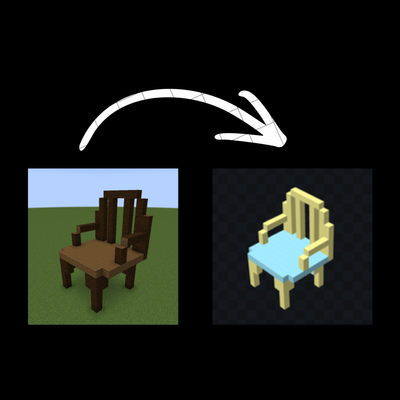
CurseForge · Minecraft mod
Model Exporter
Export in-game Builds into Models. (Only works for Geckolib models at the moment!!!!)
Choose a version Pick your version below, then grab the matching file.
Quick answer
Which Model Exporter release should I use?
Latest stable file modelexporter-1.0.0.jar
Game version 1.21.1
Loader NeoForge
Model Exporter modelexporter-1.0.0.jar targets 1.21.1 with NeoForge. The project page does not say whether this file belongs on the client, dedicated server, or both. No extra mods listed for this file.
Where it goes
Is Model Exporter required on the client, server, or both?
The project page does not say whether this file belongs on the client, dedicated server, or both.
Client Source doesn’t say
Dedicated server Source doesn’t say
Loader for this release NeoForge
Required install it here Optional supported, not mandatory Not supported do not install here Source doesn’t say do not assume
The source does not explicitly classify this release as client-only or server-only.
What else does Model Exporter modelexporter-1.0.0.jar need?
modelexporter-1.0.0.jar. Change the file and its required mods may change too.
This file does not list any required mods. Do not add a library just because a different file uses it.
This file does not list any required or optional mods.
Before you install it
Add Model Exporter without breaking your instance.
Built for Model Exporter modelexporter-1.0.0.jar. Pick another file and the loader, install side or required mods may change.
- 01
Stick to this file
Use modelexporter-1.0.0.jar. It targets 1.21.1 with NeoForge; another release may have different loader, side or dependency requirements.
- 02
Bring the mods it needs
This file does not list any required mods. Do not add a library just because a different file uses it.
- 03
Put it on the correct side
The project page does not say whether this file belongs on the client, dedicated server, or both.
- 04
Pick the file you checked
Use the “Get this file” button beside modelexporter-1.0.0.jar. It opens that exact file at the source.
About this project
What does Model Exporter add?
Model Exporter is a Minecraft NeoForge mod designed to turn in-game builds into exportable 3D model data.
It lets players record blocks using a layer system, where each layer acts like a “bone” in a model. You can select a layer, build normally in-game, and the mod tracks every block you place or remove. These layers can then be organized, parented, and assigned pivots to form structured models instead of just raw block collections.
The main goal is to bridge Minecraft building and modeling tools like Blockbench. Builds can be exported with proper structure, including per-face textures and UV mapping, making them suitable for animation or further editing outside the game.
This mod is aimed at builders, modders, and creators who want a way to convert in-game structures into usable model assets without manually rebuilding them in external software.
To start using Model Exporter, create a new world or open an existing one in creative mode. Begin by creating a layer using /layer create <name>. This layer will store any blocks you place while it is active.
Select your layer with /layer select <name>. Once selected, any blocks you place will automatically be recorded into that layer. You can confirm this through the on-screen feedback message.
Build your structure normally. If you make a mistake, breaking a block will remove it from its layer as well.
You can create multiple layers to organize different parts of your model. Layers can be parented together, and pivots can be set to control how each part rotates when exported.
When your build is complete, use the export command to generate your model data and texture atlas. The exported files can then be imported into tools like Blockbench for further editing, animation, or conversion into other formats.
Additional Details
This mod was rushed, so bugs may arise. If any issues occur during use, please leave a detailed comment explaining the issue.
If you are a mod maker and want to create a port or develop a more advanced version of this mod, you are welcome to make a comment as well. I will respond as soon as i get the time to, so we can discuss details.
Project description from CurseForge.
Pick your setup
Model Exporter by Minecraft version and loader
Choose the version and loader you play, then open the matching release.
Check the dependencies, then try the file in a copied instance before changing a world you care about.
Recent files
Model Exporter versions and loaders
modelexporter-1.0.0.jar
9 Jun 2026
Client Source doesn’t say Server Source doesn’t say Dependencies No extras listed Listed on Release listing
Check the 1.21.1 · NeoForge setup 1.21.1NeoForge release
Looking for an older file? The official CurseForge project page is in Resources.
 mod
mod CurseForge + Modrinth · Minecraft
Resettable Trial Vaults & Spawners
Sneak and use the Trial Key to reset Trial Vaults and Trial Spawners.
 mod
mod CurseForge · Minecraft
Leaning Or Not
Leaning Or Not is a tactical leaning mod inspired by and aiming to clone Ready Or Not's leaning
 mod
mod CurseForge · Minecraft
ConfigSwitch
Synchronize your mod configs and options.txt between modpacks. Push your tuned settings to a global repository once, then fetch them into any other instance.