Minecraft version
Back to mods 
CurseForge · Minecraft mod
GPUCraft
GPUCraft is a rendering optimization mod for Minecraft
Choose a version Pick your version below, then grab the matching file.
Quick answer
Which GPUCraft release should I use?
Latest stable file GPUCraft 2.1 - 26.3
Game version 26.3
Loader Fabric
GPUCraft 2.1 - 26.3 targets 26.3 with Fabric. The project page does not say whether this file belongs on the client, dedicated server, or both. No extra mods listed for this file.
Where it goes
Is GPUCraft required on the client, server, or both?
The project page does not say whether this file belongs on the client, dedicated server, or both.
Client Source doesn’t say
Dedicated server Source doesn’t say
Loader for this release Fabric
Required install it here Optional supported, not mandatory Not supported do not install here Source doesn’t say do not assume
The source does not explicitly classify this release as client-only or server-only.
What else does GPUCraft 2.1 - 26.3 need?
GPUCraft 2.1 - 26.3. Change the file and its required mods may change too.
This file does not list any required mods. Do not add a library just because a different file uses it.
This file does not list any required or optional mods.
Before you install it
Add GPUCraft without breaking your instance.
Built for GPUCraft 2.1 - 26.3. Pick another file and the loader, install side or required mods may change.
- 01
Stick to this file
Use GPUCraft 2.1 - 26.3. It targets 26.3 with Fabric; another release may have different loader, side or dependency requirements.
- 02
Bring the mods it needs
This file does not list any required mods. Do not add a library just because a different file uses it.
- 03
Put it on the correct side
The project page does not say whether this file belongs on the client, dedicated server, or both.
- 04
Pick the file you checked
Use the “Get this file” button beside GPUCraft 2.1 - 26.3. It opens that exact file at the source.
About this project
What does GPUCraft add?
GPUcraft




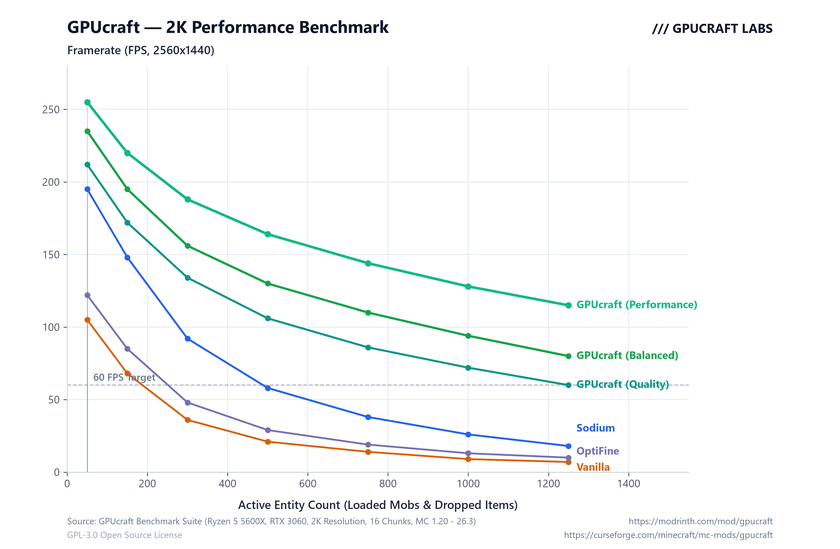
Client-side rendering optimization mod for Fabric that eliminates CPU draw overhead and stabilizes framerates in entity-heavy scenes.
Key Features
- Vulkan-Style State Caching: Skips redundant OpenGL driver state switches (
glBindTexture,glDepthMask,glBlendFunc), cutting CPU-to-GPU overhead. - Occlusion Culling: Fast raycast culling with zero per-frame heap allocations; stops rendering mobs hidden behind solid blocks.
- Frustum Culling: Bypasses rendering for entities outside the camera view cone.
- Distance Limits: Independent render distance limits for entities and block entities (chests, signs, banners).
- Particle & Drop Budgets: Caps spawned particles and dropped items to prevent freezes during explosions and mob farm operations.
- Weather Toggle: Option to disable rain/snow rendering to save GPU fillrate.
- FPS Throttling: Configurable in-game FPS cap and background throttling when unfocused.
- Live Diagnostics HUD: Real-time FPS, active GPU, and culling statistics.
Controls
F9: Toggle Diagnostics HUDF10: Cycle Presets (Quality→Balanced→Performance)
(Customizable via Mod Menu or vanilla Controls settings)
Presets
| Preset | Entity Dist | Block Entities | Particles | Max Items | Occlusion | Weather | Target |
|---|---|---|---|---|---|---|---|
| Quality | 128 | 96 | 96 | Unlimited | Off | On | High-end PCs, shaders |
| Balanced | 64 | 48 | 48 | Unlimited | On | On | Default gameplay |
| Performance | 28 | 20 | 20 | 96 | On | Off | Mob farms, low-end GPUs |
Requirements
- Fabric Loader
>= 0.16.0 - Fabric API
- Java 21+ (Java 17 for 1.20.1)
Benchmark
Links & License
- Source Code: https://github.com/kors-developer/GPUcraft
- Developer: https://github.com/kors-developer
- CurseForge: https://curseforge.com/minecraft/mc-mods/gpucraft
- Modrinth: Coming Soon (https://modrinth.com/mod/gpucraft)
This project is licensed under the GNU General Public License v3.0 (GPLv3).
Copyright (C) 2026 kors228.
Project description from CurseForge.
Pick your setup
GPUCraft by Minecraft version and loader
Choose the version and loader you play, then open the matching release.
Minecraft version
26.2
1 loader buildMinecraft version
26.1.2
1 loader buildMinecraft version
26.1.1
1 loader buildMinecraft version
26.1
1 loader buildMinecraft version
1.21.11
1 loader buildMinecraft version
1.21.10
1 loader buildMinecraft version
1.21.9
1 loader buildMinecraft version
1.21.8
1 loader buildMinecraft version
1.21.7
1 loader buildMinecraft version
1.21.6
1 loader buildMinecraft version
1.21.5
1 loader buildShowing the newest 12 of 22 game versions. Older files are in the list below.
Check the dependencies, then try the file in a copied instance before changing a world you care about.
Recent files
GPUCraft versions and loaders
GPUCraft 2.1 - 26.3
gpucraft-mc26.3-2.1.0.jar
23 Sept 2026
Client Source doesn’t say Server Source doesn’t say Dependencies No extras listed Listed on Release listing
Check the 26.3 · Fabric setup Fabric26.3 release
GPUCraft 2.1 - 26.2
gpucraft-mc26.2-2.1.0.jar
23 Sept 2026
Client Source doesn’t say Server Source doesn’t say Dependencies No extras listed Listed on Release listing
Check the 26.2 · Fabric setup Fabric26.2 release
GPUCraft 2.1 - 26.1x
gpucraft-mc26.1-2.1.0.jar
23 Sept 2026
Client Source doesn’t say Server Source doesn’t say Dependencies No extras listed Listed on Release listing
Check the 26.1.2 · Fabric setup Fabric26.126.1.126.1.2 release
GPUCraft 2.1 - 1.21x
gpucraft-mc1.21-2.1.0.jar
23 Sept 2026
Client Source doesn’t say Server Source doesn’t say Dependencies No extras listed Listed on Release listing
Check the 1.21.11 · Fabric setup 1.21Fabric1.21.81.21.5 release
GPUCraft 2.1 - 1.20x
gpucraft-mc1.20.1-2.1.0.jar
23 Sept 2026
Client Source doesn’t say Server Source doesn’t say Dependencies No extras listed Listed on Release listing
Check the 1.20.4 · Fabric setup 1.20.2Fabric1.20.11.20 release
GPUCraft 2.0 - 1.21x
gpucraft-mc1.21.x-2.0.0.jar
3 Sept 2026
Client Source doesn’t say Server Source doesn’t say Dependencies No extras listed Listed on Release listing
Check the 1.21.11 · Fabric setup 1.21Fabric1.21.81.21.5 release
GPUCraft 2.0 - 26.1x
gpucraft-mc26.1.x-2.0.0.jar
3 Sept 2026
Client Source doesn’t say Server Source doesn’t say Dependencies No extras listed Listed on Release listing
Check the 26.1.2 · Fabric setup Fabric26.126.1.126.1.2 release
GPUCraft 2.0 - 26.2
gpucraft-mc26.2.x-2.0.0.jar
3 Sept 2026
Client Source doesn’t say Server Source doesn’t say Dependencies No extras listed Listed on Release listing
Check the 26.2 · Fabric setup Fabric26.2 release
GPUCraft 1.5 26.x
gpucraft-fabric-26plus-1.5.0.jar
11 Jun 2026
Client Source doesn’t say Server Source doesn’t say Dependencies No extras listed Listed on Release listing
Check the 26.1.2 · Fabric setup Fabric26.126.1.126.1.2 release
GPUCraft 1.5
gpucraft-fabric-1.5.0.jar
11 Jun 2026
Client Source doesn’t say Server Source doesn’t say Dependencies No extras listed Listed on Release listing
Check the 1.21.11 · Fabric setup 1.21Fabric1.21.81.21.5 release
Looking for an older file? The official CurseForge project page is in Resources.
 mod
mod CurseForge · Minecraft
Moderately Enough Effect Descriptions (MEED)
JEED/Emiffect addon with support for over 100 mods and 600 status effects!
 mod
mod CurseForge · Minecraft
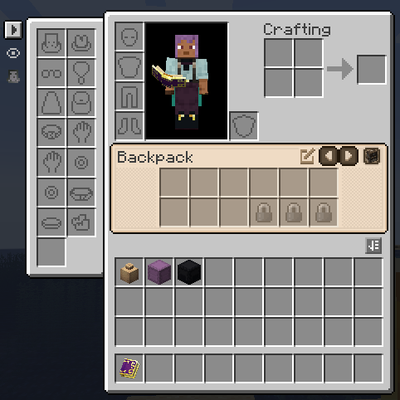
Integrated UI
UI Integration mod that adds a container bar to your inventory displaying backpacks and shulker boxes while integrating the ui elements of all of your favorite mods into a cohesive and userfriendly window.
 mod
mod CurseForge · Minecraft
NsTut Endless
Allows customization or removes build height limits, enabling construction beyond vanilla restrictions.