Minecraft version
Back to mods 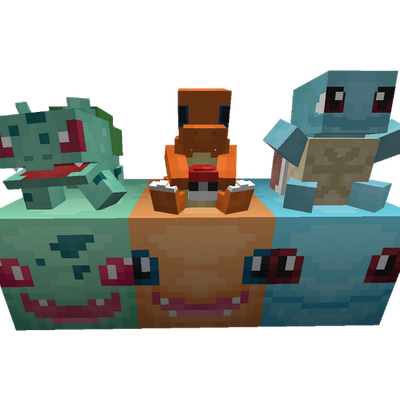
CurseForge · Minecraft mod
Pokeblocks unofficial
Unofficial NeoForge build of Pokeblocks for Minecraft 1.21.1
Choose a version Pick your version below, then grab the matching file.
Quick answer
Which Pokeblocks unofficial release should I use?
Latest stable file pokeblocks-neoforge-1.5.0-1.21.1.jar
Game version 1.21.1
Loader NeoForge
Pokeblocks unofficial pokeblocks-neoforge-1.5.0-1.21.1.jar targets 1.21.1 with NeoForge. The project page does not say whether this file belongs on the client, dedicated server, or both. No extra mods listed for this file.
Where it goes
Is Pokeblocks unofficial required on the client, server, or both?
The project page does not say whether this file belongs on the client, dedicated server, or both.
Client Source doesn’t say
Dedicated server Source doesn’t say
Loader for this release NeoForge
Required install it here Optional supported, not mandatory Not supported do not install here Source doesn’t say do not assume
The source does not explicitly classify this release as client-only or server-only.
What else does Pokeblocks unofficial pokeblocks-neoforge-1.5.0-1.21.1.jar need?
pokeblocks-neoforge-1.5.0-1.21.1.jar. Change the file and its required mods may change too.
This file does not list any required mods. Do not add a library just because a different file uses it.
This file does not list any required or optional mods.
Before you install it
Add Pokeblocks unofficial without breaking your instance.
Built for Pokeblocks unofficial pokeblocks-neoforge-1.5.0-1.21.1.jar. Pick another file and the loader, install side or required mods may change.
- 01
Stick to this file
Use pokeblocks-neoforge-1.5.0-1.21.1.jar. It targets 1.21.1 with NeoForge; another release may have different loader, side or dependency requirements.
- 02
Bring the mods it needs
This file does not list any required mods. Do not add a library just because a different file uses it.
- 03
Put it on the correct side
The project page does not say whether this file belongs on the client, dedicated server, or both.
- 04
Pick the file you checked
Use the “Get this file” button beside pokeblocks-neoforge-1.5.0-1.21.1.jar. It opens that exact file at the source.
About this project
What does Pokeblocks unofficial add?
Pokeblocks NeoForge Unofficial
Bring more collectible decorations to your world ! This is an unofficial NeoForge build of Pokeblocks for Minecraft 1.21.1.
This mod adds a large collection of placeable Pokedolls, oversized gigantic variants, themed decorations, figurines, and collectible items for players who want to decorate bases, shops, spawn areas, gyms, or Cobblemon-style servers.
Features
- A large lineup of placeable Pokedolls.
- Regular, shiny, animated, and gigantic doll variants.
- Decorative blocks such as the Luvdisc Cushion, Magikarp Fishbowl, Applin Basket, Eiscue Head, and Pokemon Trophy.
- Figurines and small collectible items for display or server rewards.
- Poke Block decorations for Bulbasaur, Charmander, and Squirtle variants.
- Pokedolls can appear in supported vanilla chest loot tables.
- English and French language support.
- Compatible with current CobbledGacha v.3 for Minecraft
1.21.1on NeoForge
Good for
- Cobblemon-themed worlds and servers.
- Decorative reward crates, builds, and event areas.
- Player shops, museums, collection rooms, and themed bases.
- Anywhere you want pokemon style plushies i guess.
Compatibility
- Minecraft
1.21.1 - NeoForge
21.1.200+ - GeckoLib
4.8.4or newer
Credits and License
This is an unofficial NeoForge redistribution/port of Pokeblocks. Original mod credit goes to MrShawn. Apart from the NeoForge port, the only changes are french translations and fixes described in the changelogs.
The bundled license is Creative Commons Attribution-NonCommercial-ShareAlike 4.0 International. See the included LICENSE file for the full terms.
Project description from CurseForge.
Pick your setup
Pokeblocks unofficial by Minecraft version and loader
Choose the version and loader you play, then open the matching release.
Check the dependencies, then try the file in a copied instance before changing a world you care about.
Recent files
Pokeblocks unofficial versions and loaders
pokeblocks-neoforge-1.5.0-1.21.1.jar
12 Jun 2026
Client Source doesn’t say Server Source doesn’t say Dependencies No extras listed Listed on Release listing
Check the 1.21.1 · NeoForge setup 1.21.1NeoForge release
Looking for an older file? The official CurseForge project page is in Resources.
 mod
CurseForge · Minecraft
Adventure Item Stats
Gaussian variation on base stats of naturally-spawned items — every found sword and armor piece rolls a little different.
 mod
CurseForge + Modrinth · Minecraft
Casual Tinkering
A mod that adds some new tools for Tinkers' Construct.
 mod
CurseForge · Minecraft
Brecher's Breeding - Cobblemon
Inspired by the popular Cobbreeding mod, Brecher's Breeding adds Pokemon breeding mechanics to the Cobblemon mod.