Minecraft version
Back to mods 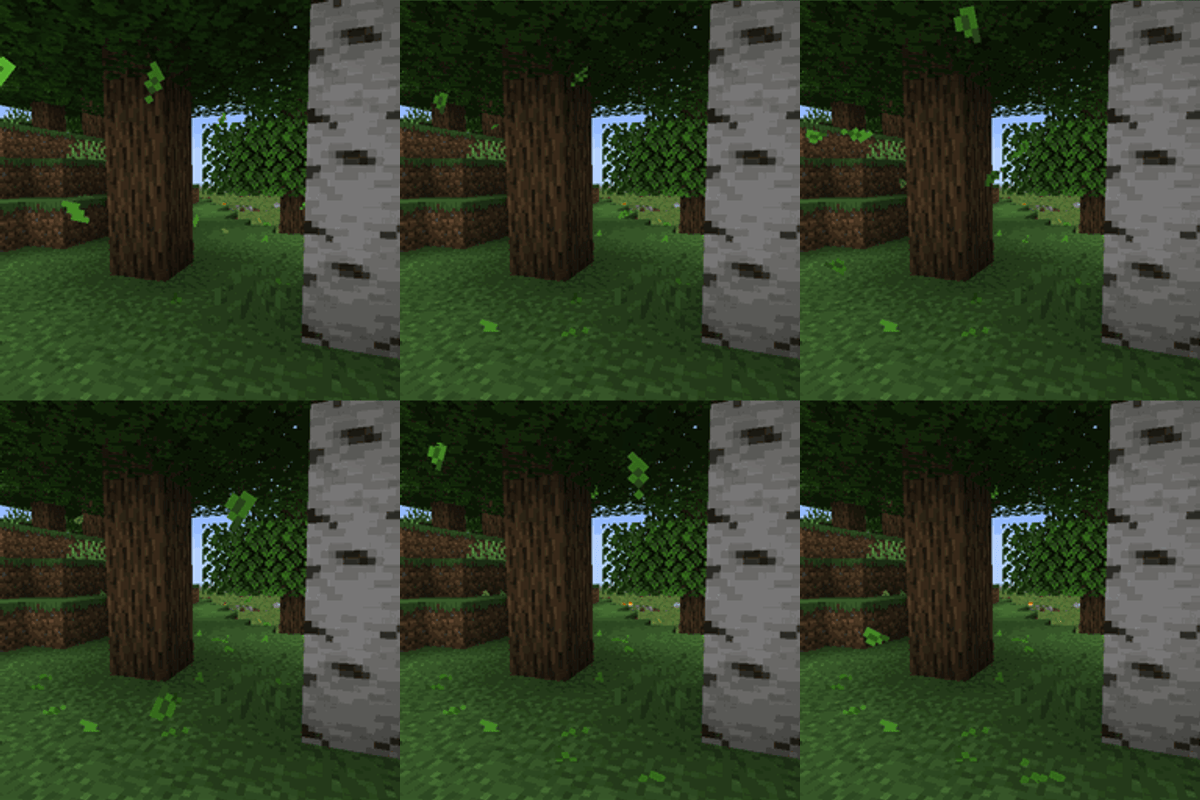
CurseForge · Minecraft mod
Falling Leaves (Backport)
This mod for 1.12.2 adds a neat little particle effect to leaf blocks.
Choose a version Pick your version below, then grab the matching file.
Quick answer
Which Falling Leaves (Backport) release should I use?
Latest stable file Falling Leaves 1.1
Game version 1.12.2
Loader Forge
Falling Leaves (Backport) Falling Leaves 1.1 targets 1.12.2 with Forge. The project page does not say whether this file belongs on the client, dedicated server, or both. No extra mods listed for this file.
Where it goes
Is Falling Leaves (Backport) required on the client, server, or both?
The project page does not say whether this file belongs on the client, dedicated server, or both.
Client Source doesn’t say
Dedicated server Source doesn’t say
Loader for this release Forge
Required install it here Optional supported, not mandatory Not supported do not install here Source doesn’t say do not assume
The source does not explicitly classify this release as client-only or server-only.
What else does Falling Leaves (Backport) Falling Leaves 1.1 need?
Falling Leaves 1.1. Change the file and its required mods may change too.
This file does not list any required mods. Do not add a library just because a different file uses it.
This file does not list any required or optional mods.
Before you install it
Add Falling Leaves (Backport) without breaking your instance.
Built for Falling Leaves (Backport) Falling Leaves 1.1. Pick another file and the loader, install side or required mods may change.
- 01
Stick to this file
Use Falling Leaves 1.1. It targets 1.12.2 with Forge; another release may have different loader, side or dependency requirements.
- 02
Bring the mods it needs
This file does not list any required mods. Do not add a library just because a different file uses it.
- 03
Put it on the correct side
The project page does not say whether this file belongs on the client, dedicated server, or both.
- 04
Pick the file you checked
Use the “Get this file” button beside Falling Leaves 1.1. It opens that exact file at the source.
About this project
What does Falling Leaves (Backport) add?

This mod adds a neat little particle effect to leaf blocks. Users can configure which types of leaf blocks will drop leaves and the frequency that these leaves are dropped at. This is a Client side only mod.
This is a backport of Falling Leaves (Forge)

How it works
Falling Leaves watches the leaf blocks near you and lets leaves break loose from the bottom of the canopy (so they fall into open air, not through other leaves). Once loose, a leaf is driven by a small physics model:
- Wind is procedural, a smooth-noise field with calm, windy, and stormy states that follow the weather. Leaves sway toward the wind while airborne; calm days barely nudge them, storms blow them sideways.
- Falling leaves tumble as they go, spin up over a few seconds, and fall a little faster in the rain when they're under open sky.
- Landing snaps them in place — they stick where they touch down and rest there rather than sliding around, then fade out cleanly over their last few ticks.
- Water catches a leaf and lets it glide briefly across the surface before it stops.
Punching a leaf block knocks a small burst of leaves loose, and conifers (spruce and friends) drop needle-shaped particles with their own spawn rate.
Compatibility :
| Mod | How it interacts |
|---|---|
| Dynamic Trees | Works out of the box — its leaves extend BlockLeaves, so leaves fall from dynamic trees with no setup. It has no particle system of its own, so nothing doubles up. |
| Serene Seasons | Fully supported. Leaves recolour with the season automatically, and seasonFallRate adjusts how many fall per season. |
| Weather2 / Weather2 Remastered | These add their own wind-blown foliage particles, so leaves may visually double up. Falling Leaves detects them and shows a one-time notice in chat. |
Configuration :
You can configure the following settings in config/fallingleaves.cfg, or in-game from the
mod list config screen:
leafSize: modifies the size of the leaves
leafLifespan: modifies how long it takes for the leaves to disappear
leafSpawnRate: modifies the amount of leaves that spawn
coniferLeafSpawnRate: modifies the amount of leaves that spawn from conifer trees
dropFromPlayerPlacedBlocks: whether player-placed blocks should drop leaves too
minimumFreeSpaceBelow: how much room below the leaf block is needed for leaves to spawn
disableWind: disables wind effects on the leaf particles
windlessDimension: a list of dimension names where there should be no wind (e.g. the_nether, the_end)
showCompatWarning: shows a one-time in-game notice if another mod that also adds leaf particles is detected
Project description from CurseForge.
Pick your setup
Falling Leaves (Backport) by Minecraft version and loader
Choose the version and loader you play, then open the matching release.
Check the dependencies, then try the file in a copied instance before changing a world you care about.
Recent files
Falling Leaves (Backport) versions and loaders
Falling Leaves 1.1
fallingleaves-2.1.2.3.jar
25 Oct 2026
Client Source doesn’t say Server Source doesn’t say Dependencies No extras listed Listed on Release listing
Check the 1.12.2 · Forge setup Forge1.12.2 release
Falling Leaves 1.0
fallingleaves-2.1.2.2.jar
13 Jun 2026
Client Source doesn’t say Server Source doesn’t say Dependencies No extras listed Listed on Release listing
Check the 1.12.2 · Forge setup Forge1.12.2 release
Looking for an older file? The official CurseForge project page is in Resources.
 mod
mod Modrinth · Minecraft
Glowing Trims Mod
Glowing Trims adds permanent glow to armor trims.
 mod
mod Modrinth · Minecraft
Sparkle's Morpher
A universal Minecraft custom model platform with custom models, animations, sounds, and a new cloud-based multiplayer architecture.
 mod
mod CurseForge · Minecraft
Sixth Sense
Provides clean and simple visual alerts for incoming threats.