Fabric API Needed by Resource Pack Profiles 26.3 v2.0.0+26.3
requiredMatching file found Matched file: [26.3] Fabric API 0.166.2+26.3

CurseForge · Minecraft mod
Save, manage, and share named resource pack load-order profiles. Switch between completely different pack setups in seconds, right from the resource pack screen.
Quick answer
Resource Pack Profiles 26.3 v2.0.0+26.3 targets 26.3 with Fabric. The project page does not say whether this file belongs on the client, dedicated server, or both. All 2 required mods have matching files.
Where it goes
The project page does not say whether this file belongs on the client, dedicated server, or both.
The source does not explicitly classify this release as client-only or server-only.
26.3 v2.0.0+26.3. Change the file and its required mods may change too.
Install Fabric API, Fabric Language Kotlin first. We found matching files for this game-version and loader setup. 2 come through another mod in the chain.
2 extra mods were pulled in by other dependencies. Indented rows show who needs each one. We only count dependency files that match this setup. A file for another loader does not fill the gap.
Before you install it
Built for Resource Pack Profiles 26.3 v2.0.0+26.3. Pick another file and the loader, install side or required mods may change.
Use 26.3 v2.0.0+26.3. It targets 26.3 with Fabric; another release may have different loader, side or dependency requirements.
Install Fabric API, Fabric Language Kotlin first. We found matching files for this game-version and loader setup. 2 come through another mod in the chain.
The project page does not say whether this file belongs on the client, dedicated server, or both.
Use the “Get this file” button beside 26.3 v2.0.0+26.3. It opens that exact file at the source.
About this project


A client-side Fabric mod for saving, managing, and sharing named resource pack load order profiles. Switch between different pack setups from the resource pack screen.
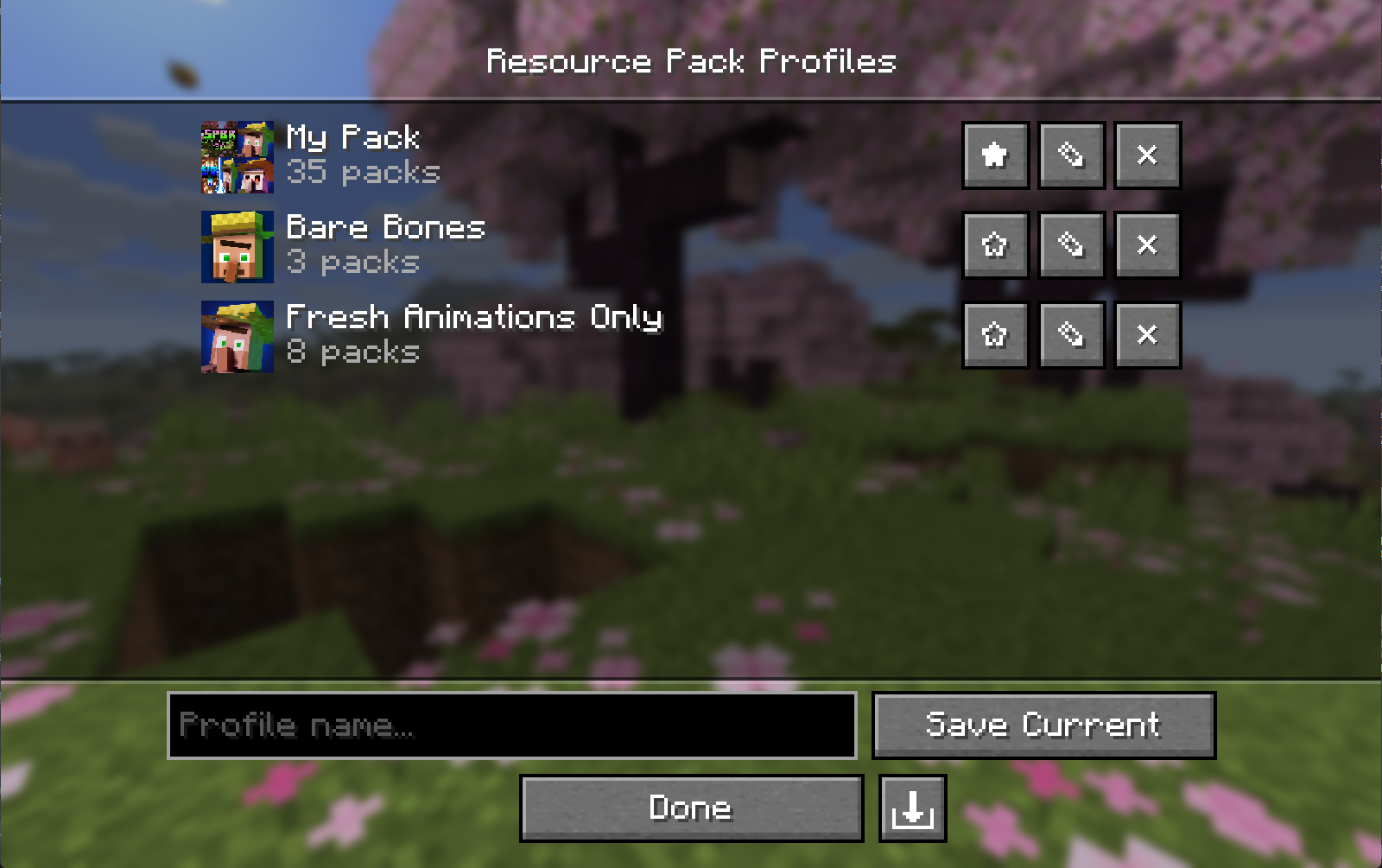
.rpprofile files, a single JSON file with the pack list and custom icon..jar into your .minecraft/mods folder.Client-side only. No server installation is needed.
| Minecraft | Fabric Loader | Fabric API | Fabric Language Kotlin | Mod Menu (optional) |
|---|---|---|---|---|
26.3 |
0.19.5+ |
0.161.0+26.3 |
1.14.1+kotlin.2.4.20 |
21.0.0-beta.1 |
26.2 |
0.19.3+ |
0.152.2+26.2 |
1.13.12+kotlin.2.4.0 |
20.0.0-beta.3 |
26.1 to 26.1.2 |
0.19.3+ |
0.145.1+26.1 |
1.13.12+kotlin.2.4.0 |
18.0.0-beta.1 |
Open the Resource Pack Profiles screen via the Profiles button on the vanilla resource pack screen (left of Open Pack Folder), or via Mod Menu.
| Action | How |
|---|---|
| Save current load order | Type a name then click Save Current |
| Load a profile | Click anywhere on the profile's row |
| Edit packs in a profile | Click ✎ |
| Delete a profile | Click ✕ |
| Favorite a profile | Click ★ / ☆ |
| Set / change a profile icon | Open Edit (✎) then click Icon… |
| Remove a custom icon | Open Edit (✎) then click ✕ next to the icon |
| Export a profile | Open Edit (✎) then click the export button (bottom right) |
| Import a profile | Click the import button (bottom right of the profile list) |
In the editor, click a pack in the Available column to add it to the top of Selected. Use the arrow overlay on a selected pack's icon to remove it or reorder it. With keyboard focus, use Enter to add/remove and Shift+Up/Down to reorder.
Profiles are saved to:
config/resourcepackprofiles.json
Custom icons are stored in:
config/resourcepackprofiles/icons/
Exported .rpprofile files are standard JSON:
{
  "name": "My Profile",
  "packIds": ["file/Pack1", "file/Pack2"],
  "favorite": false,
  "customIcon": "<base64 encoded PNG, or null>"
}
git clone https://github.com/ZephByte/ResourcePackProfiles.git
cd ResourcePackProfiles
./gradlew build
MIT - free to use, modify, and redistribute. See LICENSE.
Made by ZephByte.
Project description from CurseForge.
Pick your setup
Choose the version and loader you play, then open the matching release.
Check the dependencies, then try the file in a copied instance before changing a world you care about.
Recent files
ResourcePackProfiles-v2.0.0-26.3.jar
11 Nov 2026
ResourcePackProfiles-v2.0.0-26.2.jar
11 Nov 2026
ResourcePackProfiles-v2.0.0-26.1.jar
11 Nov 2026
2 Oct 2026
ResourcePackProfiles-v1.0.0+26.1.jar
22 Jun 2026
ResourcePackProfiles-v1.0.0+26.2.jar
22 Jun 2026
22 Jun 2026
21 Jun 2026
Looking for an older file? The official CurseForge project page is in Resources.
 mod
Completely removes recipe book from the game, optimizing player data.
 mod
Select any area on screen with J to instantly OCR and translate it using an AI vision model (OpenAI or local Ollama).
 mod
A gravestone keeps all your items and XP when you die, right where you fell. A death compass leads you back; right-click the grave to get everything back in the same slots. Keep inventory, but fair.
