
Minecraft version
Back to mods 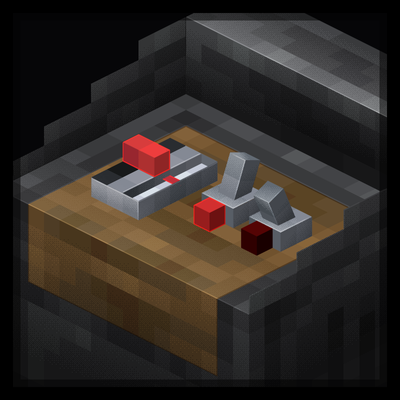
CurseForge · Minecraft mod
Dashpanels
A mod adding modular control panels for redstone control.
Choose a version Pick your version below, then grab the matching file.
Quick answer
Which Dashpanels release should I use?
Latest stable file dashpanels-2.1+neoforge1.21.1.jar
Game version 1.21.1
Loader NeoForge
dashpanels-2.1+neoforge1.21.1.jar targets 1.21.1 with NeoForge. The project page does not say whether this file belongs on the client, dedicated server, or both. No extra mods listed for this file.
Where it goes
Is Dashpanels required on the client, server, or both?
The project page does not say whether this file belongs on the client, dedicated server, or both.
Client Source doesn’t say
Dedicated server Source doesn’t say
Loader for this release NeoForge
Required install it here Optional supported, not mandatory Not supported do not install here Source doesn’t say do not assume
The source does not explicitly classify this release as client-only or server-only.
What else does dashpanels-2.1+neoforge1.21.1.jar need?
dashpanels-2.1+neoforge1.21.1.jar. Change the file and its required mods may change too.
This file does not list any required mods. Do not add a library just because a different file uses it.
This file does not list any required or optional mods.
Before you install it
Add Dashpanels without breaking your instance.
Built for dashpanels-2.1+neoforge1.21.1.jar. Pick another file and the loader, install side or required mods may change.
- 01
Stick to this file
Use dashpanels-2.1+neoforge1.21.1.jar. It targets 1.21.1 with NeoForge; another release may have different loader, side or dependency requirements.
- 02
Bring the mods it needs
This file does not list any required mods. Do not add a library just because a different file uses it.
- 03
Put it on the correct side
The project page does not say whether this file belongs on the client, dedicated server, or both.
- 04
Pick the file you checked
Use the “Get this file” button beside dashpanels-2.1+neoforge1.21.1.jar. It opens that exact file at the source.
About this project
What does Dashpanels add?
Dashpanels
Mod adding control panels for more compact redstone controls


Content
Control Panel
- Put modules onto this block by shift right clicking on it without an item in hand and having the modules in your inventory
Control Cable
- Use this block to connect panels to eachother and has a stripped form
Stripped Cable
- Connects to the control cable to take redstone inputs or outputs from the panels themselves
Cable Stripper
- Shift right click control cables or stripped cables to pick them up
- Right click control cables to strip them
- Right click stripped cables to change their configured module
- #### Quite a few cool modules for controlling redstone
Compatibility
Computercraft
- Control Panel can be a peripheral
Create
- Adds a new exclusive block for easier link connections
Sable
- Control Panels can be used aboard sublevels
Dye Depot
- Bulbs can be dyed to extra dyes added by dye depot (or any other dye mod)
Logo made by JWX
Project description from CurseForge.
Pick your setup
Dashpanels by Minecraft version and loader
Choose the version and loader you play, then open the matching release.
Check the dependencies, then try the file in a copied instance before changing a world you care about.
Recent files
Dashpanels versions and loaders
dashpanels-2.1+neoforge1.21.1.jar
7 Aug 2026
Client Source doesn’t say Server Source doesn’t say Dependencies No extras listed Listed on Release listing
Check the 1.21.1 · NeoForge setup 1.21.1NeoForge release
dashpanels-2.0+neoforge1.21.1.jar
6 Aug 2026
Client Source doesn’t say Server Source doesn’t say Dependencies No extras listed Listed on Release listing
Check the 1.21.1 · NeoForge setup 1.21.1NeoForge release
dashpanels-1.6+neoforge1.21.1.jar
16 Jul 2026
Client Source doesn’t say Server Source doesn’t say Dependencies No extras listed Listed on Release listing
Check the 1.21.1 · NeoForge setup 1.21.1NeoForge release
dashpanels-1.5+neoforge1.21.1.jar
13 Jul 2026
Client Source doesn’t say Server Source doesn’t say Dependencies No extras listed Listed on Release listing
Check the 1.21.1 · NeoForge setup 1.21.1NeoForge release
dashpanels-1.4+neoforge1.21.1.jar
13 Jul 2026
Client Source doesn’t say Server Source doesn’t say Dependencies No extras listed Listed on Release listing
Check the 1.21.1 · NeoForge setup 1.21.1NeoForge release
dashpanels-1.3+neoforge1.21.1.jar
25 Jun 2026
Client Source doesn’t say Server Source doesn’t say Dependencies No extras listed Listed on Release listing
Check the 1.21.1 · NeoForge setup 1.21.1NeoForge release
dashpanels-1.2+neoforge1.21.1.jar
25 Jun 2026
Client Source doesn’t say Server Source doesn’t say Dependencies No extras listed Listed on Release listing
Check the 1.21.1 · NeoForge setup 1.21.1NeoForge release
dashpanels-1.1+neoforge1.21.1.jar
23 Jun 2026
Client Source doesn’t say Server Source doesn’t say Dependencies No extras listed Listed on Release listing
Check the 1.21.1 · NeoForge setup 1.21.1NeoForge release
Looking for an older file? The official CurseForge project page is in Resources.
 mod
mod CurseForge · Minecraft
Full Stack Computing
Most detailed realistic minecraft computer mod
 mod
mod CurseForge · Minecraft
Arctania's Vault
Arctania’s Vault adds new custom weapons, tools & armor all with unique abilities, as well as relics that each serve its own unique purpose, lost vaults deep underground that contain loot from any mods installed. 0 gravity cases, gambling machines & more!
 mod
mod Modrinth · Minecraft
Space
Bring the real space to the Minecraft!