Minecraft version
Back to mods 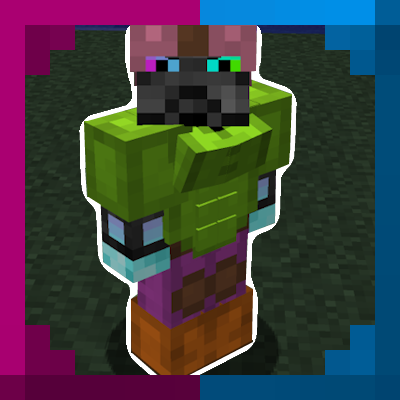
CurseForge · Minecraft mod
Genders
This client and server sided mod adds customizable body parts (chest, abs, back) to the players model.
Choose a version Pick your version below, then grab the matching file.
Quick answer
Which Genders release should I use?
Latest stable file Genders-1.0.3.jar
Game version 1.12.2
Loader Forge
Genders-1.0.3.jar targets 1.12.2 with Forge. The project page does not say whether this file belongs on the client, dedicated server, or both. No extra mods listed for this file.
Where it goes
Is Genders required on the client, server, or both?
The project page does not say whether this file belongs on the client, dedicated server, or both.
Client Source doesn’t say
Dedicated server Source doesn’t say
Loader for this release Forge
Required install it here Optional supported, not mandatory Not supported do not install here Source doesn’t say do not assume
The source does not explicitly classify this release as client-only or server-only.
What else does Genders-1.0.3.jar need?
Genders-1.0.3.jar. Change the file and its required mods may change too.
This file does not list any required mods. Do not add a library just because a different file uses it.
This file does not list any required or optional mods.
Before you install it
Add Genders without breaking your instance.
Built for Genders-1.0.3.jar. Pick another file and the loader, install side or required mods may change.
- 01
Stick to this file
Use Genders-1.0.3.jar. It targets 1.12.2 with Forge; another release may have different loader, side or dependency requirements.
- 02
Bring the mods it needs
This file does not list any required mods. Do not add a library just because a different file uses it.
- 03
Put it on the correct side
The project page does not say whether this file belongs on the client, dedicated server, or both.
- 04
Pick the file you checked
Use the “Get this file” button beside Genders-1.0.3.jar. It opens that exact file at the source.
About this project
What does Genders add?
Genders is a model customization mod for Minecraft 1.12.2 that adds adjustable 3D meshes for chest, back, and abdominal options, with dynamic physics and armor rendering, for players and now for mobs too.
Key Features
Detailed 3D Adjustments: Position, rotate, and scale custom meshes using an interactive in-game configuration GUI that scales cleanly to any resolution and GUI scale.
Independent Physics System: Dynamic physics simulate motion and momentum realistically for both sides. Includes customizable strength, momentum, stretch, and falloff sliders with five presets. Stretch follows the direction of movement, and a Test Jiggle button previews it on the spot.
Mob Support: Give chests and backs to any mob, vanilla or modded, through an in game editor. Each mob type can be set up separately, and mobs without a definition stay the same.
In-Game Mob Editor: Pick any mob from an icon grid with search and mod filter, then edit it in a live preview. It includes auto-fit placement, bone selection, texture mapping, part highlighting, physics tests, and multiple default looks for mobs.Nothing changes in the world until you press Save.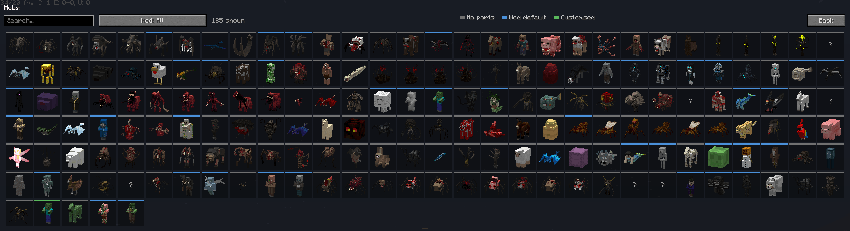
Per-Mob Variety: Every individual mob gets its own size, position, rotation, and physics within ranges you set, plus spawn chances for the whole mob and for each part. The result is decided by the mob itself, so it stays the same every time you see it.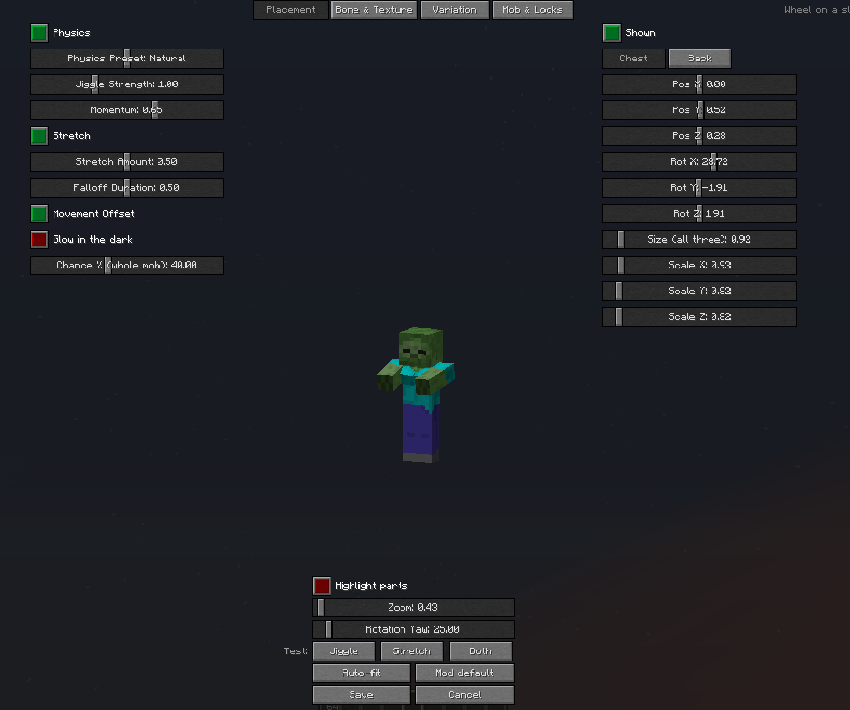
Conditions: Limit parts to certain mobs by size, profession, variant, wool, charge, health, name, or any NBT tag. Anything with baby tag never get parts.
Armor & Texture Overlays: Player skin and mob textures are mapped onto the meshes, with equipped chestplate and leggings textures drawn over them, including custom leather dyes, enchantment glints, and modded armor. See-through textures (slimes, ghosts) and adjustable opacity are supported.
Inventory GUI & Command Support: Open the editor from your survival or creative inventory. Export settings to your clipboard and import them anywhere with the /gender command. /gendermobs reloads, lists, inspects, and exports mob definitions.
Server-Side Syncing: Player customizations are saved to server-side player data, so they persist through respawns, dimension changes, and re-logins.
Resource Pack & Config Friendly: Mob definitions can come from the mod, from resource packs, or from your config folder, with your own files taking priority. Settings let you turn mob parts off, skip the built-in defaults, limit the render distance.
Project description from CurseForge.
Pick your setup
Genders by Minecraft version and loader
Choose the version and loader you play, then open the matching release.
Check the dependencies, then try the file in a copied instance before changing a world you care about.
Recent files
Genders versions and loaders
Genders-1.0.3.jar
16 Oct 2026
Client Source doesn’t say Server Source doesn’t say Dependencies No extras listed Listed on Release listing
Check the 1.12.2 · Forge setup Forge1.12.2 release
Genders-1.0.2.jar
9 Oct 2026
Client Source doesn’t say Server Source doesn’t say Dependencies No extras listed Listed on Release listing
Check the 1.12.2 · Forge setup Forge1.12.2 release
Genders-1.0.1.jar
26 Jun 2026
Client Source doesn’t say Server Source doesn’t say Dependencies No extras listed Listed on Release listing
Check the 1.12.2 · Forge setup Forge1.12.2 release
Genders-1.0.0.jar
23 Jun 2026
Client Source doesn’t say Server Source doesn’t say Dependencies No extras listed Listed on Release listing
Check the 1.12.2 · Forge setup Forge1.12.2 release
Looking for an older file? The official CurseForge project page is in Resources.
 mod
mod CurseForge + Modrinth · Minecraft
GUI Tween
Added some GUI animation effects.
 mod
mod CurseForge + Modrinth · Minecraft
Snowy Spirit
Sleds, winter/ christmas themed blocks and villagers ai, gingerbread golems
 mod
mod CurseForge + Modrinth · Minecraft
Neruina - Ticking Entity Fixer
A Mod that prevents ticking-related crashes from bricking worlds