Minecraft version
Back to mods 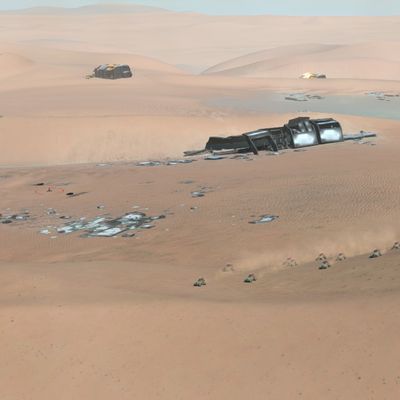
CurseForge · Minecraft mod
Everflowing Sands
A mod to make most of your worlds into the desert
Choose a version Pick your version below, then grab the matching file.
Quick answer
Which Everflowing Sands release should I use?
Latest stable file everflowingsands-1.21.1-0.1.0.jar
Game version 1.21.1
Loader NeoForge
Everflowing Sands everflowingsands-1.21.1-0.1.0.jar targets 1.21.1 with NeoForge. The project page does not say whether this file belongs on the client, dedicated server, or both. No extra mods listed for this file.
Where it goes
Is Everflowing Sands required on the client, server, or both?
The project page does not say whether this file belongs on the client, dedicated server, or both.
Client Source doesn’t say
Dedicated server Source doesn’t say
Loader for this release NeoForge
Required install it here Optional supported, not mandatory Not supported do not install here Source doesn’t say do not assume
The source does not explicitly classify this release as client-only or server-only.
What else does Everflowing Sands everflowingsands-1.21.1-0.1.0.jar need?
everflowingsands-1.21.1-0.1.0.jar. Change the file and its required mods may change too.
This file does not list any required mods. Do not add a library just because a different file uses it.
This file does not list any required or optional mods.
Before you install it
Add Everflowing Sands without breaking your instance.
Built for Everflowing Sands everflowingsands-1.21.1-0.1.0.jar. Pick another file and the loader, install side or required mods may change.
- 01
Stick to this file
Use everflowingsands-1.21.1-0.1.0.jar. It targets 1.21.1 with NeoForge; another release may have different loader, side or dependency requirements.
- 02
Bring the mods it needs
This file does not list any required mods. Do not add a library just because a different file uses it.
- 03
Put it on the correct side
The project page does not say whether this file belongs on the client, dedicated server, or both.
- 04
Pick the file you checked
Use the “Get this file” button beside everflowingsands-1.21.1-0.1.0.jar. It opens that exact file at the source.
About this project
What does Everflowing Sands add?
Everflowing Sands
Find yourself lost in the endless sea of sands, this mod brings about a unique concept of world generation. You spawn on small islands full of life, the minute you step out of it, there is nothing but sand for miles.

Features
The mod ships a fully custom chunk generator and a single utility item. Current capabilities:
- Endless dune sea — wind-shaped transverse ridges with wandering crests, blob fields, and natural roughness stretch in every direction.
- Scattered islands — patches of normal world generation placed on a jittered grid, blended smoothly into the surrounding dunes so the seam is invisible.
- Deep Dark beneath the sand — everything below sea level inside the dune sea is Deep Dark biome, so the danger is real once you dig down.
- Dune Compass — points to the nearest island you have not visited yet. Walk onto an island and it auto-marks it and retargets to the next one.
- Modded Support - The mod does not change the way islands generate, which makes it support almost every mod natively.
- Fully configurable — island size, spacing, dune height, ridge shape, wind direction, and more are exposed in the common config.
Vision
This is a worldgen overhaul for players who want exploration to mean something again. The dunes are deliberately vast and quiet so that spotting an island on the horizon feels earned. The compass exists to guide that journey without handing you a map of the whole world.
Currently the focus is the dune sea, islands, and the compass. Future work may add dune-specific structures, points of interest worth the trek, and richer surface detail.
Official Partners
We are partnered with Kinetic Host who help support the continuous development of this mod. Truly, a great host with really good prices and support.
Development
As a solo developer, updates may take time. Backports are not currently planned.
Project description from CurseForge.
Pick your setup
Everflowing Sands by Minecraft version and loader
Choose the version and loader you play, then open the matching release.
Check the dependencies, then try the file in a copied instance before changing a world you care about.
Recent files
Everflowing Sands versions and loaders
everflowingsands-1.21.1-0.1.0.jar
24 Jun 2026
Client Source doesn’t say Server Source doesn’t say Dependencies No extras listed Listed on Release listing
Check the 1.21.1 · NeoForge setup 1.21.1NeoForge release
Looking for an older file? The official CurseForge project page is in Resources.
 mod
CurseForge · Minecraft
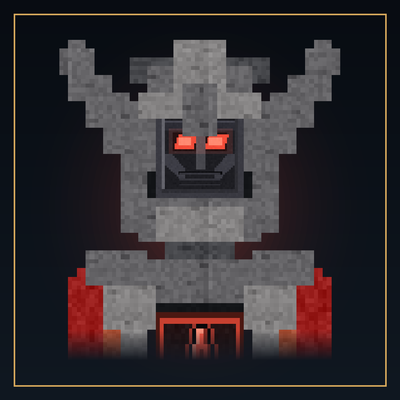
Old Gods' - Monuments, rituals and blessings
Old Gods' Monuments adds six ancient statues to Minecraft. Each one is a hand-built voxel figure. Once awake it hums, its rune burns, and it can grant its god's blessing.
 mod
CurseForge + Modrinth · Minecraft
Cobblemon Catch Rate Display
Real-time catch rate calculator for Cobblemon. Shows live percentages, ball comparisons, and status effects. 100% client-side. It works on any server.
 mod
CurseForge · Minecraft
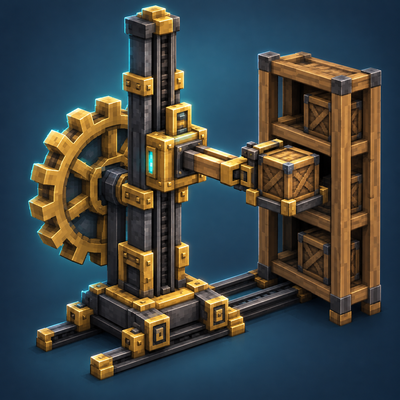
Create Wareworks
Build real automated warehouses for Create. Stacker cranes physically store and fetch your items along rails. Nothing teleports. Order from a terminal, sort chests with Create filters and let your own machines produce on demand.