Collective Needed by Brand New Day [Fabric/Forge/Neo] 26.3.0-1.0 | Brand New Day
requiredMatching file found Matched file: [Fabric/Forge/Neo] 26.3.0-8.39 | Collective
CurseForge · Minecraft mod
🌅 Shows an animated day counter and statistics whenever a new Minecraft day starts!
Quick answer
Brand New Day [Fabric/Forge/Neo] 26.3.0-1.0 | Brand New Day targets 26.3 with Fabric, Forge, NeoForge. The project page does not say whether this file belongs on the client, dedicated server, or both. All 1 required mods have matching files.
Where it goes
The project page does not say whether this file belongs on the client, dedicated server, or both.
The source does not explicitly classify this release as client-only or server-only.
[Fabric/Forge/Neo] 26.3.0-1.0 | Brand New Day. Change the file and its required mods may change too.
Install Collective first. We found matching files for this game-version and loader setup.
We only count dependency files that match this setup. A file for another loader does not fill the gap.
Before you install it
Built for Brand New Day [Fabric/Forge/Neo] 26.3.0-1.0 | Brand New Day. Pick another file and the loader, install side or required mods may change.
Use [Fabric/Forge/Neo] 26.3.0-1.0 | Brand New Day. It targets 26.3 with Fabric, Forge, NeoForge; another release may have different loader, side or dependency requirements.
Install Collective first. We found matching files for this game-version and loader setup.
The project page does not say whether this file belongs on the client, dedicated server, or both.
Use the “Get this file” button beside [Fabric/Forge/Neo] 26.3.0-1.0 | Brand New Day. It opens that exact file at the source.
About this project


Brand New Day is a client-side mod that shows a screen at the start of each day. The screen displays an animated day counter and statistics of what the player has done that day. It's a nice transition between night and day, and an easy way to keep track of how many days you've played.
The statistics it currently shows are:
Blocks broken, blocks travelled, deaths, items crafted and monsters slain.
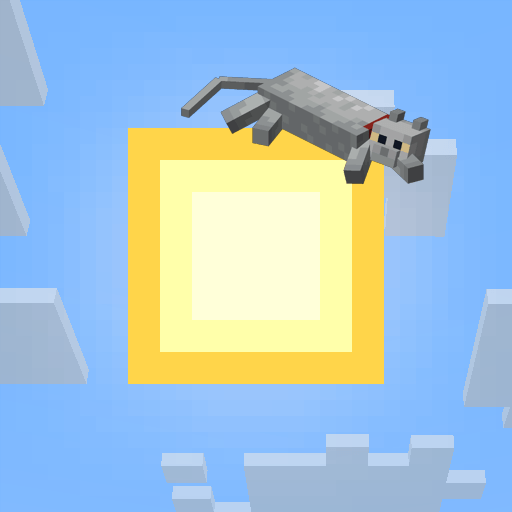
Any statistic can be enabled/disabled inside the config. The header image that's shown at the top of the screen, by default the sun and a cat, can be changed as well in ./config/brandnewday/header/.


All available config options:
showHeader default true
If the header image should be shown at the top of the new day screen.
showDayCount default true
If the current day number should be shown on the new day screen.
showStats default true
If a summary of the previous day should be shown. Each line can be toggled individually below.
playSound default true
If a sound plays when the new day screen appears.
newDayScreenDurationTicks default 200, min 1, max 1200
How many ticks the new day screen stays on screen in total. 20 ticks = 1 second.
newDayScreenFadeInTicks default 20, min 1, max 200
How many ticks the screen takes to fade in. 20 ticks = 1 second.
newDayScreenFadeOutTicks default 20, min 1, max 200
How many ticks the screen takes to fade out before disappearing. 20 ticks = 1 second.
guiScaleModifier default 1.0f, min 0.1, max 5.0
Scales the day number, stats text, and header image together, based on the player's GUI scale. 1.0 matches the configured sizes at GUI scale 4; higher makes everything bigger.
headerImageWidth default 64, min 0, max 2000
The width in pixels the header image is rendered at on screen.
headerImageHeight default 64, min 0, max 2000
The height in pixels the header image is rendered at on screen.
headerImageYOffset default 10, min 0, max 1000
How far down from the top of the screen the header image is drawn, in pixels. 0 is flush against the top.
dayFontScale default 3, min 1, max 8
How much bigger the day number text should be rendered. 1 is the normal font size.
dayTextRGB_R default 218, min 0, max 255
The red RGB value for the day number text.
dayTextRGB_G default 164, min 0, max 255
The green RGB value for the day number text.
dayTextRGB_B default 40, min 0, max 255
The blue RGB value for the day number text.
showMobsKilled default true
If the monsters slain line is shown in the day summary.
showBlocksBroken default true
If the blocks broken line is shown in the day summary.
showDistanceTraveled default true
If the distance traveled line is shown in the day summary.
showDeaths default true
If the deaths line is shown in the day summary.
showItemsCrafted default true
If the items crafted line is shown in the day summary.
statsKeyTextRGB_R default 216, min 0, max 255
The red RGB value for the stat labels (the key text).
statsKeyTextRGB_G default 196, min 0, max 255
The green RGB value for the stat labels (the key text).
statsKeyTextRGB_B default 180, min 0, max 255
The blue RGB value for the stat labels (the key text).
statsValueTextRGB_R default 255, min 0, max 255
The red RGB value for the stat values (the numbers).
statsValueTextRGB_G default 234, min 0, max 255
The green RGB value for the stat values (the numbers).
statsValueTextRGB_B default 210, min 0, max 255
The blue RGB value for the stat values (the numbers).

/brandnewday preview - Preview the brand new day screen. Useful during configuration.
/brandnewday last - Shows the last brand new day screen again. For when it disappeared too quickly.

The screen itself:
Here's you can see the screen and its animated day counter:


You may freely use this mod in any modpack, as long as the download remains hosted within the CurseForge or Modrinth ecosystem.
Serilum.com contains an overview and more information on all mods available.
Comments are disabled as I'm unable to keep track of them across so many separate mod pages.
For issues, ideas, suggestions or anything else there is the Github repo. Thanks!
Project description from CurseForge.
Pick your setup
Choose the version and loader you play, then open the matching release.
Check the dependencies, then try the file in a copied instance before changing a world you care about.
Recent files
brandnewday-26.3.0-1.0.jar
20 Sept 2026
brandnewday-26.2.0-1.0.jar
25 Jun 2026
brandnewday-26.1.2-1.0.jar
25 Jun 2026
brandnewday-1.21.11-1.0.jar
25 Jun 2026
brandnewday-1.21.1-1.0.jar
25 Jun 2026
brandnewday-1.20.1-1.0.jar
25 Jun 2026
Looking for an older file? The official CurseForge project page is in Resources.
 mod
modAdds 50+ unique biomes to enhance your world, with new trees, flowers, and more!
 mod
modIntroducing Armed N' Dangerous, a cohesive gun extension to the original Just Enough Guns mod(JEG)!
 mod
modAdds a Fusion station block where you can fuse Cobblemon together to combine and customize IVs