Waystones Needed by project-1601435 Tower Waystone (1.1.1)
requiredMatching file found Matched file: waystones-neoforge-26.2-26.2.0.12.jar
CurseForge · Minecraft mod
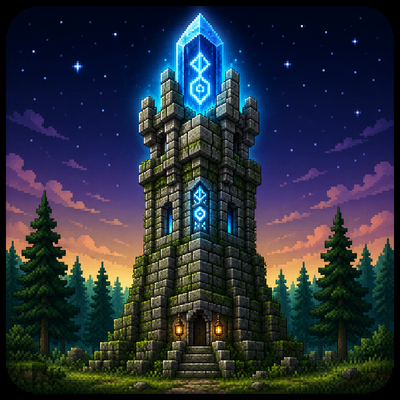
Generates stone towers with waystones across your world — pair with the Waystones mod for fast travel.
Quick answer
project-1601435 Tower Waystone (1.1.1) targets 26.2 with NeoForge. The project page does not say whether this file belongs on the client, dedicated server, or both. All 3 required mods have matching files.
Where it goes
The project page does not say whether this file belongs on the client, dedicated server, or both.
The source does not explicitly classify this release as client-only or server-only.
Tower Waystone (1.1.1). Change the file and its required mods may change too.
Install Waystones, Shogi, Balm first. We found matching files for this game-version and loader setup. 2 come through another mod in the chain.
2 extra mods were pulled in by other dependencies. Indented rows show who needs each one. We only count dependency files that match this setup. A file for another loader does not fill the gap.
Before you install it
Built for project-1601435 Tower Waystone (1.1.1). Pick another file and the loader, install side or required mods may change.
Use Tower Waystone (1.1.1). It targets 26.2 with NeoForge; another release may have different loader, side or dependency requirements.
Install Waystones, Shogi, Balm first. We found matching files for this game-version and loader setup. 2 come through another mod in the chain.
The project page does not say whether this file belongs on the client, dedicated server, or both.
Use the “Get this file” button beside Tower Waystone (1.1.1). It opens that exact file at the source.
About this project
Stone towers with waystones scattered across your world — activate, explore, teleport.



| Tower Waystone generates stone towers across your world, each with a naturally-spawning waystone ready to be activated. Pair it with the Waystones mod to fast-travel between towers as you explore. Each tower variant only spawns in biomes that match its look, its waystone gets a random fantasy name, and each variant has its own structure set so distribution stays even. Original concept by Ner07CA, built for NeoForge by Stalking Dragons. |
 |
|---|
| Variant | Biomes |
|---|---|
| Normal | Plains, forests, meadows, savannas, windswept hills, cherry groves |
| Sandy | Deserts, badlands |
| Mossy | Jungles, swamps, mangroves, taigas |
| Snowy | Frozen peaks, snowy plains, ice spikes, groves |
| Nether Blackstone / Nether Brick | Nether wastes, soul sand valleys, crimson & warped forests, basalt deltas |
| End Stone / End Purpur | End highlands, midlands, barrens, small end islands |
Towers generate as part of your world using vanilla JigsawStructure, so /locate structure tower_waystone:<variant> works.
Each tower's waystone is automatically assigned a random name (Whispering Peak, Stormwatch, Iron Sentinel…) via the official Waystones API.
Every variant has its own structure set with wide chunk spacing, keeping distribution even across compatible biomes without overcrowding.
No dependencies beyond NeoForge and the Waystones mod.
| Minecraft / NeoForge | see Available Versions below |
|---|---|
| Dependencies | Waystones (required) |
| Side | Server (worldgen) — also needed on the client for structure data |
| Minecraft | NeoForge | Latest build | Status |
|---|---|---|---|
| 26.1.2 | 26.1.2.78+ | 1.2.5 |
Stable |
| 26.2 | 26.2.0.57+ | 1.1.1 |
Stable |
All versions share this CurseForge project. Pick the file that matches your Minecraft version. No 1.21.1 build is planned.
/locate structure tower_waystone:<variant>, or just explore — towers generate naturally.Tower Waystone was created by Stalking Dragons from an original concept by Ner07CA. All tower variants (Normal, Sandy, Mossy, Snowy, Nether and End), the mod code, textures and structures are released under Creative Commons Attribution-NonCommercial-ShareAlike 4.0 International (CC BY-NC-SA 4.0).
https://codex.skdragons.com/
Codex Stalking Dragons — Minecraft Modding
Project description from CurseForge.
Pick your setup
Choose the version and loader you play, then open the matching release.
Check the dependencies, then try the file in a copied instance before changing a world you care about.
Recent files
tower_waystone-26.2-neoforge-26.2.0.57-1.1.1.jar
3 Sept 2026
tower_waystone-26.2-neoforge-26.2.0.57-1.1.0.jar
20 Aug 2026
tower_waystone-26.2-neoforge-26.2.0.45-beta-1.0.11.jar
18 Aug 2026
tower_waystone-26.2-neoforge-26.2.0.37-beta-1.0.10.jar
17 Aug 2026
tower_waystone-26.2-neoforge-26.2.0.37-beta-1.0.9.jar
16 Aug 2026
tower_waystone-26.2-neoforge-26.2.0.37-beta-1.0.8.jar
16 Aug 2026
tower_waystone-26.2-neoforge-26.2.0.37-beta-1.0.6.jar
14 Aug 2026
tower_waystone-26.2-neoforge-26.2.0.37-beta-1.0.5.jar
14 Aug 2026
tower_waystone-26.2-neoforge-1.0.3.jar
5 Aug 2026
tower_waystone-26.1.2-neoforge-1.2.4.jar
3 Aug 2026
tower_waystone-26.2-neoforge-1.0.2.jar
3 Aug 2026
tower_waystone-26.2-neoforge-1.0.1.jar
2 Aug 2026
Looking for an older file? The official CurseForge project page is in Resources.
 mod
modThis is a re-creation of old but gold NuclearCraft on a modern MC version
 mod
modA client side Minecraft mod to find blocks in singleplayer or multiplayer
 mod
mod15× faster JEI ingredient filter build — drastically reduces "Joining world..." wait time on big modded servers.
