Minecraft version
Back to mods 
CurseForge · Minecraft mod
Block Finder (X-Ray)
A client side Minecraft mod to find blocks in singleplayer or multiplayer
Choose a version Pick your version below, then grab the matching file.
Quick answer
Which Block Finder (X-Ray) release should I use?
Latest stable file 1.3.1.nc
Game version 26.3
Loader Forge
Block Finder (X-Ray) 1.3.1.nc targets 26.3 with Forge. It must be installed on the client. Do not install it on the dedicated server. No extra mods listed for this file.
Where it goes
Is Block Finder (X-Ray) required on the client, server, or both?
It must be installed on the client. Do not install it on the dedicated server.
Client Required
Dedicated server Not supported
Loader for this release Forge
Required install it here Optional supported, not mandatory Not supported do not install here Source doesn’t say do not assume
This file is marked client-only.
What else does Block Finder (X-Ray) 1.3.1.nc need?
1.3.1.nc. Change the file and its required mods may change too.
This file does not list any required mods. Do not add a library just because a different file uses it.
This file does not list any required or optional mods.
Before you install it
Add Block Finder (X-Ray) without breaking your instance.
Built for Block Finder (X-Ray) 1.3.1.nc. Pick another file and the loader, install side or required mods may change.
- 01
Stick to this file
Use 1.3.1.nc. It targets 26.3 with Forge; another release may have different loader, side or dependency requirements.
- 02
Bring the mods it needs
This file does not list any required mods. Do not add a library just because a different file uses it.
- 03
Put it on the correct side
It must be installed on the client. Do not install it on the dedicated server.
- 04
Pick the file you checked
Use the “Get this file” button beside 1.3.1.nc. It opens that exact file at the source.
About this project
What does Block Finder (X-Ray) add?
Overview
Block Locator (Finder) is a Minecraft mod that lets you quickly find blocks in both singleplayer or multiplayer worlds. It comes with a custom menu that is easy to use and has many features to help you find what you need.
Usage
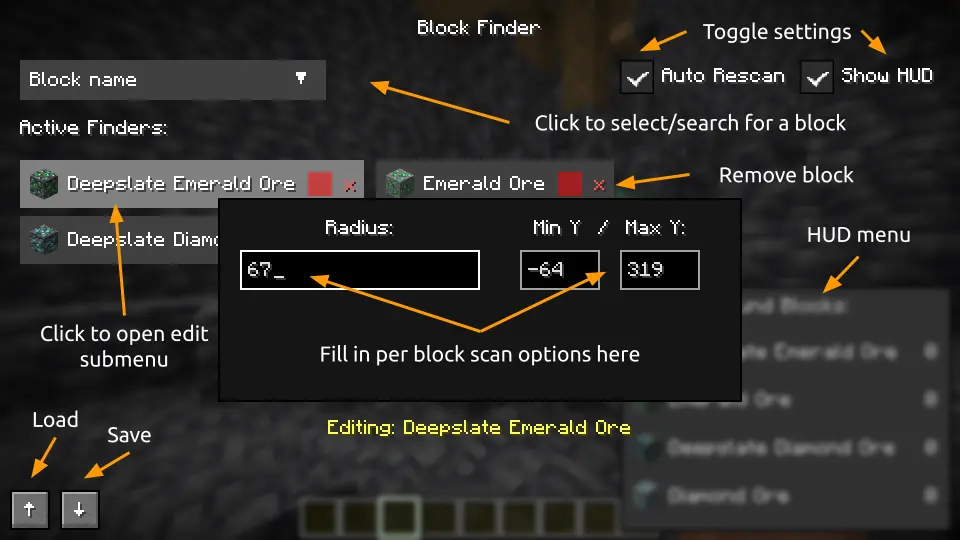
- Open menu: Press 'V' to open the Block Finder menu. If key is taken up, check your keybinds and assign a new one for this menu.
- Add blocks: Click on the dropdown widget and search for your wanted block. Select it to add to the active pool. Many can be added at a time.
- Configure scan settings: Click on one of your blocks and it should bring up a menu to edit scan radius from yourself, color, minimum Y-level, and maximum Y-level.
- Clear block: Click the red 'x' to remove that block from the active pool.
- Toggle Auto Scan: Updates the scanned blocks when the player starts moving.
- Toggle HUD: Shows a live update GUI of the amount of found blocks.
- Submit button: Click to start the scan.
- Clear All button: Click to remove all active pool blocks.
- Load/Save buttons: Import or export JSON for scan configurations (↑ for Load, ↓ for Save).
Dependencies
Make sure to install Fabric API valid for the Fabric mod.
Features
- Highlights matching blocks with x-ray outlines visible through walls.
- Search for multiple block types in a single scan.
- Customize scan radius and minimum/maximum Y-level for each tracked block.
- Assign a unique outline color to every tracked block.
- Quickly find blocks with block icons and friendly searchable dropdown.
- Performs scans on a separate thread to reduce gameplay stuttering.
- Updates results when blocks are broken/placed.
- Has a live HUD giving counts of found blocks.
- Saves and loads configurations through JSON.
- Works in both singleplayer and multiplayer (except .nc versions for Modrinth).
- Works with Iris shaders (report issues as needed).
Note to player:
- If you notice "jumping" issues with the tracer lines, turn off View Bobbing in settings (Options → Accessibility Settings → View Bobbing: Off)
- If you run into display problems on Wayland with Forge or Neoforge, run your Minecraft instance with X11.
- If you want to request me to make a release for a different Minecraft version, or if there are any issues, suggestions, please add them to the GitHub https://github.com/echen0719/block-finder/issues or https://docs.google.com/forms/d/e/1FAIpQLSeA5xHOVSt4gOofTIGXKj6x84aETpXDe4h4o3GRChpovcCMpg/viewform so I can improve this mod (with a label please).
Credits
Author: @echen0719 (GitHub)
Project description from CurseForge.
Pick your setup
Block Finder (X-Ray) by Minecraft version and loader
Choose the version and loader you play, then open the matching release.
Minecraft version
26.2
3 loader buildsMinecraft version
26.1.2
3 loader buildsMinecraft version
26.1.1
3 loader buildsMinecraft version
26.1
3 loader buildsMinecraft version
1.21.11
3 loader buildsMinecraft version
1.21.4
3 loader buildsMinecraft version
1.21.1
3 loader buildsMinecraft version
1.20.1
2 loader buildsCheck the dependencies, then try the file in a copied instance before changing a world you care about.
Recent files
Block Finder (X-Ray) versions and loaders
1.3.1.nc
block-finder-forge-1.3.1.nc+26.3.jar
19 Sept 2026
Client Required Server Not supported Dependencies No extras listed Listed on Release listing
Check the 26.3 · Forge setup 26.3Forge release
1.3.1.nc
block-finder-neoforge-1.3.1.nc+26.3.jar
19 Sept 2026
Client Required Server Not supported Dependencies No extras listed Listed on Release listing
Check the 26.3 · NeoForge setup 26.3NeoForge release
1.3.1.nc
block-finder-fabric-1.3.1.nc+26.3.jar
19 Sept 2026
Client Required Server Not supported Dependencies 1 required · 1 unchecked Listed on Release listing
Check the 26.3 · Fabric setup 26.3Fabric release
block-finder-forge-1.3.1+26.3.jar
19 Sept 2026
Client Source doesn’t say Server Source doesn’t say Dependencies No extras listed Listed on Release listing
Check the 26.3 · Forge setup Forge26.3 release
block-finder-neoforge-1.3.1+26.3.jar
19 Sept 2026
Client Source doesn’t say Server Source doesn’t say Dependencies No extras listed Listed on Release listing
Check the 26.3 · NeoForge setup NeoForge26.3 release
block-finder-fabric-1.3.1+26.3.jar
19 Sept 2026
Client Source doesn’t say Server Source doesn’t say Dependencies 1 required · 1 unchecked Listed on Release listing
Check the 26.3 · Fabric setup Fabric26.3 release
1.3.1.nc
block-finder-forge-1.3.1.nc+26.2.jar
19 Sept 2026
Client Required Server Not supported Dependencies No extras listed Listed on Release listing
Check the 26.2 · Forge setup 26.2Forge release
1.3.1.nc
block-finder-neoforge-1.3.1.nc+26.2.jar
19 Sept 2026
Client Required Server Not supported Dependencies No extras listed Listed on Release listing
Check the 26.2 · NeoForge setup 26.2NeoForge release
1.3.1.nc
block-finder-fabric-1.3.1.nc+26.2.jar
19 Sept 2026
Client Required Server Not supported Dependencies 1 required · 1 unchecked Listed on Release listing
Check the 26.2 · Fabric setup 26.2Fabric release
1.3.1.nc
block-finder-forge-1.3.1.nc+1.21.11.jar
19 Sept 2026
Client Required Server Not supported Dependencies No extras listed Listed on Release listing
Check the 1.21.11 · Forge setup 1.21.11Forge release
1.3.1.nc
block-finder-neoforge-1.3.1.nc+1.21.11.jar
19 Sept 2026
Client Required Server Not supported Dependencies No extras listed Listed on Release listing
Check the 1.21.11 · NeoForge setup 1.21.11NeoForge release
1.3.1.nc
block-finder-fabric-1.3.1.nc+1.21.11.jar
19 Sept 2026
Client Required Server Not supported Dependencies 1 required · 1 unchecked Listed on Release listing
Check the 1.21.11 · Fabric setup 1.21.11Fabric release
Looking for an older file? The official CurseForge project page is in Resources.
 mod
mod CurseForge + Modrinth · Minecraft
Patched
Allows data/resource packs and mods to modify parts of json files instead of completely replacing them.
 mod
mod CurseForge + Modrinth · Minecraft
VO: Better Dogs
Enhances vanilla wolves with unique personalities (Aggressive, Pacifist, Normal), smarter AI, safety behaviors, and combat improvements.
 mod
mod CurseForge · Minecraft
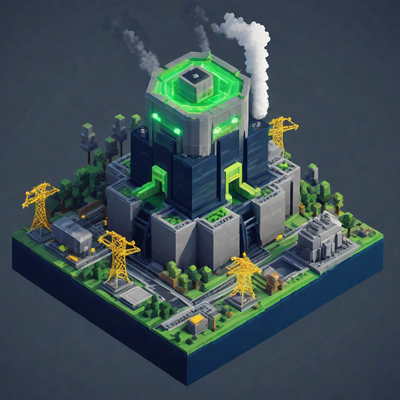
Nuclear Power Plant
Build your own power grid – from a hand-crank generator to a full