Fabric API Needed by Dynamic Performance 0.2.0+1.21 NeoForge
requiredNo matching file

CurseForge · Minecraft mod
A vanilla-preserving and lightweight performance mod that dynamically adjusts view distance, simulation distance, and the mob cap based on the server's load.
Quick answer
Dynamic Performance 0.2.0+1.21 NeoForge targets 1.21, 1.21.1 with NeoForge. The project page does not say whether this file belongs on the client, dedicated server, or both. 1 required mod needs a matching file.
Where it goes
The project page does not say whether this file belongs on the client, dedicated server, or both.
The source does not explicitly classify this release as client-only or server-only.
Dynamic Performance 0.2.0+1.21 NeoForge. Change the file and its required mods may change too.
Install Fabric API first, but 1 required mod has no matching file for this setup. Do not mix loader builds to force a match.
We only count dependency files that match this setup. A file for another loader does not fill the gap.
Before you install it
Built for Dynamic Performance 0.2.0+1.21 NeoForge. Pick another file and the loader, install side or required mods may change.
Use Dynamic Performance 0.2.0+1.21 NeoForge. It targets 1.21, 1.21.1 with NeoForge; another release may have different loader, side or dependency requirements.
Install Fabric API first, but 1 required mod has no matching file for this setup. Do not mix loader builds to force a match.
The project page does not say whether this file belongs on the client, dedicated server, or both.
Use the “Get this file” button beside Dynamic Performance 0.2.0+1.21 NeoForge. It opens that exact file at the source.
About this project
A vanilla-preserving and lightweight performance mod that dynamically adjusts view distance, simulation distance, and the mob cap based on the server's load.
Ideal for server owners who want to keep the best possible playing experience even on weaker hardware.
Dynamic Performance monitors the current MSPT by checking it every 15 seconds or so. For further information, consult the Configuration section.
Side Info: A healthy server targets 20 TPS (ticks per second) and, therefore, 50 MSPT at max. So, the lag threshold should be around this value.
Furthermore, if the MSPT exceeds the lag threshold, the server starts scaling down as configured in the performance levels until it no longer exceeds the threshold. The same is true for recovery: If the MSPT is lower than the recovery threshold, the server starts scaling up based on the mentioned levels, now in reverse.
If the MSPT stays between the lag and recovery thresholds, no scaling changes are made. The server is then considered stable. See the Performance States section for more details.
After adding the mod to your world or server, you should be able to open the about panel, which is fully controllable with the mouse:
/dp about
or
/dynamicperformance about
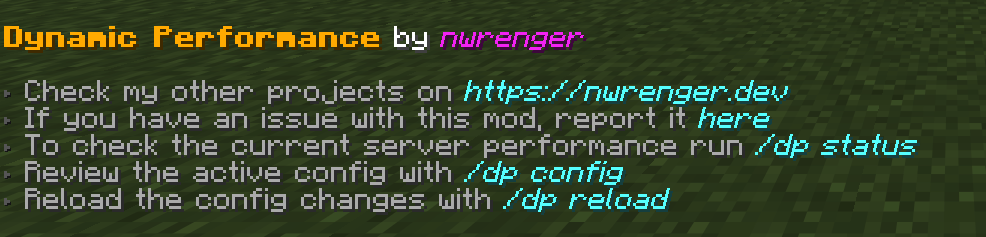
The current performance state, MSPT, view distance, simulation distance, and mob cap percentage can be checked with:
/dp status
or
/dynamicperformance status
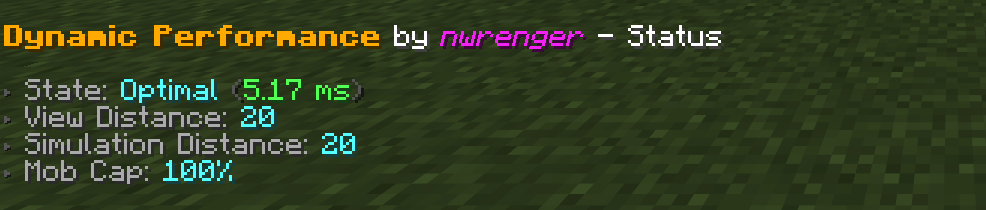
The following performance states are reported:
Optimal: All configured levels are restored.Stable: MSPT is between the recovery and lag thresholds.Scaling Down: MSPT is high and settings can still be reduced.Lagging: MSPT is high, but all configured levels are already at their minimum values.Scaling Up: Settings are being restored.A config file is created at:
./config/dynamic-performance.json
Default contents:
{
  "interval": 15,
  "lag_threshold": 45.0,
  "recovery_threshold": 30.0,
  "levels": [
    {
      "type": "SIMULATION_DISTANCE",
      "max": 16,
      "min": 8,
      "increment": 1
    },
    {
      "type": "MOB_CAP_PERCENTAGE",
      "max": 100,
      "min": 75,
      "increment": 5
    },
    {
      "type": "SIMULATION_DISTANCE",
      "max": 8,
      "min": 5,
      "increment": 1
    },
    {
      "type": "MOB_CAP_PERCENTAGE",
      "max": 75,
      "min": 30,
      "increment": 15
    },
    {
      "type": "VIEW_DISTANCE",
      "max": 20,
      "min": 4,
      "increment": 2
    }
  ]
}
This config keeps the most visible change, view distance, as the last fallback while reducing server-side load earlier through simulation distance and mob spawning.
interval: How often, in seconds, the server performance is checked and adjusted.lag_threshold: MSPT value at which scaling down starts.recovery_threshold: MSPT value at or below which scaling back up starts.levels: Ordered scaling rules for view distance, simulation distance, and mob cap percentage.Supported level types:
VIEW_DISTANCE: Adjusts the server view distance.SIMULATION_DISTANCE: Adjusts the server simulation distance.MOB_CAP_PERCENTAGE: Adjusts the mob cap as a percentage of vanilla mob caps.Each level has:
max: Highest value the mod may restore this setting to.min: Lowest value the mod may reduce this setting to.increment: Step size used when scaling up or down.The order matters. Scaling down follows the list from top to bottom, while scaling back up follows it from bottom to top.
The active configuration can be reviewed in-game with:
/dp config
or
/dynamicperformance config
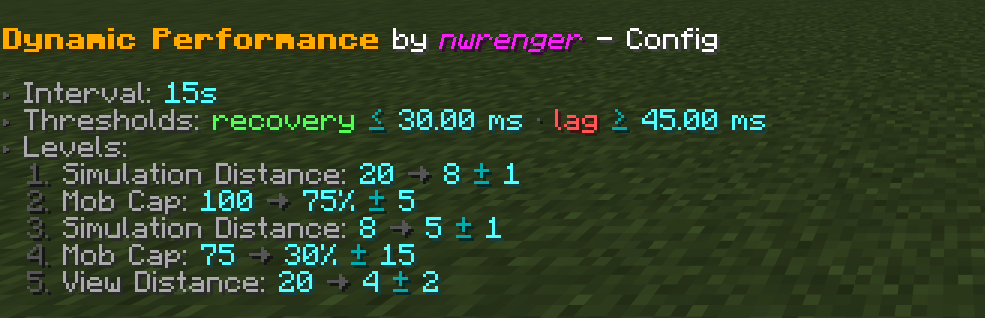
The screenshot shows the default config listed above.
After editing the config file, apply changes without restarting by running:
/dp reload
or
/dynamicperformance reload
If the config is invalid, the command reports the error and keeps the previous valid config active.
I warmly welcome:
Please open issues or PRs on GitHub.
This project is licensed under the LGPLv3 License. See LICENSE for details.
Project description from CurseForge.
Pick your setup
Choose the version and loader you play, then open the matching release.
Check the dependencies, then try the file in a copied instance before changing a world you care about.
Recent files
dynamic-performance-0.2.0+1.21-neoforge.jar
16 Sept 2026
dynamic-performance-0.2.0+1.21-fabric.jar
16 Sept 2026
dynamic-performance-0.2.0+26.1-neoforge.jar
12 Jul 2026
dynamic-performance-0.2.0+26.1-fabric.jar
12 Jul 2026
dynamic-performance-0.2.0+1.21.11-neoforge.jar
12 Jul 2026
dynamic-performance-0.2.0+1.21.11-fabric.jar
12 Jul 2026
dynamic-performance-0.2.0+1.21.9-neoforge.jar
12 Jul 2026
dynamic-performance-0.2.0+1.21.9-fabric.jar
12 Jul 2026
dynamic-performance-0.2.0+1.21.1-neoforge.jar
12 Jul 2026
dynamic-performance-0.2.0+1.21.1-fabric.jar
12 Jul 2026
dynamic-performance-0.1.1+26.2-neoforge.jar
9 Jul 2026
dynamic-performance-0.1.1+26.2-fabric.jar
9 Jul 2026
Looking for an older file? The official CurseForge project page is in Resources.
 mod
modAllows players to create a not-wandering, faster, smaller, silenced Happy Ghast, get damage alerts and even summon it back in survival using items.
 mod
modAdds variants to the creaking based on the wood used to spawn it.
 mod
modThe ULTIMATE Vanilla-Friendly Archery Overhaul!