Minecraft version
Back to mods 
CurseForge · Minecraft mod
JSON HUD
A simple mod that allows modifying the player's HUD using JSON files.
Choose a version Pick your version below, then grab the matching file.
Quick answer
Which JSON HUD release should I use?
Latest stable file jsonhud-3.0.0.jar
Game version 1.20.1
Loader Forge
JSON HUD jsonhud-3.0.0.jar targets 1.20.1 with Forge. The project page does not say whether this file belongs on the client, dedicated server, or both. No extra mods listed for this file.
Where it goes
Is JSON HUD required on the client, server, or both?
The project page does not say whether this file belongs on the client, dedicated server, or both.
Client Source doesn’t say
Dedicated server Source doesn’t say
Loader for this release Forge
Required install it here Optional supported, not mandatory Not supported do not install here Source doesn’t say do not assume
The source does not explicitly classify this release as client-only or server-only.
What else does JSON HUD jsonhud-3.0.0.jar need?
jsonhud-3.0.0.jar. Change the file and its required mods may change too.
This file does not list any required mods. Do not add a library just because a different file uses it.
This file does not list any required or optional mods.
Before you install it
Add JSON HUD without breaking your instance.
Built for JSON HUD jsonhud-3.0.0.jar. Pick another file and the loader, install side or required mods may change.
- 01
Stick to this file
Use jsonhud-3.0.0.jar. It targets 1.20.1 with Forge; another release may have different loader, side or dependency requirements.
- 02
Bring the mods it needs
This file does not list any required mods. Do not add a library just because a different file uses it.
- 03
Put it on the correct side
The project page does not say whether this file belongs on the client, dedicated server, or both.
- 04
Pick the file you checked
Use the “Get this file” button beside jsonhud-3.0.0.jar. It opens that exact file at the source.
About this project
What does JSON HUD add?
A Minecraft mod that allows you to add text to the player interface using JSON files.
This mod is currently in beta; please report any bugs.
The json file is in .minecraft/config/hud.json
The more lines you add, the higher the likelihood of an FPS drop.
Wiki under construction.
Currently available placeholders:
$player_name$
$player_world$
$player_health$ $player_xp$
$player_level$
$player_food$
$pos_x$
$pos_y$
$pos_z$
$score_<scoreboard_name>$
Updated how colors are rendered, adding more variety by using & prefixes.
For example:
Food: &c$player_food$
Added new item symbols using $item:<item>$.
Example:
$item:golden_apple$ Health: $player_health$

The scoreboard must be displayed somewhere for the client to receive it; example command:
/scoreboard objectives setdisplay (belowname, sidebar, list, sidebar.team_aqua, etc.) <scoreboard>
Example:

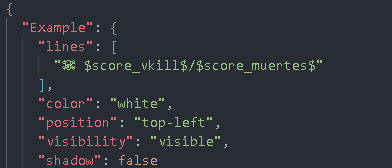
"Example": {
"lines": [
"Player: $player_name$",
"Health: $player_health$",
"Food: $player_food$"
],
"color": "yellow / white / red / black / gray / orange / green / blue / purple / pink",
"position": "top-left / top-right / left / right / bottom-left / bottom-right / bottom / top",
"visibility": "visible / hidden",
"shadow": true / false
}
When Shadow = true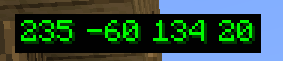
When Shadow = false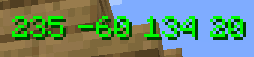
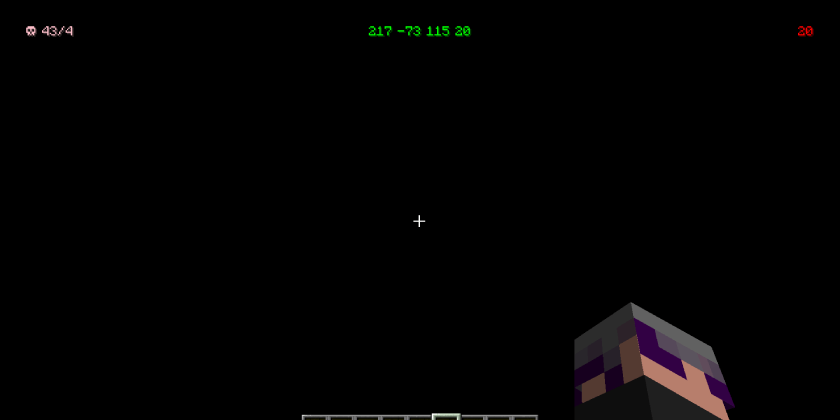
Project description from CurseForge.
Pick your setup
JSON HUD by Minecraft version and loader
Choose the version and loader you play, then open the matching release.
Check the dependencies, then try the file in a copied instance before changing a world you care about.
Recent files
JSON HUD versions and loaders
jsonhud-3.0.0.jar
15 Nov 2026
Client Source doesn’t say Server Source doesn’t say Dependencies No extras listed Listed on Release listing
Check the 1.20.1 · Forge setup 1.20.1Forge release
jsonhud-2.0.0.jar
12 Aug 2026
Client Source doesn’t say Server Source doesn’t say Dependencies No extras listed Listed on Release listing
Check the 1.20.1 · Forge setup 1.20.1Forge release
jsonhud-beta-1.4.0.jar
8 Jul 2026
Client Source doesn’t say Server Source doesn’t say Dependencies No extras listed Listed on Release listing
Check the 1.20.1 · Forge setup 1.20.1Forge beta
Looking for an older file? The official CurseForge project page is in Resources.
 mod
CurseForge + Modrinth · Minecraft
Practical Enchantments
This mod adds a series of imaginative mods.
 mod
CurseForge · Minecraft
Evolved Warfare⚔️
Evolved Warfare is an ambitious, hand-crafted creation—a modpack within a mod—that is under constant development.
 mod
CurseForge · Minecraft
Headlamp
orange hard hat with a headlamp that lights where you're looking rather than glowing around your head.