Minecraft version
Back to mods 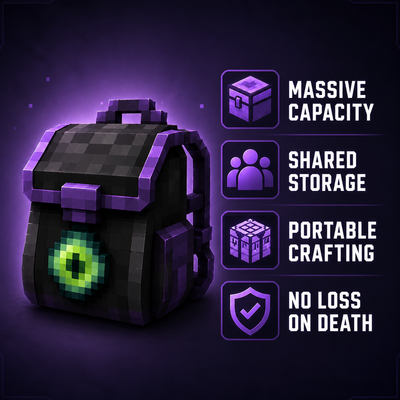
CurseForge · Minecraft mod
Shared Inventory(共享背包)
A powerful Fabric backpack mod with 1,440 personal storage slots, shared team storage, and built-in crafting utilities—perfect for multiplayer servers and cooperative gameplay.
Choose a version Pick your version below, then grab the matching file.
Quick answer
Which Shared Inventory(共享背包) release should I use?
Latest stable file SharedInventoryMod-fabric-1.20.1-v1.02.jar
Game version 1.20.1
Loader Fabric
Shared Inventory(共享背包) SharedInventoryMod-fabric-1.20.1-v1.02.jar targets 1.20.1 with Fabric. The project page does not say whether this file belongs on the client, dedicated server, or both. No extra mods listed for this file.
Where it goes
Is Shared Inventory(共享背包) required on the client, server, or both?
The project page does not say whether this file belongs on the client, dedicated server, or both.
Client Source doesn’t say
Dedicated server Source doesn’t say
Loader for this release Fabric
Required install it here Optional supported, not mandatory Not supported do not install here Source doesn’t say do not assume
The source does not explicitly classify this release as client-only or server-only.
What else does Shared Inventory(共享背包) SharedInventoryMod-fabric-1.20.1-v1.02.jar need?
SharedInventoryMod-fabric-1.20.1-v1.02.jar. Change the file and its required mods may change too.
This file does not list any required mods. Do not add a library just because a different file uses it.
This file does not list any required or optional mods.
Before you install it
Add Shared Inventory(共享背包) without breaking your instance.
Built for Shared Inventory(共享背包) SharedInventoryMod-fabric-1.20.1-v1.02.jar. Pick another file and the loader, install side or required mods may change.
- 01
Stick to this file
Use SharedInventoryMod-fabric-1.20.1-v1.02.jar. It targets 1.20.1 with Fabric; another release may have different loader, side or dependency requirements.
- 02
Bring the mods it needs
This file does not list any required mods. Do not add a library just because a different file uses it.
- 03
Put it on the correct side
The project page does not say whether this file belongs on the client, dedicated server, or both.
- 04
Pick the file you checked
Use the “Get this file” button beside SharedInventoryMod-fabric-1.20.1-v1.02.jar. It opens that exact file at the source.
About this project
What does Shared Inventory(共享背包) add?
Shared Inventory Mod
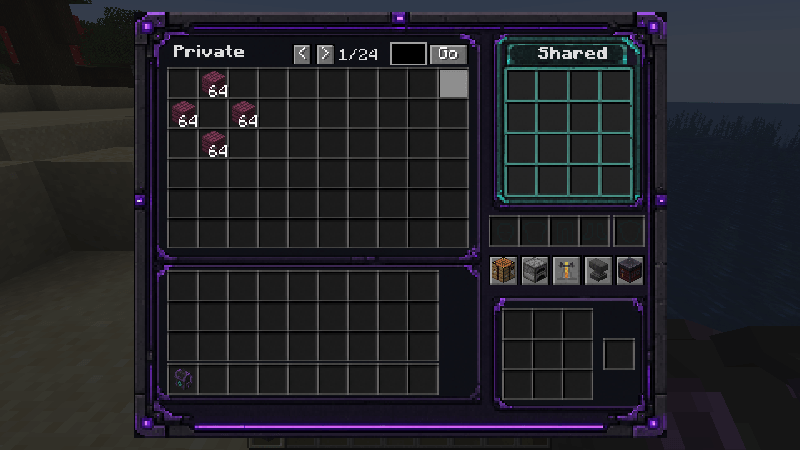
One Backpack. Endless Possibilities.
A Fabric mod that combines massive personal storage, shared team storage, and a portable workspace into one seamless interface.
Equip your backpack, press B, and instantly access your personal inventory, your team's shared storage, and essential crafting utilities—anytime, anywhere.
Whether you're playing solo, with friends, or on a long-term multiplayer server, Shared Inventory Mod helps you spend less time managing storage and more time exploring.
✨ Features
🎒 Massive Personal Storage
Carry up to 1,440 inventory slots with you at all times.
Features include:
- 24 pages of storage
- 60 slots per page
- Quick page navigation
No more endless rows of chests just to organize your items.
🤝 Shared Team Storage
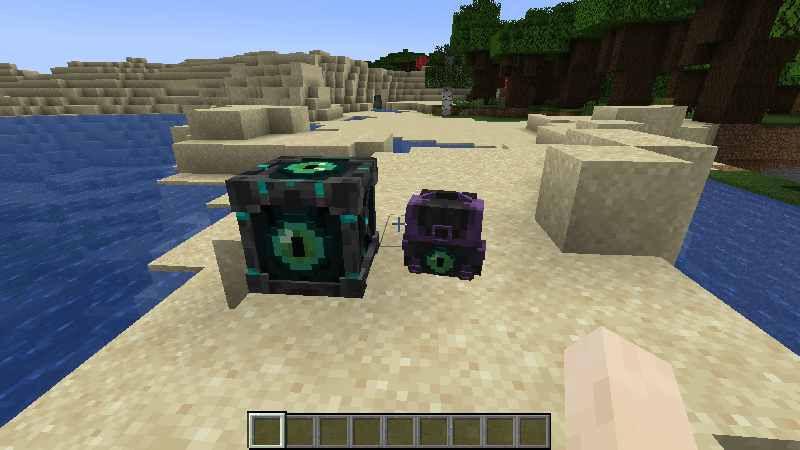
Place a Shared Core in your world and link multiple backpacks to it.
Every linked player can access the same shared storage in real time, making teamwork effortless.
Perfect for cooperative multiplayer gameplay.
🛠 Portable Workspace
No need to carry or place utility blocks everywhere.
Switch between built-in workstations directly inside your backpack:
- Crafting Table
- Furnace
- Brewing Stand
- Anvil
- Smithing Table
Everything you need is always within reach.
💀 Keep Your Backpack After Death
Your backpack inventory remains intact after death and respawning.
Travel between dimensions or recover from accidents without worrying about losing your stored items.
📦 Items
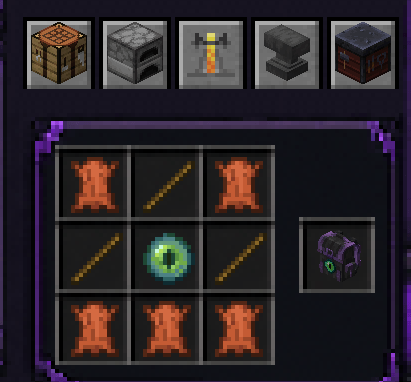
Shared Inventory Backpack
The core item of the mod.
Right-click to equip it into a dedicated backpack slot without occupying your armor slot.
Once equipped, simply press B to open the integrated interface.
Shared Core
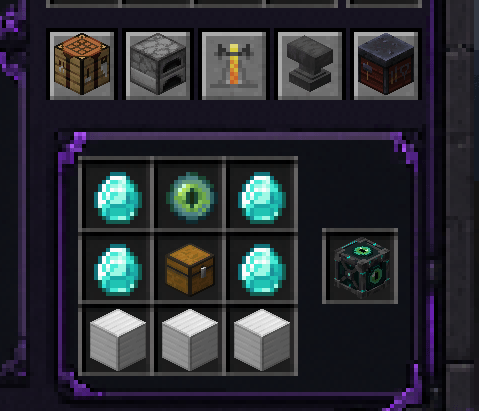 The heart of your shared storage network.
Multiple backpacks linked to the same Shared Core can access the same storage, allowing teammates to store and retrieve items together.
📖 Getting Started
Step 1 – Craft and Place a Shared Core
Place the Shared Core anywhere in your world.
Step 2 – Link Your Backpack
Hold your backpack and right-click the Shared Core.
Once linked, the backpack will remember that Shared Core and gain access to its shared storage.
Step 3 – Equip Your Backpack
Right-click the backpack to equip it into its dedicated backpack slot.
Step 4 – Press B
Open the complete backpack interface, including:
- Personal Storage
- Shared Storage
- Portable Workspace
- Player Inventory
- Equipment Slots
Everything is available in one convenient screen.
🌍 Perfect For
✔ Solo Survival
✔ Multiplayer Servers
✔ Players who love organized storage
✔ Players who want crafting utilities on the go
🌐 Localization
Built-in language support:
- English
- Simplified Chinese
- Traditional Chinese
Community translations are always welcome.
⚙️ Requirements
Supported Versions
- Minecraft: 1.18.1 – 1.20.6
- Mod Loader: Fabric
- Java: Depends on the target Minecraft version
Please install the appropriate version of Fabric Loader and Fabric API for your Minecraft version.
🚧 Future Plans
The long-term goal of Shared Inventory Mod is to provide a consistent experience across the Minecraft ecosystem.
Planned milestones include:
- Support every Minecraft version from 1.18.1 onward
- Support Fabric, Forge, and NeoForge
- Continuous feature improvements
- Better compatibility with other mods
- Ongoing optimization and maintenance
❤️ Feedback
If you enjoy this mod, feel free to leave a comment, report issues, or share your suggestions.
Your feedback helps make Shared Inventory Mod even better!
Project description from CurseForge.
Pick your setup
Shared Inventory(共享背包) by Minecraft version and loader
Choose the version and loader you play, then open the matching release.
Minecraft version
1.20.5
1 loader buildMinecraft version
1.20.4
1 loader buildMinecraft version
1.20.3
1 loader buildMinecraft version
1.20.2
1 loader buildMinecraft version
1.20.1
1 loader buildMinecraft version
1.20
1 loader buildMinecraft version
1.19.4
1 loader buildMinecraft version
1.19.3
1 loader buildMinecraft version
1.19.2
1 loader buildMinecraft version
1.19.1
1 loader buildMinecraft version
1.19
1 loader buildShowing the newest 12 of 14 game versions. Older files are in the list below.
Check the dependencies, then try the file in a copied instance before changing a world you care about.
Recent files
Shared Inventory(共享背包) versions and loaders
SharedInventoryMod-fabric-1.20.1-v1.02.jar
30 Aug 2026
Client Source doesn’t say Server Source doesn’t say Dependencies No extras listed Listed on Release listing
Check the 1.20.1 · Fabric setup Fabric1.20.1 release
SharedInventoryMod-fabric-mc1.18.1-v1.01.jar
9 Jul 2026
Client Source doesn’t say Server Source doesn’t say Dependencies No extras listed Listed on Release listing
Check the 1.18.1 · Fabric setup 1.18.1Fabric release
SharedInventoryMod-fabric-mc1.18.2-v1.01.jar
9 Jul 2026
Client Source doesn’t say Server Source doesn’t say Dependencies No extras listed Listed on Release listing
Check the 1.18.2 · Fabric setup Fabric1.18.2 release
SharedInventoryMod-fabric-mc1.19.0-v1.01.jar
9 Jul 2026
Client Source doesn’t say Server Source doesn’t say Dependencies No extras listed Listed on Release listing
Check the 1.19 · Fabric setup Fabric1.19 release
SharedInventoryMod-fabric-mc1.19.1-v1.01.jar
9 Jul 2026
Client Source doesn’t say Server Source doesn’t say Dependencies No extras listed Listed on Release listing
Check the 1.19.1 · Fabric setup Fabric1.19.1 release
SharedInventoryMod-fabric-mc1.19.2-v1.01.jar
9 Jul 2026
Client Source doesn’t say Server Source doesn’t say Dependencies No extras listed Listed on Release listing
Check the 1.19.2 · Fabric setup Fabric1.19.2 release
SharedInventoryMod-fabric-mc1.19.3-v1.01.jar
9 Jul 2026
Client Source doesn’t say Server Source doesn’t say Dependencies No extras listed Listed on Release listing
Check the 1.19.3 · Fabric setup 1.19.3Fabric release
SharedInventoryMod-fabric-mc1.19.4-v1.01.jar
9 Jul 2026
Client Source doesn’t say Server Source doesn’t say Dependencies No extras listed Listed on Release listing
Check the 1.19.4 · Fabric setup 1.19.4Fabric release
SharedInventoryMod-fabric-mc1.20.0-v1.01.jar
9 Jul 2026
Client Source doesn’t say Server Source doesn’t say Dependencies No extras listed Listed on Release listing
Check the 1.20 · Fabric setup Fabric1.20 release
SharedInventoryMod-fabric-mc1.20.1-v1.01.jar
9 Jul 2026
Client Source doesn’t say Server Source doesn’t say Dependencies No extras listed Listed on Release listing
Check the 1.20.1 · Fabric setup Fabric1.20.1 release
SharedInventoryMod-fabric-mc1.20.2-v1.01.jar
9 Jul 2026
Client Source doesn’t say Server Source doesn’t say Dependencies No extras listed Listed on Release listing
Check the 1.20.2 · Fabric setup 1.20.2Fabric release
SharedInventoryMod-fabric-mc1.20.3-v1.01.jar
9 Jul 2026
Client Source doesn’t say Server Source doesn’t say Dependencies No extras listed Listed on Release listing
Check the 1.20.3 · Fabric setup Fabric1.20.3 release
Looking for an older file? The official CurseForge project page is in Resources.
 mod
mod CurseForge + Modrinth · Minecraft
SeasonHud (Fabric)
Display the current season on the Hud or under the minimap
 mod
mod CurseForge · Minecraft
MapMakerMusic
A very simple solution for playing custom music and sounds, designed for adventure map developers
 mod
mod CurseForge + Modrinth · Minecraft
delta_force_skills
A Forge combat mod that adds tactical operator-style characters, active skills, gadgets, equipment, and character selection to Minecraft.