Minecraft version
Back to mods 
CurseForge · Minecraft mod
Nautilus Studio - Pack Editor IDE
Resource Pack and Datapack general IDE json editor and generator. Automatically supports codecs from any mod and generates a friendly UI for them with previews and syntax highlight
Choose a version Pick your version below, then grab the matching file.
Quick answer
Which Nautilus Studio - Pack Editor IDE release matches 26.2?
Best match for your filters nautilus_studio-26.2-1.11.0-fabric
Game version 26.2
Loader Fabric
Nautilus Studio - Pack Editor IDE nautilus_studio-26.2-1.11.0-fabric targets 26.2 with Fabric. The project page does not say whether this file belongs on the client, dedicated server, or both. No extra mods listed for this file.
Where it goes
Is Nautilus Studio - Pack Editor IDE required on the client, server, or both?
The project page does not say whether this file belongs on the client, dedicated server, or both.
Client Source doesn’t say
Dedicated server Source doesn’t say
Loader for this release Fabric
Required install it here Optional supported, not mandatory Not supported do not install here Source doesn’t say do not assume
The source does not explicitly classify this release as client-only or server-only.
What else does Nautilus Studio - Pack Editor IDE nautilus_studio-26.2-1.11.0-fabric need?
nautilus_studio-26.2-1.11.0-fabric on 26.2. Every mod below is checked against that same setup.
This file does not list any required mods. Do not add a library just because a different file uses it.
This file does not list any required or optional mods.
Before you install it
Add Nautilus Studio - Pack Editor IDE without breaking your instance.
Built for Nautilus Studio - Pack Editor IDE nautilus_studio-26.2-1.11.0-fabric on 26.2. Pick another file and the loader, install side or required mods may change.
- 01
Stick to this file
Use nautilus_studio-26.2-1.11.0-fabric. It targets 26.2 with Fabric; another release may have different loader, side or dependency requirements.
- 02
Bring the mods it needs
This file does not list any required mods. Do not add a library just because a different file uses it.
- 03
Put it on the correct side
The project page does not say whether this file belongs on the client, dedicated server, or both.
- 04
Pick the file you checked
Use the “Get this file” button beside nautilus_studio-26.2-1.11.0-fabric. It opens that exact file at the source.
About this project
What does Nautilus Studio - Pack Editor IDE add?





📖 About 📖
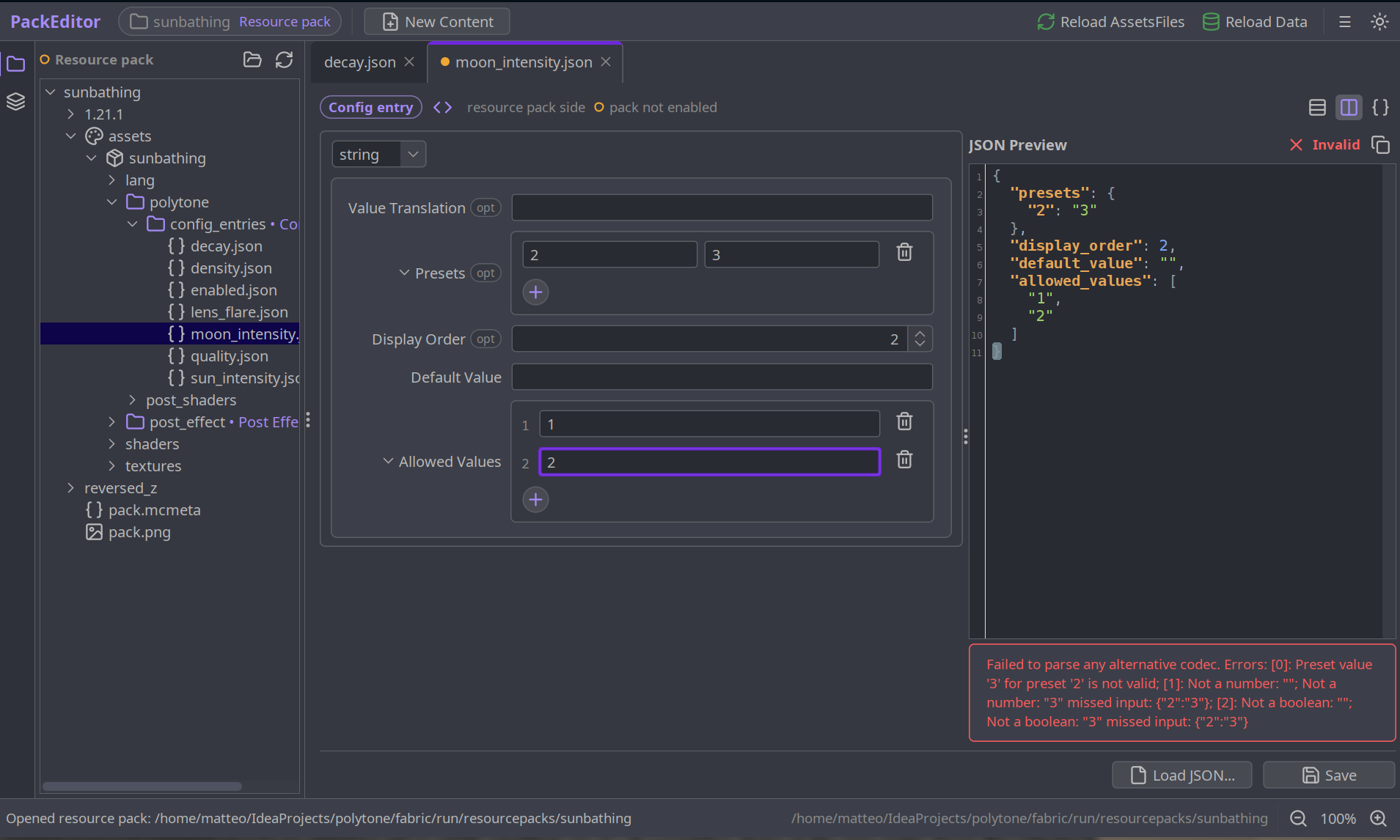
Nautilus Studio is an in-game data and resource pack workbench. Instead of hand-writing JSON and guessing at the right fields, it opens a full editor alongside the game: pick a file, fill in a generated form, hit reload, and the change appears in the running world.
The forms are built automatically from the game's own content definitions, so it works with modded content as well as vanilla.
🖼️ Media 🖼️
📦 Features 📦
What It Can Edit
- Worldgen: configured and placed features, carvers, biomes, noise settings, density functions, world presets
- Structures: structures, structure sets, jigsaw pools
- Loot and Predicates: loot tables, item modifiers, predicates
- Recipes and Advancements
- Enchantments
- World and Dimension: dimensions, dimension types
- Mob Variants, Decoration and Trims, Items and Sound, and more
- Anything a mod registers. Polytone registers its colormaps, particle effects and custom models, for example
- Any custom codec, pointed at by class name, even for content the editor has never seen
- Anything it cannot parse falls back to a live-validated raw JSON editor with syntax highlighting
Using It
- Join a world first: the editor needs live registries to build its forms and to reload
- Open it from the Mod Menu entry on Fabric, or the config-screen button in the mods list on NeoForge
- The workbench opens in its own window beside the game
- Hit reload to push changes into the running world
Nautilus Studio runs best on Fabric. On NeoForge the editor window can occasionally fail to open, due to Java's headless-window restrictions.
🛠️ For Mod Developers 🛠️
For most things the mod should just work. However if you want proper compat here is what you can do:
To register your codec so they appear by default in the editor you can register them like such:
NautilusStudioApi.register(
    "My Mod",                  // group name, shown next to "Minecraft"
    "Widget Layout",           // this content type's label
    MY_CODEC,                  // your per-file Codec (the DIRECT_CODEC)
    Side.CLIENT_RESOURCES,     // CLIENT_RESOURCES (assets/) or SERVER_DATA (data/)
    "mymod/widgets"            // folder the files live in
);
To get nicer widgets, a color picker, a slider, a dropdown for a sum type, build your codec as a CodecUI SchemaCodec and pass that instead. It stays a real Codec with the same wire format. Anything CodecUI can't read falls back to a validated raw-JSON editor, so registering is always safe.
Simply add these lines (jar-in-jar, so CodecUI ships inside your mod) and replace your Codec calls with SchemaCodec calls, following the API in that class:
repositories {
    maven { url "https://registry.somethingcatchy.net/repository/maven-public/" }
}

dependencies {
    // Fabric (Loom)
    modImplementation "net.mehvahdjukaar:codecui-fabric:1.21.11-0.4.0"
    include           "net.mehvahdjukaar:codecui-fabric:1.21.11-0.4.0"

    // NeoForge (ModDevGradle)
    implementation "net.mehvahdjukaar:codecui-neoforge:1.21.11-0.4.0"
    jarJar         "net.mehvahdjukaar:codecui-neoforge:1.21.11-0.4.0"
}
See the CodecUI repo for the full DSL and examples.
❓ F.A.Q. ❓
Q: Is this client-side only?
A: Yes. The editor is a client tool: it edits pack files on disk and reloads your client. You don't need it on a server.
Q: Do players need this to use my pack/mod?
A: No. Nautilus Studio is a creation tool. The packs you make with it are plain vanilla data/resource packs that work for everyone.
Q: Does it work with modded content?
A: Yes. Any mod that registers its codec (a one-liner, thanks to CodecUI) shows up automatically. You can also add custom codecs yourself by class name.
Q: What if Nautilus Studio doesn't understand a file?
A: It falls back to a live-validated raw JSON editor with syntax highlighting, so you can still edit anything.
Q: Do I need CodecUI as a dependency?
A: No. Nautilus Studio bundles it. You only touch CodecUI directly if you want to hand-tune your editor's widgets.
Q: Fabric or NeoForge?
A: Both are supported. Fabric is the smoother experience; on NeoForge the external window can occasionally hit AWT headless limitations.
❤️ Support Me ❤️
Modding takes a lot of my time. If you like what I do and want to support me, you'll receive a custom Globe and/or Statue just for you - this also applies if you buy a server from Akliz using the code below.

Need a server? Akliz offers top-tier servers built for modded Minecraft, with a great community and support team.
Use code "supplementaries" to get 20% off and support me at the same time!
🦉 Our Mods 🦉


















Project description from CurseForge.
Pick your setup
Nautilus Studio - Pack Editor IDE by Minecraft version and loader
Choose the version and loader you play, then open the matching release.
Minecraft version
26.2
2 loader buildsMinecraft version
26.1.2
2 loader buildsMinecraft version
1.21.11
2 loader buildsMinecraft version
1.21.1
2 loader buildsCheck the dependencies, then try the file in a copied instance before changing a world you care about.
Recent files
Nautilus Studio - Pack Editor IDE versions and loaders
nautilus_studio-26.2-1.11.0-fabric
nautilus_studio-26.2-1.11.0-fabric.jar
11 Sept 2026
Client Source doesn’t say Server Source doesn’t say Dependencies No extras listed Listed on Release listing
Check the 26.2 · Fabric setup Fabric26.2 release
nautilus_studio-26.2-1.11.0-neoforge
nautilus_studio-26.2-1.11.0-neoforge.jar
11 Sept 2026
Client Source doesn’t say Server Source doesn’t say Dependencies No extras listed Listed on Release listing
Check the 26.2 · NeoForge setup NeoForge26.2 release
nautilus_studio-26.2-1.10.4-neoforge
nautilus_studio-26.2-1.10.4-neoforge.jar
8 Sept 2026
Client Source doesn’t say Server Source doesn’t say Dependencies No extras listed Listed on Release listing
Check the 26.2 · NeoForge setup NeoForge26.2 release
nautilus_studio-26.2-1.10.4-fabric
nautilus_studio-26.2-1.10.4-fabric.jar
8 Sept 2026
Client Source doesn’t say Server Source doesn’t say Dependencies No extras listed Listed on Release listing
Check the 26.2 · Fabric setup Fabric26.2 release
nautilus_studio-26.2-1.10.3-fabric
nautilus_studio-26.2-1.10.3-fabric.jar
8 Sept 2026
Client Source doesn’t say Server Source doesn’t say Dependencies No extras listed Listed on Release listing
Check the 26.2 · Fabric setup Fabric26.2 release
nautilus_studio-26.2-1.10.3-neoforge
nautilus_studio-26.2-1.10.3-neoforge.jar
8 Sept 2026
Client Source doesn’t say Server Source doesn’t say Dependencies No extras listed Listed on Release listing
Check the 26.2 · NeoForge setup NeoForge26.2 release
nautilus_studio-26.2-1.10.2-fabric
nautilus_studio-26.2-1.10.2-fabric.jar
5 Sept 2026
Client Source doesn’t say Server Source doesn’t say Dependencies No extras listed Listed on Release listing
Check the 26.2 · Fabric setup Fabric26.2 release
nautilus_studio-26.2-1.10.2-neoforge
nautilus_studio-26.2-1.10.2-neoforge.jar
5 Sept 2026
Client Source doesn’t say Server Source doesn’t say Dependencies No extras listed Listed on Release listing
Check the 26.2 · NeoForge setup NeoForge26.2 release
nautilus_studio-26.2-1.9.0-fabric
nautilus_studio-26.2-1.9.0-fabric.jar
27 Aug 2026
Client Source doesn’t say Server Source doesn’t say Dependencies No extras listed Listed on Release listing
Check the 26.2 · Fabric setup Fabric26.2 release
nautilus_studio-26.2-1.9.0-neoforge
nautilus_studio-26.2-1.9.0-neoforge.jar
27 Aug 2026
Client Source doesn’t say Server Source doesn’t say Dependencies No extras listed Listed on Release listing
Check the 26.2 · NeoForge setup NeoForge26.2 release
Looking for an older file? The official CurseForge project page is in Resources.
 mod
CurseForge · Minecraft
Add to Creative tab
Automatically restores missing mod items into the vanilla Creative inventory so players can access every item effortlessly.
 mod
CurseForge · Minecraft
Bellows OG - Faster Furnaces, Water Wheels & Ore Doubling
Bellows make furnaces burn twice as fast, water wheels and windmills work them for you, and a grinder turns every ore into two dusts.
 mod
CurseForge · Minecraft
NeroEconomy
Buy, sell, haul and bid — a player-driven economy that turns a Neroland server from sixteen solo grinds into one living market.