Minecraft version
Back to mods 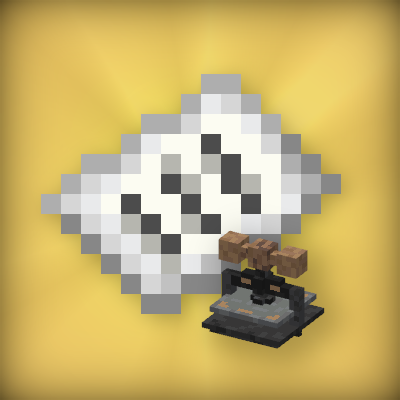
CurseForge · Minecraft mod
PageBlock
Allows players to open real PDF books directly from the game
Choose a version Pick your version below, then grab the matching file.
Quick answer
Which PageBlock release should I use?
beta file 0.2.0
Game version 1.20.1, 1.20.2, 1.20.3
Loader Forge
PageBlock 0.2.0 targets 1.20.1, 1.20.2, 1.20.3 with Forge. Installation on the client is optional. Installation on the dedicated server is optional. No extra mods listed for this file.
Where it goes
Is PageBlock required on the client, server, or both?
Installation on the client is optional. Installation on the dedicated server is optional.
Client Optional
Dedicated server Optional
Loader for this release Forge
Required install it here Optional supported, not mandatory Not supported do not install here Source doesn’t say do not assume
The source marks this as usable on both the client and server.
What else does PageBlock 0.2.0 need?
0.2.0. Change the file and its required mods may change too.
This file does not list any required mods. Do not add a library just because a different file uses it.
This file does not list any required or optional mods.
Before you install it
Add PageBlock without breaking your instance.
Built for PageBlock 0.2.0. Pick another file and the loader, install side or required mods may change.
- 01
Stick to this file
Use 0.2.0. It targets 1.20.1, 1.20.2, 1.20.3 with Forge; another release may have different loader, side or dependency requirements.
- 02
Bring the mods it needs
This file does not list any required mods. Do not add a library just because a different file uses it.
- 03
Put it on the correct side
Installation on the client is optional. Installation on the dedicated server is optional.
- 04
Pick the file you checked
Use the “Get this file” button beside 0.2.0. It opens that exact file at the source.
About this project
What does PageBlock add?
PageBlock
PageBlock is a Minecraft Forge mod that allows you to read real PDF documents directly inside Minecraft.
Whether you're creating adventure maps, RPG servers, educational worlds, or simply want to keep manuals and documentation available in-game, PageBlock provides an immersive reading experience without requiring players to leave Minecraft.
Features
- Read PDF files inside Minecraft.
- Custom PDF Book item.
- Supports reading books placed on lecterns.
Installation
- Install Minecraft Forge 1.20.1.
- Place the PageBlock mod inside your
modsfolder. - Launch Minecraft once.
After the first launch, the mod will automatically create the following folder:
pageblock/
Simply copy your PDF files into this folder.
How to Use
1. Place your PDF files
Copy your PDF documents into the pageblock folder.
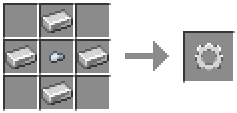
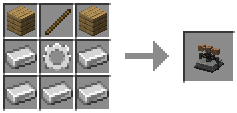
2. Craft the Printing Press
Craft and place the Printing Press.
3. Select a PDF
Open the Printing Press and choose one of the available PDF files.
4. Print the Paper
Insert a paper into the Printing Press to create a printed paper.
5. Craft the Book
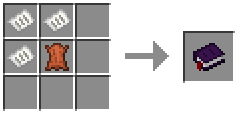
6. Read your PDF
Right-click the PDF Book to open the document.
You can also place the book on a Lectern and read it from there.
Project description from CurseForge.
Pick your setup
PageBlock by Minecraft version and loader
Choose the version and loader you play, then open the matching release.
Minecraft version
1.20.5
1 loader buildMinecraft version
1.20.4
1 loader buildMinecraft version
1.20.3
1 loader buildMinecraft version
1.20.2
1 loader buildMinecraft version
1.20.1
1 loader buildCheck the dependencies, then try the file in a copied instance before changing a world you care about.
Recent files
PageBlock versions and loaders
0.2.0
PageBlock-mc1.20.1-0.2.0beta.jar
12 Jul 2026
Client Optional Server Optional Dependencies No extras listed Listed on Release listing
Check the 1.20.6 · Forge setup 1.20.11.20.21.20.31.20.4 beta
PageBlock-mc1.20.1-0.1beta.jar
11 Jul 2026
Client Source doesn’t say Server Source doesn’t say Dependencies No extras listed Listed on Release listing
Check the 1.20.6 · Forge setup 1.20.1Forge1.20.21.20.3 beta
Looking for an older file? The official CurseForge project page is in Resources.
 mod
CurseForge · Minecraft
Additional Equipment
Adds new modded weapons and items to make pvp more fun
 mod
CurseForge + Modrinth · Minecraft
TheZenithSword
Adding the Zenith Sword to Minecraft, use it to attack groups of enemies from a distance.
 mod
CurseForge · Minecraft
Yueyue Quick Backup
Singleplayer full and file-deduplicated backups, named restore points, quick restore, integrity checks and Carpet fake-player state support.