Minecraft version
Back to mods 
CurseForge · Minecraft mod
Auto Librarian
Automatically rerolls a librarian's enchanted book trades until one of your selected enchantments is offered.
Choose a version Pick your version below, then grab the matching file.
Quick answer
Which Auto Librarian release should I use?
Latest stable file autolibrarian-fabric-mc26.2-1.2.jar
Game version 26.2
Loader Fabric
Auto Librarian autolibrarian-fabric-mc26.2-1.2.jar targets 26.2 with Fabric. The project page does not say whether this file belongs on the client, dedicated server, or both. No extra mods listed for this file.
Where it goes
Is Auto Librarian required on the client, server, or both?
The project page does not say whether this file belongs on the client, dedicated server, or both.
Client Source doesn’t say
Dedicated server Source doesn’t say
Loader for this release Fabric
Required install it here Optional supported, not mandatory Not supported do not install here Source doesn’t say do not assume
The source does not explicitly classify this release as client-only or server-only.
What else does Auto Librarian autolibrarian-fabric-mc26.2-1.2.jar need?
autolibrarian-fabric-mc26.2-1.2.jar. Change the file and its required mods may change too.
This file does not list any required mods. Do not add a library just because a different file uses it.
This file does not list any required or optional mods.
Before you install it
Add Auto Librarian without breaking your instance.
Built for Auto Librarian autolibrarian-fabric-mc26.2-1.2.jar. Pick another file and the loader, install side or required mods may change.
- 01
Stick to this file
Use autolibrarian-fabric-mc26.2-1.2.jar. It targets 26.2 with Fabric; another release may have different loader, side or dependency requirements.
- 02
Bring the mods it needs
This file does not list any required mods. Do not add a library just because a different file uses it.
- 03
Put it on the correct side
The project page does not say whether this file belongs on the client, dedicated server, or both.
- 04
Pick the file you checked
Use the “Get this file” button beside autolibrarian-fabric-mc26.2-1.2.jar. It opens that exact file at the source.
About this project
What does Auto Librarian add?
AutoLibrarian is a lightweight automation mod that takes the tedium out of librarian villager trading. Instead of manually breaking and replacing lecterns for 20–40 minutes to reroll a single enchanted-book trade, AutoLibrarian handles the entire process for you — fast, reliably, and with no commands or config files.
Main Features
- Automatically rerolls a librarian's enchanted-book trade until one of your selected enchantments appears.
- Pick enchantments on a selection screen (K by default).
- Start and stop the loop with a single key (J by default) or by .al chat commands.
- 28 supported enchantments, including Mending, Unbreaking III, Efficiency V, and more. (SEE THE FULL LIST DOWN BELOW)
- Plays a soundeffect and announces the find on the action bar when a match is found, then stops automatically.
- Breaks the librarian's own lectern, picks up the drop, and places it back. No spare lecterns required.
- Auto-swaps to an axe (if one is in your hotbar) while breaking, then swaps back to your previous slot.
- Client-side only — works on any server, no server-side install required.
See the full Enchantment list here:
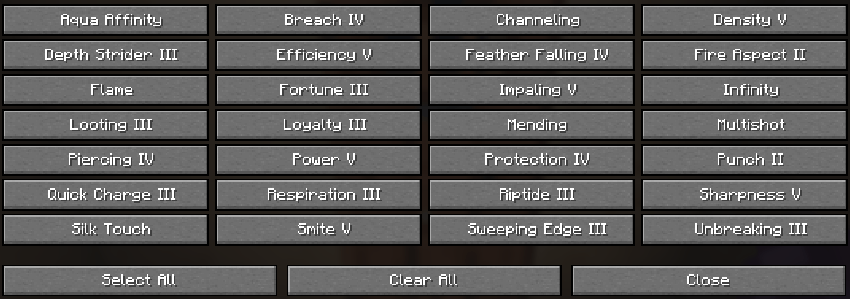
How It Works
- Press K to open the selection screen. Toggle the enchantments you want — green ✓ means selected. Close the screen.
- Stand within ~3 blocks of a librarian villager and its lectern. An axe in your hotbar is recommended.
- Press J to start (or use
.al <enchantment>in chat). The mod will- Find the nearest librarian within 5 blocks.
- Open its trade list and read the offered enchanted book.
- Compare the book's enchantment against your selection.
- If it's a match → stop, play the sound, and announce the find.
- If not → break the lectern, wait for the drop to be picked up, place the lectern back, check trades again.
- Repeat until a match is found or you press J again to stop.
Project description from CurseForge.
Pick your setup
Auto Librarian by Minecraft version and loader
Choose the version and loader you play, then open the matching release.
Check the dependencies, then try the file in a copied instance before changing a world you care about.
Recent files
Auto Librarian versions and loaders
autolibrarian-fabric-mc26.2-1.2.jar
9 Aug 2026
Client Source doesn’t say Server Source doesn’t say Dependencies No extras listed Listed on Release listing
Check the 26.2 · Fabric setup Fabric26.2 release
autolibrarian-fabric-mc26.2-1.1.jar
26 Jul 2026
Client Source doesn’t say Server Source doesn’t say Dependencies No extras listed Listed on Release listing
Check the 26.2 · Fabric setup Fabric26.2 release
autolibrarian-fabric-mc26.2-1.0.jar
autolibrarian-1.0.jar
12 Jul 2026
Client Source doesn’t say Server Source doesn’t say Dependencies No extras listed Listed on Release listing
Check the 26.2 · Fabric setup Fabric26.2 release
Looking for an older file? The official CurseForge project page is in Resources.
 mod
mod CurseForge + Modrinth · Minecraft
GD BetterLoot
Improves vanilla loot generated in structures.
 mod
mod CurseForge · Minecraft
FreeCam by Zergatul
This mod allows you to move camera freely
 mod
mod CurseForge · Minecraft
MalisisDoorsReborn
Animated doors and custom door creation with millions of possibilities! — Re-imagined from the original MalisisDoors mod by Ordinastie.