Minecraft version
Back to mods 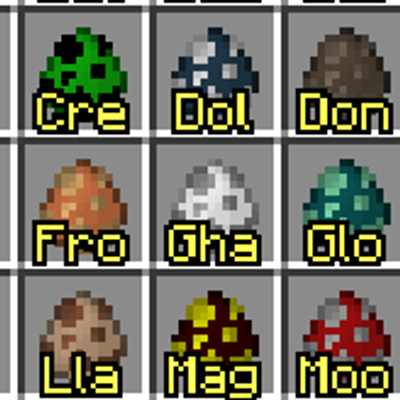
CurseForge · Minecraft mod
Item Nameplate
Used to distinguish items with the same texture at a glance
Choose a version Pick your version below, then grab the matching file.
Quick answer
Which Item Nameplate release should I use?
Latest stable file item_nameplate-26.1.2-neoforge-1.3
Game version 26.1.2
Loader NeoForge
Item Nameplate item_nameplate-26.1.2-neoforge-1.3 targets 26.1.2 with NeoForge. The project page does not say whether this file belongs on the client, dedicated server, or both. No extra mods listed for this file.
Where it goes
Is Item Nameplate required on the client, server, or both?
The project page does not say whether this file belongs on the client, dedicated server, or both.
Client Source doesn’t say
Dedicated server Source doesn’t say
Loader for this release NeoForge
Required install it here Optional supported, not mandatory Not supported do not install here Source doesn’t say do not assume
The source does not explicitly classify this release as client-only or server-only.
What else does Item Nameplate item_nameplate-26.1.2-neoforge-1.3 need?
item_nameplate-26.1.2-neoforge-1.3. Change the file and its required mods may change too.
This file does not list any required mods. Do not add a library just because a different file uses it.
This file does not list any required or optional mods.
Before you install it
Add Item Nameplate without breaking your instance.
Built for Item Nameplate item_nameplate-26.1.2-neoforge-1.3. Pick another file and the loader, install side or required mods may change.
- 01
Stick to this file
Use item_nameplate-26.1.2-neoforge-1.3. It targets 26.1.2 with NeoForge; another release may have different loader, side or dependency requirements.
- 02
Bring the mods it needs
This file does not list any required mods. Do not add a library just because a different file uses it.
- 03
Put it on the correct side
The project page does not say whether this file belongs on the client, dedicated server, or both.
- 04
Pick the file you checked
Use the “Get this file” button beside item_nameplate-26.1.2-neoforge-1.3. It opens that exact file at the source.
About this project
What does Item Nameplate add?
Item Nameplate
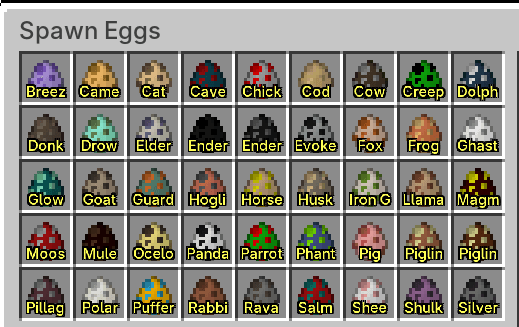
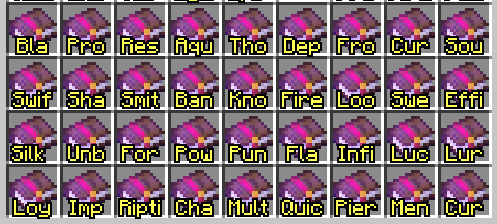
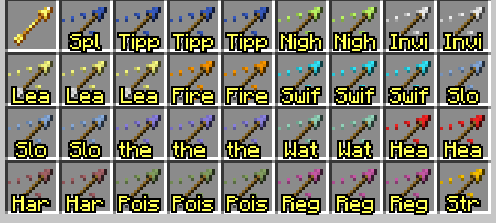
Renders item names directly over item icons, making it easy to distinguish items that share the same texture but serve different purposes.
Features
- Displays item names over item icons in inventories, containers, and other GUI screens.
- Text overlays the item texture without taking up extra space beneath the icon.
- Configure which items display their names through a configuration file.
- Supports matching items by item class or item tag.
Compatibility for More Items and Mods
Players and modpack authors can edit the configuration file to add name display support for more items.
For details, see the Wiki.
If you would like to provide default compatibility for other mods, add the file to src/main/resources/item_nameplate/default_rules/ in this Git repository.
Each JSON file is included in the mod jar and copied to the player's config/item_nameplate_rules/ directory when the game starts. Existing files with the same name will not be overwritten.
You can increase the font size in the configuration file, or decrease it to display more information.
Project description from CurseForge.
Pick your setup
Item Nameplate by Minecraft version and loader
Choose the version and loader you play, then open the matching release.
Minecraft version
1.21.1
1 loader buildMinecraft version
1.20.1
1 loader buildCheck the dependencies, then try the file in a copied instance before changing a world you care about.
Recent files
Item Nameplate versions and loaders
item_nameplate-26.1.2-neoforge-1.3
item_nameplate-26.1.2-neoforge-1.3.jar
15 Sept 2026
Client Source doesn’t say Server Source doesn’t say Dependencies No extras listed Listed on Release listing
Check the 26.1.2 · NeoForge setup NeoForge26.1.2 release
Item Nameplate 1.21.1 NeoForge 1.3
item_nameplate-1.21.1-neoforge-1.3.jar
15 Sept 2026
Client Source doesn’t say Server Source doesn’t say Dependencies No extras listed Listed on Release listing
Check the 1.21.1 · NeoForge setup 1.21.1NeoForge release
Item Nameplate 1.20.1 Forge 1.3
item_nameplate-1.20.1-forge-1.3.jar
15 Sept 2026
Client Source doesn’t say Server Source doesn’t say Dependencies No extras listed Listed on Release listing
Check the 1.20.1 · Forge setup 1.20.1Forge release
item_nameplate-1.20.1-forge-1.2.jar
17 Jul 2026
Client Source doesn’t say Server Source doesn’t say Dependencies No extras listed Listed on Release listing
Check the 1.20.1 · Forge setup 1.20.1Forge release
item_nameplate-1.21.1-neoforge-1.2.jar
17 Jul 2026
Client Source doesn’t say Server Source doesn’t say Dependencies No extras listed Listed on Release listing
Check the 1.21.1 · NeoForge setup 1.21.1NeoForge release
item_nameplate-1.21.1-neoforge-1.1.jar
13 Jul 2026
Client Source doesn’t say Server Source doesn’t say Dependencies No extras listed Listed on Release listing
Check the 1.21.1 · NeoForge setup 1.21.1NeoForge release
item_nameplate-1.20.1-forge-1.1.jar
13 Jul 2026
Client Source doesn’t say Server Source doesn’t say Dependencies No extras listed Listed on Release listing
Check the 1.20.1 · Forge setup 1.20.1Forge release
item_nameplate-1.0.jar
12 Jul 2026
Client Source doesn’t say Server Source doesn’t say Dependencies No extras listed Listed on Release listing
Check the 1.20.1 · Forge setup 1.20.1Forge release
Looking for an older file? The official CurseForge project page is in Resources.
 mod
mod CurseForge · Minecraft
EnhancedAnvil
Break vanilla enchantment limits with Enhanced Anvil! Combine incompatible enchantments and disenchant gear over obsidian, extracting enchants into books, splitting enchanted books, and clearing prior-work costs.
 mod
mod CurseForge · Minecraft
Wiki Zoomer Unofficial
Unofficial version of Wiki Zoomer
 mod
mod CurseForge · Minecraft
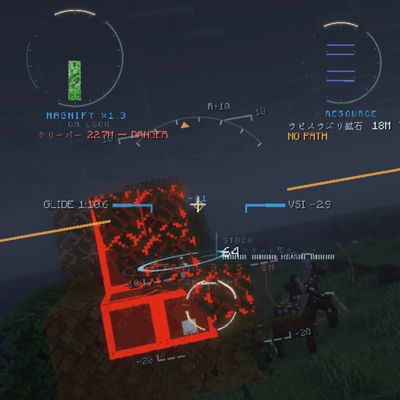
VECTOR HUD
A cinematic, fully vector-drawn HUD: holographic terrain map, flight instruments, threat alerts, and ten switchable themes. Every element is geometry, not a texture.