Minecraft version
Back to mods 
CurseForge · Minecraft mod
Replace
Mass Fill + New Z Menu – Select an area, fill or break it in bulk. All processed on the server, no lag. Clean interface and new integrated Z menu.
Choose a version Pick your version below, then grab the matching file.
Quick answer
Which Replace release should I use?
Latest stable file autoreplace-1.2.0+1.20.1-forge.jar
Game version 1.20.1
Loader Forge
Replace autoreplace-1.2.0+1.20.1-forge.jar targets 1.20.1 with Forge. The project page does not say whether this file belongs on the client, dedicated server, or both. No extra mods listed for this file.
Where it goes
Is Replace required on the client, server, or both?
The project page does not say whether this file belongs on the client, dedicated server, or both.
Client Source doesn’t say
Dedicated server Source doesn’t say
Loader for this release Forge
Required install it here Optional supported, not mandatory Not supported do not install here Source doesn’t say do not assume
The source does not explicitly classify this release as client-only or server-only.
What else does Replace autoreplace-1.2.0+1.20.1-forge.jar need?
autoreplace-1.2.0+1.20.1-forge.jar. Change the file and its required mods may change too.
This file does not list any required mods. Do not add a library just because a different file uses it.
This file does not list any required or optional mods.
Before you install it
Add Replace without breaking your instance.
Built for Replace autoreplace-1.2.0+1.20.1-forge.jar. Pick another file and the loader, install side or required mods may change.
- 01
Stick to this file
Use autoreplace-1.2.0+1.20.1-forge.jar. It targets 1.20.1 with Forge; another release may have different loader, side or dependency requirements.
- 02
Bring the mods it needs
This file does not list any required mods. Do not add a library just because a different file uses it.
- 03
Put it on the correct side
The project page does not say whether this file belongs on the client, dedicated server, or both.
- 04
Pick the file you checked
Use the “Get this file” button beside autoreplace-1.2.0+1.20.1-forge.jar. It opens that exact file at the source.
About this project
What does Replace add?
Auto Replace

Select a region · mass-break · mass-fill — server-side, so blocks stay gone.
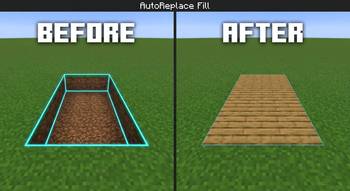
AutoReplace is a lightweight Fabric utility for Minecraft 26.2. Select a box like Litematica and break or fill the entire area in one action. Breaks and fills are executed on the server, so nothing reverts in singleplayer or multiplayer.
📋 Features
- Area selection — right-click two corners (cyan outline, Litematica-style)
- Mass break — break one block inside the selection → matching blocks in the box break server-side
- Mass fill — pick a block from your hand or the world and fill the selection automatically
- Simple Z menu — clean panel with toggles, tooltips, and a fill block preview
- Server authority — no ghost blocks / no "blocks come back" failure
- Paper plugin (optional) — same-network support for Paper/Spigot multiplayer servers
- Safety caps — max 4096 blocks per action, range checks, unbreakable blocks ignored
🎮 How to Use
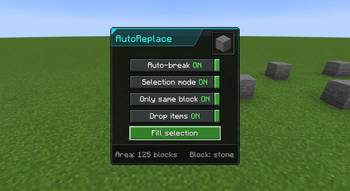
- Press Z to open the menu
- Enable Selection mode
- Right-click the first corner, then right-click the second corner
- Choose what you want:
🔨 Break
- Turn Auto-break on
- Mine one block inside the selection
- The server breaks the rest (same block type if "Same block only" is on)
🧱 Fill
- Hold a block → Use held block or Pick from world and right-click a block
- With Fill on select enabled, the selection fills automatically
- Or press ▶ Fill selection
⚙️ Menu Options
| Option | Description |
|---|---|
| Auto-break | Mass-break when you mine a block inside the selection |
| Selection mode | Right-click two corners to set the box |
| Same block only | Only break blocks matching the one you mined |
| Drop items | Survival drops (Creative never drops) |
| Use held block | Set fill material from the item you're holding |
| Pick from world | Right-click a world block to set fill material |
| Fill on select | Auto-fill after picking a block |
| Replace blocks | Fill existing blocks (not just air) |
| ▶ Fill selection | Place the chosen block throughout the area |
📦 Requirements
| Item | Specification |
|---|---|
| Minecraft | 26.2 |
| Loader | Fabric |
| Dependency | Fabric API |
| Java | 25+ (game requirement) |
🎮 Singleplayer
Only the mod + Fabric API in your mods folder.
🌐 Multiplayer (Paper / Spigot)
- Players install the mod + Fabric API on the client
- Put AutoReplacePlugin in the server
pluginsfolder - Restart the server
Without the plugin on Paper, mass break/fill will not persist.
⌨️ Controls
| Key | Action |
|---|---|
| Z | Open / close menu (rebindable in Controls → AutoReplace) |
⚠️ Notes
- Adventure / Spectator modes cannot break or fill
- Unbreakable blocks (e.g. bedrock) are ignored
- Survival fill consumes items from inventory; Creative does not
- Large selections are capped at 4096 blocks per action
🖼️ Gallery (optional screenshots)
- Cyan selection box in the world
- Z menu panel with toggles
- Before / after mass break
- Before / after mass fill
📄 License
CC0-1.0 (public domain dedication) — free to use, modify, and redistribute.
👏 Credits
Developed Black_br 26.2 with server-side networking so selections actually stay.
Project description from CurseForge.
Pick your setup
Replace by Minecraft version and loader
Choose the version and loader you play, then open the matching release.
Minecraft version
26.1.2
1 loader buildMinecraft version
26.1
1 loader buildMinecraft version
1.21.11
1 loader buildMinecraft version
1.21.5
1 loader buildMinecraft version
1.21.4
1 loader buildMinecraft version
1.21.3
1 loader buildMinecraft version
1.21.2
1 loader buildMinecraft version
1.21.1
1 loader buildMinecraft version
1.21
1 loader buildMinecraft version
1.20.6
1 loader buildMinecraft version
1.20.4
1 loader buildShowing the newest 12 of 15 game versions. Older files are in the list below.
Check the dependencies, then try the file in a copied instance before changing a world you care about.
Recent files
Replace versions and loaders
autoreplace-1.2.0+1.20.1-forge.jar
18 Jul 2026
Client Source doesn’t say Server Source doesn’t say Dependencies No extras listed Listed on Release listing
Check the 1.20.1 · Forge setup 1.20.1Forge release
autoreplace-1.2.0+1.21.2.jar
18 Jul 2026
Client Source doesn’t say Server Source doesn’t say Dependencies 1 required · 1 unchecked Listed on Release listing
Check the 1.21.2 · Fabric setup Fabric1.21.2 release
autoreplace-1.2.0+1.20.4.jar
18 Jul 2026
Client Source doesn’t say Server Source doesn’t say Dependencies 1 required · 1 unchecked Listed on Release listing
Check the 1.20.4 · Fabric setup Fabric1.20.4 release
autoreplace-1.2.0+1.20.2.jar
18 Jul 2026
Client Source doesn’t say Server Source doesn’t say Dependencies 1 required · 1 unchecked Listed on Release listing
Check the 1.20.2 · Fabric setup 1.20.2Fabric release
autoreplace-1.2.0+1.20.jar
18 Jul 2026
Client Source doesn’t say Server Source doesn’t say Dependencies 1 required · 1 unchecked Listed on Release listing
Check the 1.20 · Fabric setup Fabric1.20 release
autoreplace-1.2.0+1.20.6.jar
18 Jul 2026
Client Source doesn’t say Server Source doesn’t say Dependencies 1 required · 1 unchecked Listed on Release listing
Check the 1.20.6 · Fabric setup Fabric1.20.6 release
autoreplace-1.2.0+1.21.jar
18 Jul 2026
Client Source doesn’t say Server Source doesn’t say Dependencies 1 required · 1 unchecked Listed on Release listing
Check the 1.21 · Fabric setup 1.21Fabric release
autoreplace-1.2.0+1.21.1.jar
18 Jul 2026
Client Source doesn’t say Server Source doesn’t say Dependencies 1 required · 1 unchecked Listed on Release listing
Check the 1.21.1 · Fabric setup Fabric1.21.1 release
autoreplace-1.2.0+1.21.3.jar
18 Jul 2026
Client Source doesn’t say Server Source doesn’t say Dependencies 1 required · 1 unchecked Listed on Release listing
Check the 1.21.3 · Fabric setup Fabric1.21.3 release
autoreplace-1.2.0+1.21.11.jar
17 Jul 2026
Client Source doesn’t say Server Source doesn’t say Dependencies 1 required · 1 unchecked Listed on Release listing
Check the 1.21.11 · Fabric setup Fabric1.21.11 release
autoreplace-1.2.0 (1).jar
16 Jul 2026
Client Source doesn’t say Server Source doesn’t say Dependencies No extras listed Listed on Release listing
Check the 26.2 · Fabric setup Fabric26.2 release
autoreplace-1.2.0+26.1.jar
16 Jul 2026
Client Source doesn’t say Server Source doesn’t say Dependencies No extras listed Listed on Release listing
Check the 26.1 · Fabric setup Fabric26.1 alpha
Looking for an older file? The official CurseForge project page is in Resources.
 mod
mod CurseForge + Modrinth · Minecraft
DG Natural Reproduction
Natural Reproduction allows all passive mobs in Minecraft to autonomously breed and multiply when environmental conditions are ideal, while rewarding thoughtful pasture management and multi-generational genetics investment.
 mod
mod CurseForge + Modrinth · Minecraft
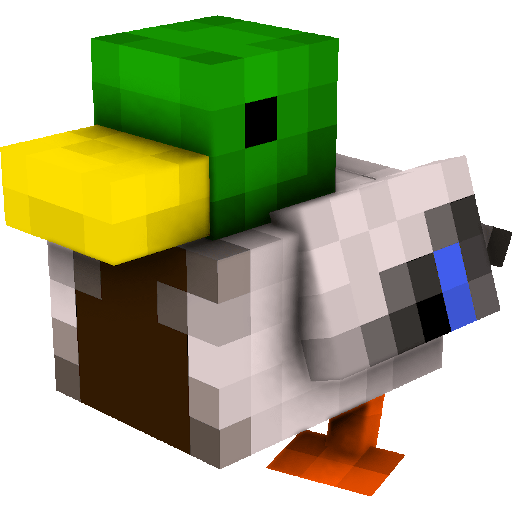
Untitled Duck Mod (Fabric)
Ducks for Forge and Fabric! Powered by geckolib and architectury.
 mod
mod CurseForge · Minecraft
MMO Econ
A server-side Economy & GUI Shop mod for NeoForge & Fabric!