Minecraft version
Back to mods 
CurseForge · Minecraft mod
Chat Customizer
Complete, live-preview customization for the Minecraft chat HUD.
Choose a version Pick your version below, then grab the matching file.
Quick answer
Which Chat Customizer release should I use?
Latest stable file Chat Customizer-NeoForge-1.21.10-0.1.0.jar
Game version 1.21.10
Loader NeoForge
Chat Customizer-NeoForge-1.21.10-0.1.0.jar targets 1.21.10 with NeoForge. The project page does not say whether this file belongs on the client, dedicated server, or both. No extra mods listed for this file.
Where it goes
Is Chat Customizer required on the client, server, or both?
The project page does not say whether this file belongs on the client, dedicated server, or both.
Client Source doesn’t say
Dedicated server Source doesn’t say
Loader for this release NeoForge
Required install it here Optional supported, not mandatory Not supported do not install here Source doesn’t say do not assume
The source does not explicitly classify this release as client-only or server-only.
What else does Chat Customizer-NeoForge-1.21.10-0.1.0.jar need?
Chat Customizer-NeoForge-1.21.10-0.1.0.jar. Change the file and its required mods may change too.
This file does not list any required mods. Do not add a library just because a different file uses it.
This file does not list any required or optional mods.
Before you install it
Add Chat Customizer without breaking your instance.
Built for Chat Customizer-NeoForge-1.21.10-0.1.0.jar. Pick another file and the loader, install side or required mods may change.
- 01
Stick to this file
Use Chat Customizer-NeoForge-1.21.10-0.1.0.jar. It targets 1.21.10 with NeoForge; another release may have different loader, side or dependency requirements.
- 02
Bring the mods it needs
This file does not list any required mods. Do not add a library just because a different file uses it.
- 03
Put it on the correct side
The project page does not say whether this file belongs on the client, dedicated server, or both.
- 04
Pick the file you checked
Use the “Get this file” button beside Chat Customizer-NeoForge-1.21.10-0.1.0.jar. It opens that exact file at the source.
About this project
What does Chat Customizer add?
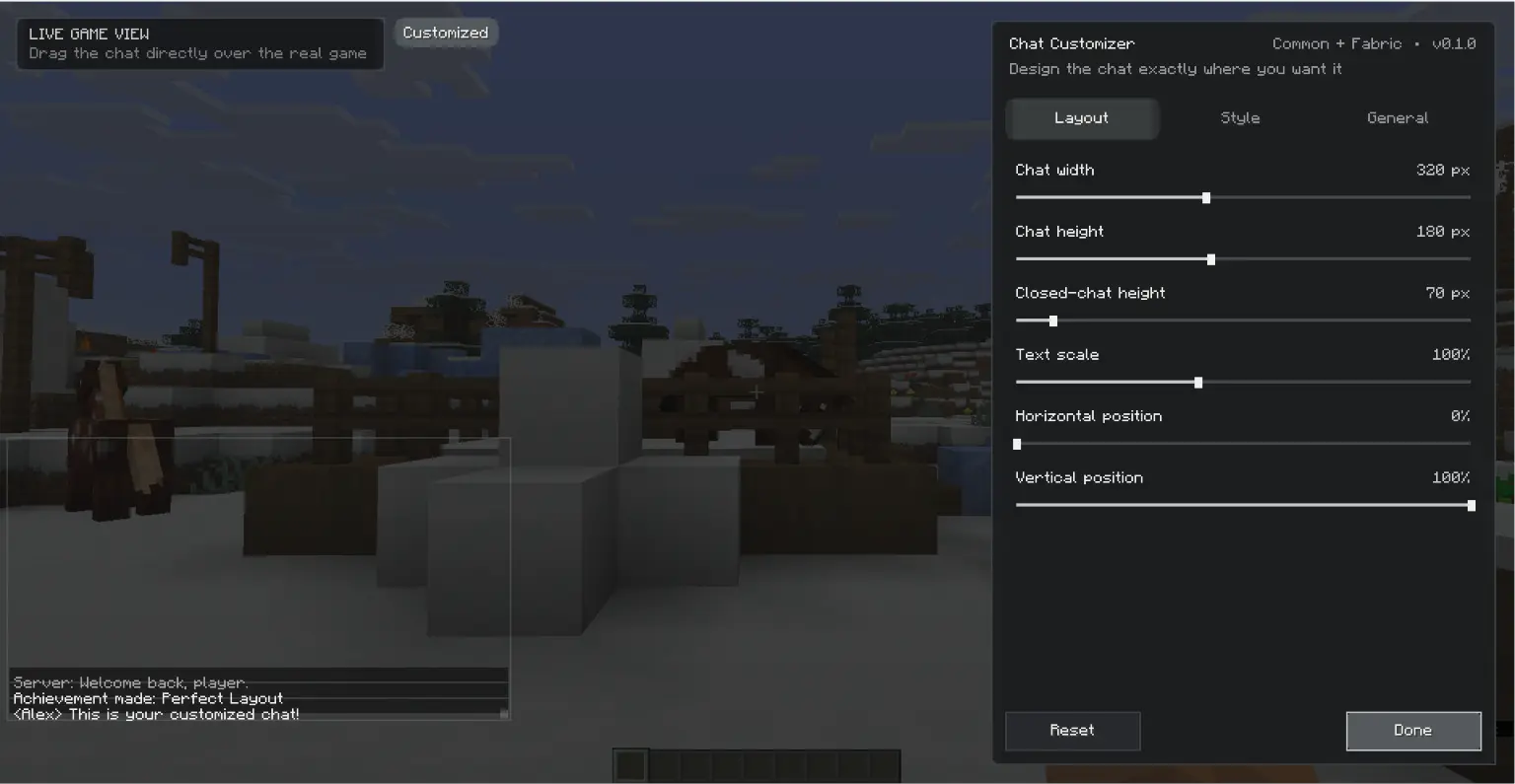
Chat Customizer
Chat Customizer is a client-side Minecraft mod for detailed control over the chat HUD while preserving the original vanilla appearance by default.
Features
- Drag and reposition the chat directly over the real game screen
- Separate focused and unfocused width and height controls
- Text scale, opacity, background opacity, and line spacing
- Vanilla per-line, unified panel, outline-only, and transparent background styles
- Corner radius and color presets
- Optional formatted-text color override
- Configurable message lifetime and fade duration
- Optional movement of the chat input with the chat panel
- English and Arabic localization
- Rebindable settings key (
Jby default) - Reset button that restores vanilla chat behavior
License
All Rights Reserved. Redistribution, modification, and commercial use require explicit permission from the author.
Project description from CurseForge.
Pick your setup
Chat Customizer by Minecraft version and loader
Choose the version and loader you play, then open the matching release.
Minecraft version
26.1.2
3 loader buildsMinecraft version
26.1.1
3 loader buildsMinecraft version
26.1
3 loader buildsMinecraft version
1.21.11
3 loader buildsMinecraft version
1.21.10
3 loader buildsCheck the dependencies, then try the file in a copied instance before changing a world you care about.
Recent files
Chat Customizer versions and loaders
Chat Customizer-NeoForge-1.21.10-0.1.0.jar
16 Jul 2026
Client Source doesn’t say Server Source doesn’t say Dependencies No extras listed Listed on Release listing
Check the 1.21.10 · NeoForge setup NeoForge1.21.10 release
Chat Customizer-Forge-1.21.10-0.1.0.jar
16 Jul 2026
Client Source doesn’t say Server Source doesn’t say Dependencies No extras listed Listed on Release listing
Check the 1.21.10 · Forge setup Forge1.21.10 release
Chat Customizer-Fabric-1.21.10-0.1.0.jar
16 Jul 2026
Client Source doesn’t say Server Source doesn’t say Dependencies No extras listed Listed on Release listing
Check the 1.21.10 · Fabric setup Fabric1.21.10 release
Chat Customizer-NeoForge-1.21.11-0.1.0.jar
16 Jul 2026
Client Source doesn’t say Server Source doesn’t say Dependencies No extras listed Listed on Release listing
Check the 1.21.11 · NeoForge setup NeoForge1.21.11 release
Chat Customizer-Forge-1.21.11-0.1.0.jar
16 Jul 2026
Client Source doesn’t say Server Source doesn’t say Dependencies No extras listed Listed on Release listing
Check the 1.21.11 · Forge setup Forge1.21.11 release
Chat Customizer-Fabric-1.21.11-0.1.0.jar
16 Jul 2026
Client Source doesn’t say Server Source doesn’t say Dependencies No extras listed Listed on Release listing
Check the 1.21.11 · Fabric setup Fabric1.21.11 release
Chat Customizer-NeoForge-26.1-0.1.0.jar
16 Jul 2026
Client Source doesn’t say Server Source doesn’t say Dependencies No extras listed Listed on Release listing
Check the 26.1 · NeoForge setup NeoForge26.1 release
Chat Customizer-Forge-26.1-0.1.0.jar
16 Jul 2026
Client Source doesn’t say Server Source doesn’t say Dependencies No extras listed Listed on Release listing
Check the 26.1 · Forge setup Forge26.1 release
Chat Customizer-Fabric-26.1-0.1.0.jar
16 Jul 2026
Client Source doesn’t say Server Source doesn’t say Dependencies No extras listed Listed on Release listing
Check the 26.1 · Fabric setup Fabric26.1 release
Chat Customizer-NeoForge-26.1.1-0.1.0.jar
16 Jul 2026
Client Source doesn’t say Server Source doesn’t say Dependencies No extras listed Listed on Release listing
Check the 26.1.1 · NeoForge setup NeoForge26.1.1 release
Chat Customizer-Forge-26.1.1-0.1.0.jar
16 Jul 2026
Client Source doesn’t say Server Source doesn’t say Dependencies No extras listed Listed on Release listing
Check the 26.1.1 · Forge setup Forge26.1.1 release
Chat Customizer-Fabric-26.1.1-0.1.0.jar
16 Jul 2026
Client Source doesn’t say Server Source doesn’t say Dependencies No extras listed Listed on Release listing
Check the 26.1.1 · Fabric setup Fabric26.1.1 release
Looking for an older file? The official CurseForge project page is in Resources.
 mod
CurseForge · Minecraft
XP: RPG Damage Indicator
Real-time damage numbers with 5+ animated styles, fully customizable via resource packs
 mod
CurseForge · Minecraft
Roguelite Advancements
Advancement now give permanent player buffs. Health, Damage, Reach, Step Assist, Pick up radius and much more.
 mod
CurseForge · Minecraft
Weather Preserves | SCP-853
SCP-853 is a group of sealed jars containing strange substances. Each jar is labeled with a weather pattern and a year. Opening one releases the weather preserved inside.