Minecraft version
Back to mods 
CurseForge · Minecraft mod
Mods List
A client-side Fabric and Quilt mod with a searchable installed-mod list, favorites, metadata, and real mod icons when available.
Choose a version Pick your version below, then grab the matching file.
Quick answer
Which Mods List release should I use?
Latest stable file mods-list-quilt-1.21.1-0.1.0-alpha.6.jar
Game version 1.21.1
Loader Quilt
Mods List mods-list-quilt-1.21.1-0.1.0-alpha.6.jar targets 1.21.1 with Quilt. The project page does not say whether this file belongs on the client, dedicated server, or both. No extra mods listed for this file.
Where it goes
Is Mods List required on the client, server, or both?
The project page does not say whether this file belongs on the client, dedicated server, or both.
Client Source doesn’t say
Dedicated server Source doesn’t say
Loader for this release Quilt
Required install it here Optional supported, not mandatory Not supported do not install here Source doesn’t say do not assume
The source does not explicitly classify this release as client-only or server-only.
What else does Mods List mods-list-quilt-1.21.1-0.1.0-alpha.6.jar need?
mods-list-quilt-1.21.1-0.1.0-alpha.6.jar. Change the file and its required mods may change too.
This file does not list any required mods. Do not add a library just because a different file uses it.
This file does not list any required or optional mods.
Before you install it
Add Mods List without breaking your instance.
Built for Mods List mods-list-quilt-1.21.1-0.1.0-alpha.6.jar. Pick another file and the loader, install side or required mods may change.
- 01
Stick to this file
Use mods-list-quilt-1.21.1-0.1.0-alpha.6.jar. It targets 1.21.1 with Quilt; another release may have different loader, side or dependency requirements.
- 02
Bring the mods it needs
This file does not list any required mods. Do not add a library just because a different file uses it.
- 03
Put it on the correct side
The project page does not say whether this file belongs on the client, dedicated server, or both.
- 04
Pick the file you checked
Use the “Get this file” button beside mods-list-quilt-1.21.1-0.1.0-alpha.6.jar. It opens that exact file at the source.
About this project
What does Mods List add?
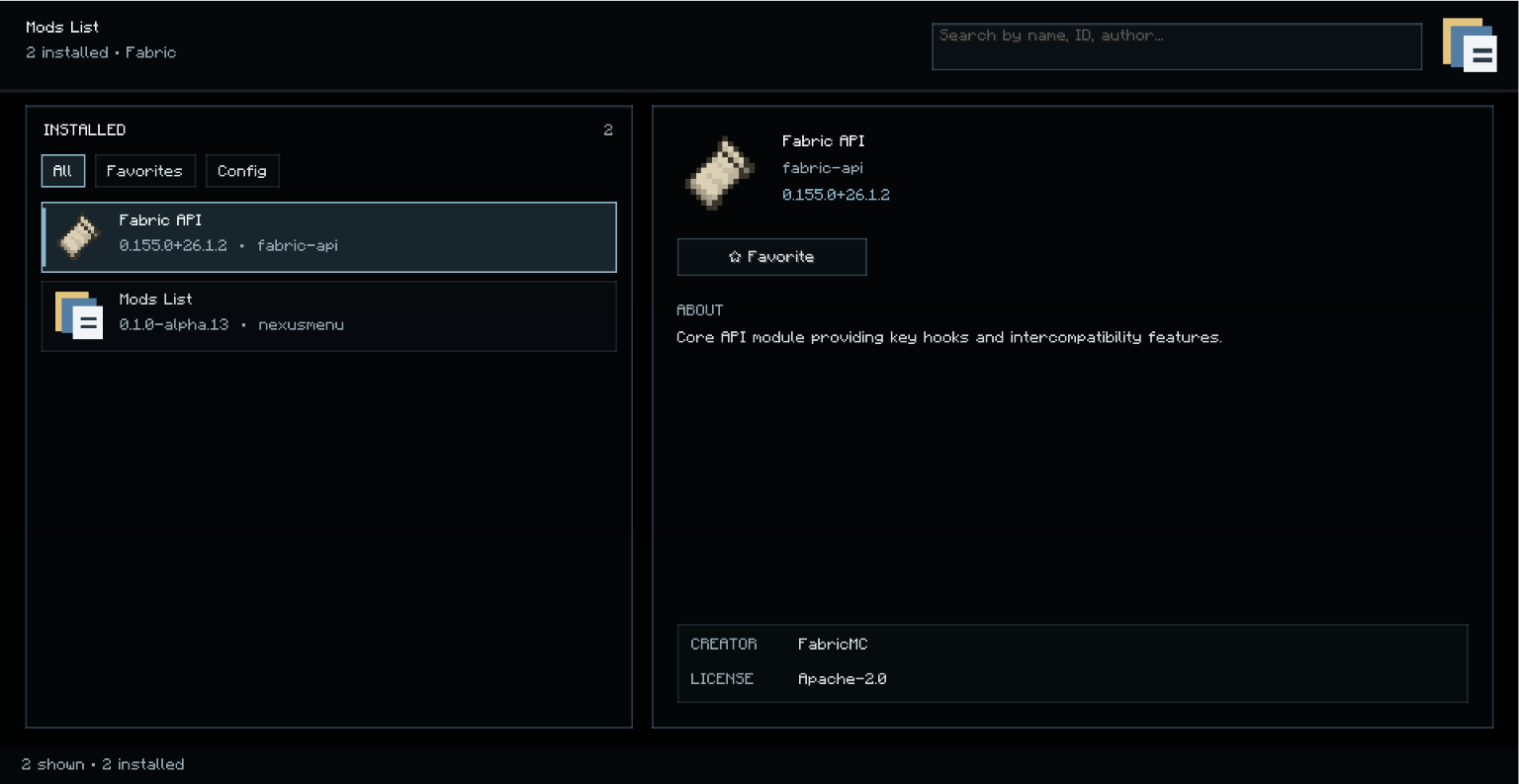
Mods List
Mods List is a client-side mod for browsing the mods that are actually installed in the current Minecraft instance.
Features
- Displays the mods reported by the active mod loader.
- Search by mod name, ID, or author.
- Filters for all mods, favorites, and mods with a compatible configuration screen.
- Favorites are saved locally.
- Shows available metadata such as version, description, author, and license.
- Uses each mod's declared icon when a readable icon is available; otherwise, it shows a neutral generated placeholder.
- Uses a transparent interface so the Minecraft background remains visible.
- Opens from the small Mods List logo on the title/options screens or with the default
Nkey.
Scope and limitations
Mods List does not download, install, update, enable, or disable mods. A configuration button is only available when a compatible configuration screen is exposed. Some mods do not provide a readable icon, so a placeholder may be shown for them.
This is a client-side mod. It does not need to be installed on a Minecraft server.
Loaders and dependencies
- Fabric and Quilt builds are published separately.
- Fabric builds require Fabric API.
- Supported Minecraft versions are listed on each file in the Versions tab.
Project description from CurseForge.
Pick your setup
Mods List by Minecraft version and loader
Choose the version and loader you play, then open the matching release.
Minecraft version
1.21.11
1 loader buildMinecraft version
1.21.1
2 loader buildsCheck the dependencies, then try the file in a copied instance before changing a world you care about.
Recent files
Mods List versions and loaders
mods-list-quilt-1.21.1-0.1.0-alpha.6.jar
17 Jul 2026
Client Source doesn’t say Server Source doesn’t say Dependencies No extras listed Listed on Release listing
Check the 1.21.1 · Quilt setup 1.21.1Quilt release
mods-list-quilt-26.1.2-0.1.0-alpha.13.jar
17 Jul 2026
Client Source doesn’t say Server Source doesn’t say Dependencies No extras listed Listed on Release listing
Check the 26.1.2 · Quilt setup Quilt26.1.2 release
mods-list-fabric-1.21.1-0.1.0-alpha.6.jar
17 Jul 2026
Client Source doesn’t say Server Source doesn’t say Dependencies No extras listed Listed on Release listing
Check the 1.21.1 · Fabric setup Fabric1.21.1 release
mods-list-fabric-1.21.11-0.1.0-alpha.14.jar
17 Jul 2026
Client Source doesn’t say Server Source doesn’t say Dependencies No extras listed Listed on Release listing
Check the 1.21.11 · Fabric setup Fabric1.21.11 release
mods-list-fabric-26.1.2-0.1.0-alpha.13.jar
17 Jul 2026
Client Source doesn’t say Server Source doesn’t say Dependencies No extras listed Listed on Release listing
Check the 26.1.2 · Fabric setup Fabric26.1.2 release
Looking for an older file? The official CurseForge project page is in Resources.
 mod
CurseForge · Minecraft
Rising Gears Core
Rising Gears Core is the central integration mod for the Rising Gears modpack. It connects and customizes various mods to create a cohesive gameplay experience, including equipment progression, economy, automation, and gameplay mechanics.
 mod
CurseForge · Minecraft
Diosesmon QOL Improvements
An unofficial Diosesmon addon with a Trainer Tablet for chat history, private messages, payment notes, customizable notifications and teletransports.
 mod
CurseForge · Minecraft
Circulation Flow Networks
Wireless energy networks — no cables, no limits.