Minecraft version
Back to mods 
CurseForge · Minecraft mod
Modern Model Format
Allows 1.21.11 models to load in older versions
Choose a version Pick your version below, then grab the matching file.
Quick answer
Which Modern Model Format release should I use?
Latest stable file ModernModelFormat-1.3.0.jar
Game version 1.21.2-Snapshot, 1.21, 1.20.2-Snapshot
Loader Fabric
Modern Model Format ModernModelFormat-1.3.0.jar targets 1.21.2-Snapshot, 1.21, 1.20.2-Snapshot with Fabric. The project page does not say whether this file belongs on the client, dedicated server, or both. No extra mods listed for this file.
Where it goes
Is Modern Model Format required on the client, server, or both?
The project page does not say whether this file belongs on the client, dedicated server, or both.
Client Source doesn’t say
Dedicated server Source doesn’t say
Loader for this release Fabric
Required install it here Optional supported, not mandatory Not supported do not install here Source doesn’t say do not assume
The source does not explicitly classify this release as client-only or server-only.
What else does Modern Model Format ModernModelFormat-1.3.0.jar need?
ModernModelFormat-1.3.0.jar. Change the file and its required mods may change too.
This file does not list any required mods. Do not add a library just because a different file uses it.
This file does not list any required or optional mods.
Before you install it
Add Modern Model Format without breaking your instance.
Built for Modern Model Format ModernModelFormat-1.3.0.jar. Pick another file and the loader, install side or required mods may change.
- 01
Stick to this file
Use ModernModelFormat-1.3.0.jar. It targets 1.21.2-Snapshot, 1.21, 1.20.2-Snapshot with Fabric; another release may have different loader, side or dependency requirements.
- 02
Bring the mods it needs
This file does not list any required mods. Do not add a library just because a different file uses it.
- 03
Put it on the correct side
The project page does not say whether this file belongs on the client, dedicated server, or both.
- 04
Pick the file you checked
Use the “Get this file” button beside ModernModelFormat-1.3.0.jar. It opens that exact file at the source.
About this project
What does Modern Model Format add?
Allows the use of the 1.21.11 model format in older versions with the help of black magic, specifically allowing all three axis (XYZ) rotation and incrementes larger/smaller than 22.5°, additionally removing the 3x3x3 size constraint.
Example
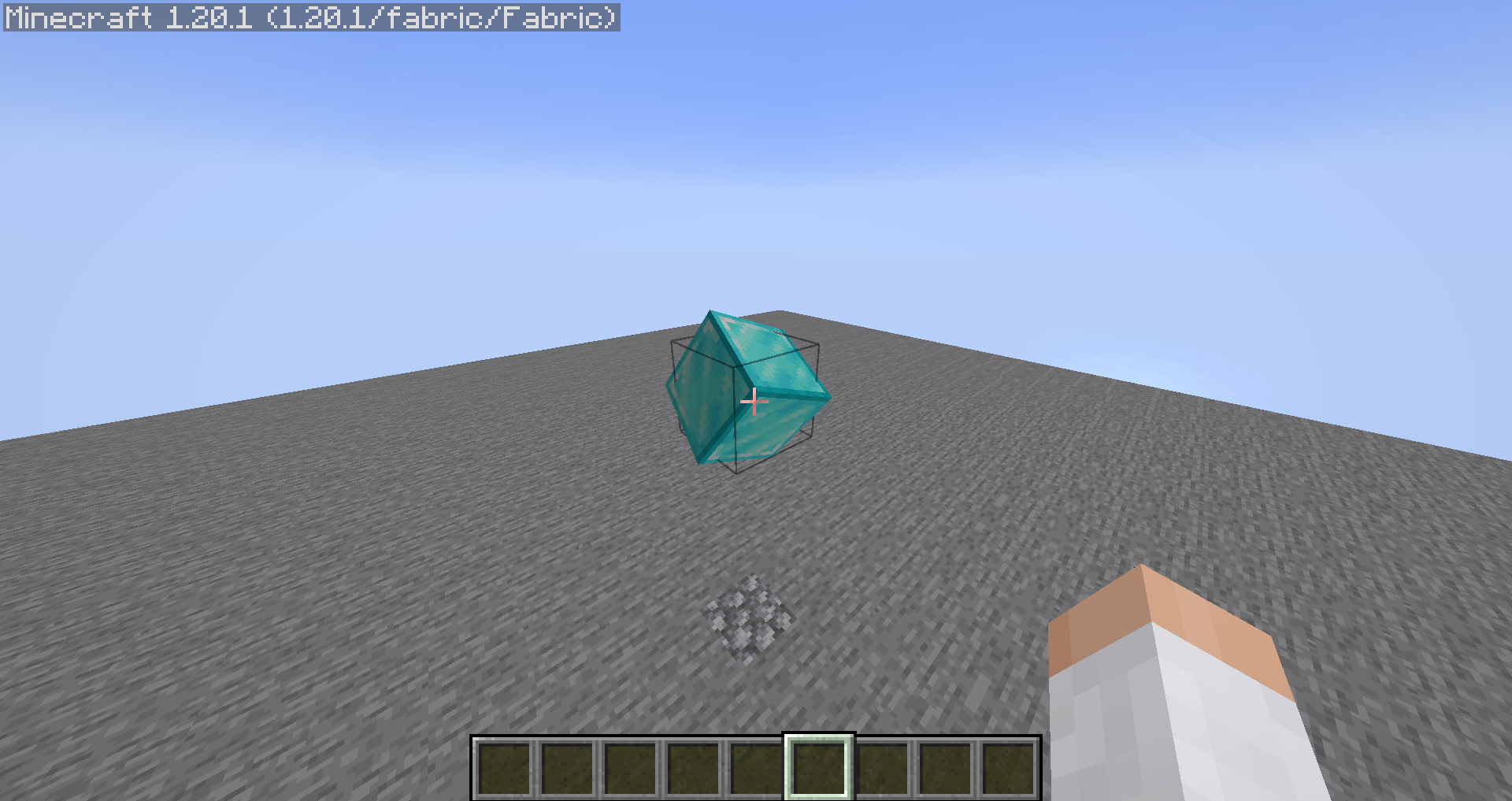
<details> <summary>Model</summary>
File: assets/minecraft/models/block/diamond_block.json
{
  "format_version": "1.21.11",
  "textures": {
    "all": "block/diamond_block"
  },
  "elements": [
    {
      "from": [0, 0, 0],
      "to": [16, 16, 16],
      "rotation": {"x": 45, "y": 45, "z": 45, "origin": [8, 8, 8]},
      "faces": {
        "north": {"uv": [0, 0, 16, 16], "texture": "#all"},
        "east": {"uv": [0, 0, 16, 16], "texture": "#all"},
        "south": {"uv": [0, 0, 16, 16], "texture": "#all"},
        "west": {"uv": [0, 0, 16, 16], "texture": "#all"},
        "up": {"uv": [0, 0, 16, 16], "texture": "#all"},
        "down": {"uv": [0, 0, 16, 16], "texture": "#all"}
      }
    }
  ]
}
</details>
Supports both rotation types:
All axis rotation
  "rotation": {
    "x": 45,
    "y": 45,
    "z": 45,
    "origin": [
      8,
      8,
      8
    ]
  }
Single axis rotation
  "rotation": {
    "angle": 45,
    "axis": "y",
    "origin": [
      8,
      8,
      8
    ]
  }
Maven
repositories {
  maven { url 'https://jitpack.io' }
}

dependencies {
  modImplementation 'com.github.Nico44YT:ModernModelFormat:<version>'
}
Version generally is comprised of "<mod_version>_<game_version_range>" e.g: "1.3.0-1.19.3-1.21.3"
Issues
If you have found an issue please report it on the github, along with (if applicable):
- any logs
- the model
- a screenshot
- the game version
- modlist
My models are not loading anymore
Try checking the model file for any extra brackets {} because Modern Model Format ensure a strict json validation.
Example:
[18:30:32] [Worker-Main-2/ERROR]: Failed to load model mod_id:models/item/example_item.json
com.google.gson.JsonSyntaxException: com.google.gson.stream.MalformedJsonException: Use JsonReader.setLenient(true) to accept malformed JSON at line 1 column 506 path $
Project description from CurseForge.
Pick your setup
Modern Model Format by Minecraft version and loader
Choose the version and loader you play, then open the matching release.
Minecraft version
1.21.2-Snapshot
1 loader buildMinecraft version
1.21.2
1 loader buildMinecraft version
1.21.1-Snapshot
1 loader buildMinecraft version
1.21.1
1 loader buildMinecraft version
1.21-Snapshot
1 loader buildMinecraft version
1.21
1 loader buildMinecraft version
1.20.6
1 loader buildMinecraft version
1.20.5-Snapshot
1 loader buildMinecraft version
1.20.5
1 loader buildMinecraft version
1.20.4
1 loader buildMinecraft version
1.20.3-Snapshot
1 loader buildShowing the newest 12 of 22 game versions. Older files are in the list below.
Check the dependencies, then try the file in a copied instance before changing a world you care about.
Recent files
Modern Model Format versions and loaders
ModernModelFormat-1.3.0.jar
19 Jul 2026
Client Source doesn’t say Server Source doesn’t say Dependencies No extras listed Listed on Release listing
Check the 1.21.3 · Fabric setup 1.21.2-Snapshot1.211.20.2-Snapshot1.20.5-Snapshot release
1.1.0_1.19.3-1.21.3
ModernModelFormat-1.1.0.jar
14 May 2026
Client Required Server Not supported Dependencies No extras listed Listed on Release listing
Check the 1.21.3 · Fabric setup 1.19.31.19.41.201.20.1 release
1.0.0_1.19.3-1.21.3
ModernModelFormat-1.0.0.jar
4 May 2026
Client Required Server Not supported Dependencies No extras listed Listed on Release listing
Check the 1.21.3 · Fabric setup 1.19.31.19.41.201.20.1 release
Looking for an older file? The official CurseForge project page is in Resources.
 mod
CurseForge · Minecraft
Shadow Fog Effect for EtBW2
Add visual effects for shadow mists, suitable for use as a game mechanic
 mod
CurseForge · Minecraft
Colossi - Sable Giant Mount
Giants that carry a real island on their backs. Climb aboard, build, ride a lift, steer one. Starts with the Zaratan, a giant turtle. Needs Sable and GeckoLib.
 mod
CurseForge · Minecraft
Industrial Facilities
A Minecraft mod adding various blocks and items useful for industrial-style building.