DoxCore Needed by doxbackpack-1.1.0.jar
requiredMatching file found Matched file: doxcore-1.0.1.jar
CurseForge · Minecraft mod
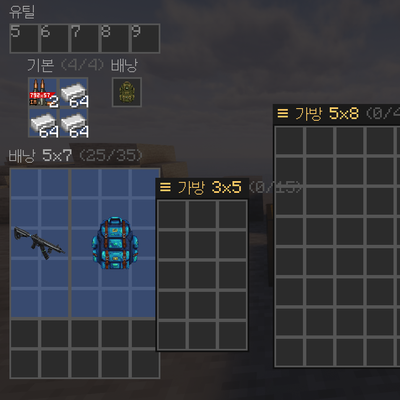
Grid-based (Tarkov-style) backpacks where items occupy w×h cells.
Quick answer
doxbackpack-1.1.0.jar targets 1.20.1 with Forge. The project page does not say whether this file belongs on the client, dedicated server, or both. All 1 required mods have matching files.
Where it goes
The project page does not say whether this file belongs on the client, dedicated server, or both.
The source does not explicitly classify this release as client-only or server-only.
doxbackpack-1.1.0.jar. Change the file and its required mods may change too.
Install DoxCore first. We found matching files for this game-version and loader setup.
We only count dependency files that match this setup. A file for another loader does not fill the gap.
Before you install it
Built for doxbackpack-1.1.0.jar. Pick another file and the loader, install side or required mods may change.
Use doxbackpack-1.1.0.jar. It targets 1.20.1 with Forge; another release may have different loader, side or dependency requirements.
Install DoxCore first. We found matching files for this game-version and loader setup.
The project page does not say whether this file belongs on the client, dedicated server, or both.
Use the “Get this file” button beside doxbackpack-1.1.0.jar. It opens that exact file at the source.
About this project
**Grid-based backpacks** — a Tarkov-style inventory where every item occupies a **w×h footprint** and you arrange gear in a grid. Six backpack sizes (small → giant) open a grid you drag items into; oversized items need space to fit. Item footprints are **extensible via DoxCore**: other mods register their own item sizes, so ammo, magazines, healing items, etc. size correctly when those mods are present. If **TACZ** is installed, guns are auto-sized per gun; if **DoxPartHealth** is installed, a part-health bar overlays the backpack screen. Works standalone — unknown items default to 1×1.
**Grid inventory** with per-item w×h footprints; 6 backpack tiers (2×3 → 5×8).
**Extensible item sizes** — DoxCore.DoxItemSize registry; producer mods register their items' sizes (soft, addon-style).
**TACZ gun sizing** (optional) — pistols/SMGs/rifles/snipers/LMGs sized per gun id.
**Part-health overlay** (optional, DoxPartHealth) in the backpack screen.
**Refit** and mirrored-container flows; server-authoritative grid with client sync.
**Translated into 20 languages** — the grid screen and item tooltips, including body part names that used to be hardcoded and could not be changed even with a resource pack.
1.20.1 (Forge) only for now. The other Dox mods also have a 1.21.1 / NeoForge line (2.x); this one has not been ported yet.
DoxCore.api.DoxItemSize.register(predicate, w, h, stackable) — declare your item's backpack footprint.Project description from CurseForge.
Pick your setup
Choose the version and loader you play, then open the matching release.
Check the dependencies, then try the file in a copied instance before changing a world you care about.
Recent files
20 Aug 2026
23 Jul 2026
23 Jul 2026
22 Jul 2026
Looking for an older file? The official CurseForge project page is in Resources.
 mod
modAn addon for Mi Alliance, reworking a multitude of things about it while adding some new ones on top.
 mod
modA addon-mod based on miraculous!
This mod adds a cloning feature; for example, while iron boots are normally crafted using 4 iron ingots, with this mod, you can place the iron boots back into the crafting grid to get 10 iron ingots.