Ars Nouveau Optional for Souls Combat HUD souls_combat_hud-neoforge-1.3.7.jar
optionalMatching file found Matched file: ars_nouveau-1.21.1-5.13.5
CurseForge · Minecraft mod
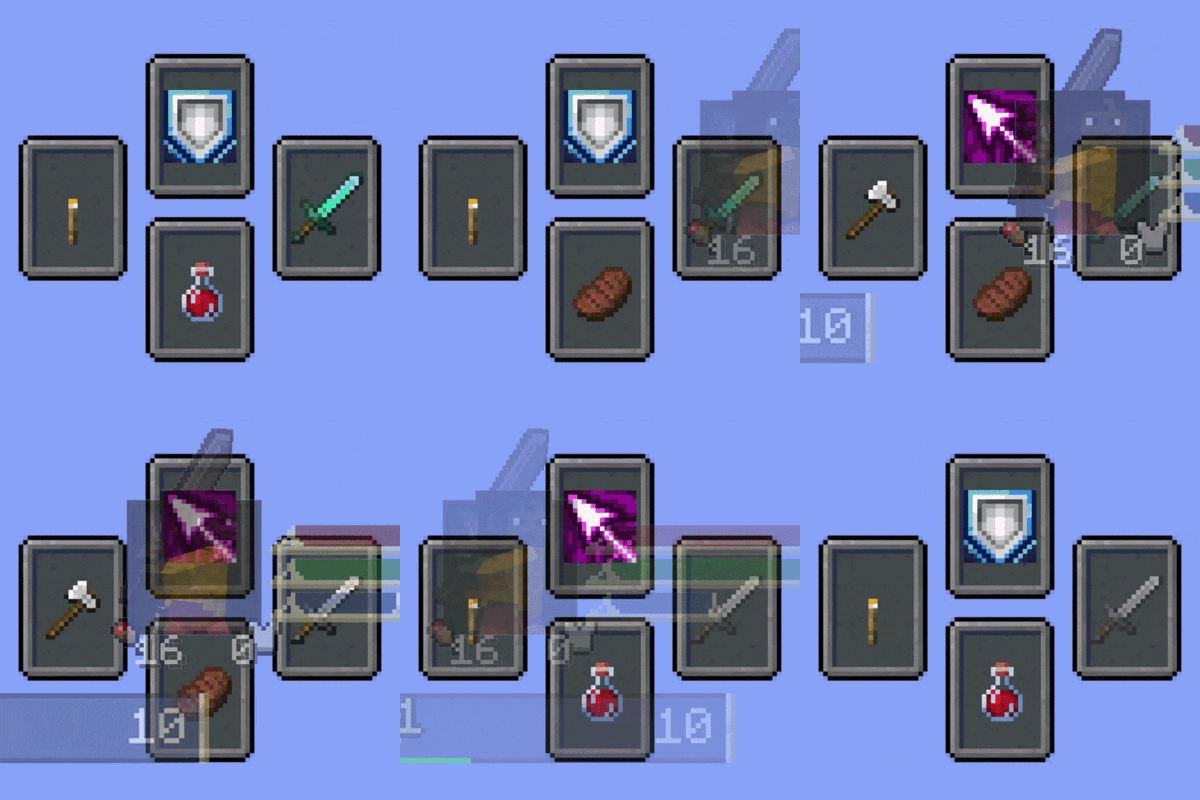
Adds a soulslike HUD featuring equipment slots, boss bar, status gauges and team display.
Quick answer
Souls Combat HUD souls_combat_hud-neoforge-1.3.7.jar targets 1.21.1 with NeoForge. The project page does not say whether this file belongs on the client, dedicated server, or both. No extra mods listed for this file.
Where it goes
The project page does not say whether this file belongs on the client, dedicated server, or both.
The source does not explicitly classify this release as client-only or server-only.
souls_combat_hud-neoforge-1.3.7.jar. Change the file and its required mods may change too.
This file does not list any required mods. Do not add a library just because a different file uses it.
13 extra mods were pulled in by other dependencies. Indented rows show who needs each one. We only count dependency files that match this setup. A file for another loader does not fill the gap.
Before you install it
Built for Souls Combat HUD souls_combat_hud-neoforge-1.3.7.jar. Pick another file and the loader, install side or required mods may change.
Use souls_combat_hud-neoforge-1.3.7.jar. It targets 1.21.1 with NeoForge; another release may have different loader, side or dependency requirements.
This file does not list any required mods. Do not add a library just because a different file uses it.
The project page does not say whether this file belongs on the client, dedicated server, or both.
Use the “Get this file” button beside souls_combat_hud-neoforge-1.3.7.jar. It opens that exact file at the source.
About this project

This client side mod adds a soulslike HUD found in FromSoftware games. The mod includes:
Each feature can be disabled through the config.
Before using the mod I also recommend:
Check out my partner mod, Souls Message Banners.
The equipment slots is essentially an extended hotbar selector. They can be cycled through your arrow keys.
Weapon slot - Indicates your selected weapon. By pressing your Right Arrow key, your main hand will cycle to weapons in your hotbar. If you are not currently holding a weapon, it will jump to the weapon it indicates.
Offhand slot - Indicates your offhand slot. By pressing your Left Arrow key, you are able to cycle through your offhand items (only with MoreOffhandSlots).
Spell slot - Indicates your active spell. By pressing your Up Arrow key, you can cycle through your spells.
Consumable slot - Indicates your food items. By pressing your Down Arrow key, you can cycle through your consumable items.
G key), which will automatically jump to the item and consume without holding right click. This replaces certain elements found in the vanilla hotbar.
assets/souls_combat_hud/souls_bars/player_gauge.json.
This displays the status of your teammates. This feature is only enabled if the mod is installed serverside.
O keyassets/souls_combat_hud/souls_bars/party_gauge.json. This replaces the vanilla bossbar with a soulslike bossbar.
entity.minecraft.ender_dragon) inside assets/<namespace>/souls_bars/entities.
Custom hotbar layout.Render armor at hunger.Notes
Project description from CurseForge.
Pick your setup
Choose the version and loader you play, then open the matching release.
Check the dependencies, then try the file in a copied instance before changing a world you care about.
Recent files
25 Nov 2026
25 Nov 2026
21 Oct 2026
18 Oct 2026
29 Sept 2026
27 Sept 2026
22 Sept 2026
20 Sept 2026
19 Sept 2026
15 Sept 2026
3 Sept 2026
31 Aug 2026
Looking for an older file? The official CurseForge project page is in Resources.
 mod
RDPL - Resource and Datapack loading to a new level. Run the same packs on any supported version of Minecraft. Restoring JOY back to Modpack building! The API that should have been. By MCT.
 mod
An immersive and fully functioning computer that provides an anternative to the stale and overused quest book and guide book
 mod
Disguise yourself from zombies by covering yourself in their flesh!