WorldEdit Optional for WorldEdit: Numeric IDs Renewed Multiloader 26.x 1.0.0
optionalMatching file found Matched file: WorldEdit 7.4.5 (NeoForge/Fabric for MC 26.2)
CurseForge · Minecraft mod
Brings WorldEdit numeric IDs back from the dead
Quick answer
WorldEdit: Numeric IDs Renewed Multiloader 26.x 1.0.0 targets 26.1, 26.1.1, 26.1.2 with Fabric, NeoForge. The project page does not say whether this file belongs on the client, dedicated server, or both. No extra mods listed for this file.
Where it goes
The project page does not say whether this file belongs on the client, dedicated server, or both.
The source does not explicitly classify this release as client-only or server-only.
Multiloader 26.x 1.0.0. Change the file and its required mods may change too.
This file does not list any required mods. Do not add a library just because a different file uses it.
2 extra mods were pulled in by other dependencies. Indented rows show who needs each one. We only count dependency files that match this setup. A file for another loader does not fill the gap.
Before you install it
Built for WorldEdit: Numeric IDs Renewed Multiloader 26.x 1.0.0. Pick another file and the loader, install side or required mods may change.
Use Multiloader 26.x 1.0.0. It targets 26.1, 26.1.1, 26.1.2 with Fabric, NeoForge; another release may have different loader, side or dependency requirements.
This file does not list any required mods. Do not add a library just because a different file uses it.
The project page does not say whether this file belongs on the client, dedicated server, or both.
Use the “Get this file” button beside Multiloader 26.x 1.0.0. It opens that exact file at the source.
About this project
Back in the good old days, Minecraft had a numeric ID system, which was later completely replaced by a namespace-based system starting with 1.13. WorldEdit, however, preserved this system for its commands, but it only works for blocks added before 1.13. This mod reworks that system by linking it to the registry ID and also adds convenient ways to find out that ID.
Using numeric IDs instead of Identifiers (aka ResourceLocation) in commands is much more efficient. This is especially true when filling different blocks at once or blocks with a complex BlockState. By remembering frequently used IDs, using worldedit commands will take just a matter of seconds
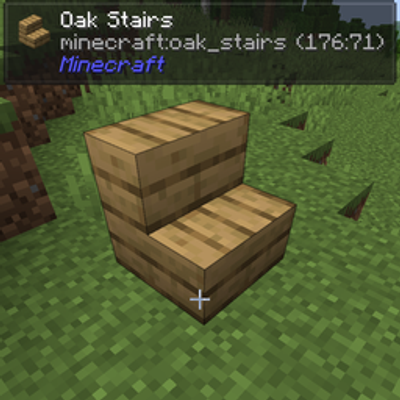
Numeric ID is shown next to the regular ID in the tooltip on item hover (requires advanced tooltips to be shown F3 + H)
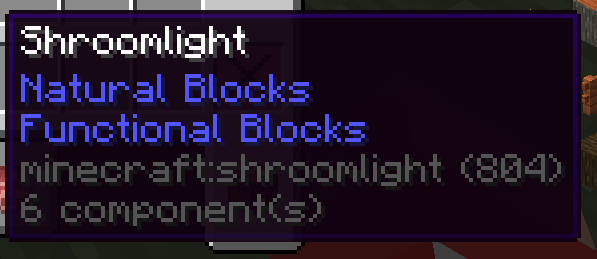
Jade Integration: Same principle as with the hover tooltip but in Jade HUD (Regsitry Name must be on in Plugin Settings)
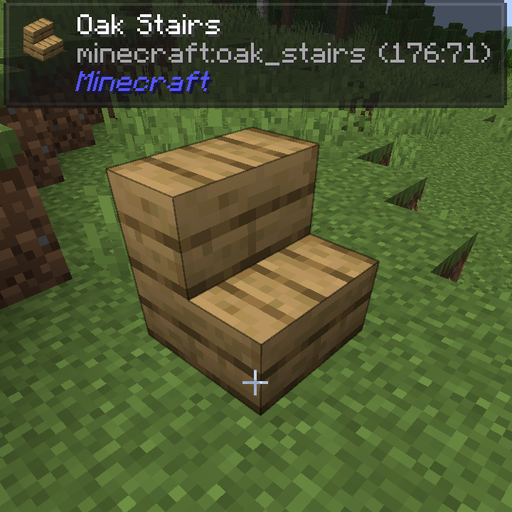
Project description from CurseForge.
Pick your setup
Choose the version and loader you play, then open the matching release.
Showing the newest 12 of 16 game versions. Older files are in the list below.
Check the dependencies, then try the file in a copied instance before changing a world you care about.
Recent files
worldeditnum-26.x-1.0.0.jar
30 Jul 2026
worldeditnum-fabric-1.21-1.0.0.jar
30 Jul 2026
worldeditnum-neoforge-1.21-1.0.0.jar
30 Jul 2026
worldeditnum-fabric-1.20-1.0.0.jar
30 Jul 2026
worldeditnum-forge-1.20-1.0.0.jar
27 Jul 2026
Looking for an older file? The official CurseForge project page is in Resources.
 mod
modEMI/JEI/REI plugin for displaying advanced information about loot tables and villager trades
 mod
modEMI/JEI/REI plugin for displaying advanced information about worldgen
 mod
modAn addon for Hex Casting (1.20.1) that allows you to open a wheel menu to select a spell book page!