Minecraft version
Back to mods 
CurseForge · Minecraft mod
Bloom UI - Resource Pack Manager
Transforms Minecraft’s resource pack screen into a fast, categorized manager with drag-and-drop ordering, bulk actions, load-order presets, and customizable pack controls.
Choose a version Pick your version below, then grab the matching file.
Quick answer
Which Bloom UI - Resource Pack Manager release matches 26.1.2?
Best match for your filters GAROSUI-ResourcePackManager-NeoForge-26.1.2-v1.1.1.jar
Game version 26.1.2
Loader NeoForge
Bloom UI - Resource Pack Manager GAROSUI-ResourcePackManager-NeoForge-26.1.2-v1.1.1.jar targets 26.1.2 with NeoForge. The project page does not say whether this file belongs on the client, dedicated server, or both. No extra mods listed for this file.
Where it goes
Is Bloom UI - Resource Pack Manager required on the client, server, or both?
The project page does not say whether this file belongs on the client, dedicated server, or both.
Client Source doesn’t say
Dedicated server Source doesn’t say
Loader for this release NeoForge
Required install it here Optional supported, not mandatory Not supported do not install here Source doesn’t say do not assume
The source does not explicitly classify this release as client-only or server-only.
What else does Bloom UI - Resource Pack Manager GAROSUI-ResourcePackManager-NeoForge-26.1.2-v1.1.1.jar need?
GAROSUI-ResourcePackManager-NeoForge-26.1.2-v1.1.1.jar on 26.1.2. Every mod below is checked against that same setup.
This file does not list any required mods. Do not add a library just because a different file uses it.
This file does not list any required or optional mods.
Before you install it
Add Bloom UI - Resource Pack Manager without breaking your instance.
Built for Bloom UI - Resource Pack Manager GAROSUI-ResourcePackManager-NeoForge-26.1.2-v1.1.1.jar on 26.1.2. Pick another file and the loader, install side or required mods may change.
- 01
Stick to this file
Use GAROSUI-ResourcePackManager-NeoForge-26.1.2-v1.1.1.jar. It targets 26.1.2 with NeoForge; another release may have different loader, side or dependency requirements.
- 02
Bring the mods it needs
This file does not list any required mods. Do not add a library just because a different file uses it.
- 03
Put it on the correct side
The project page does not say whether this file belongs on the client, dedicated server, or both.
- 04
Pick the file you checked
Use the “Get this file” button beside GAROSUI-ResourcePackManager-NeoForge-26.1.2-v1.1.1.jar. It opens that exact file at the source.
About this project
What does Bloom UI - Resource Pack Manager add?

Overview
Bloom UI - Resource Pack Manager replaces Minecraft's resource-pack screen with an organized workspace for browsing, enabling and arranging your packs. Search large collections, manage several packs at once, save load-order presets, and spot duplicate downloads while keeping a clear view of your active setup.
Features
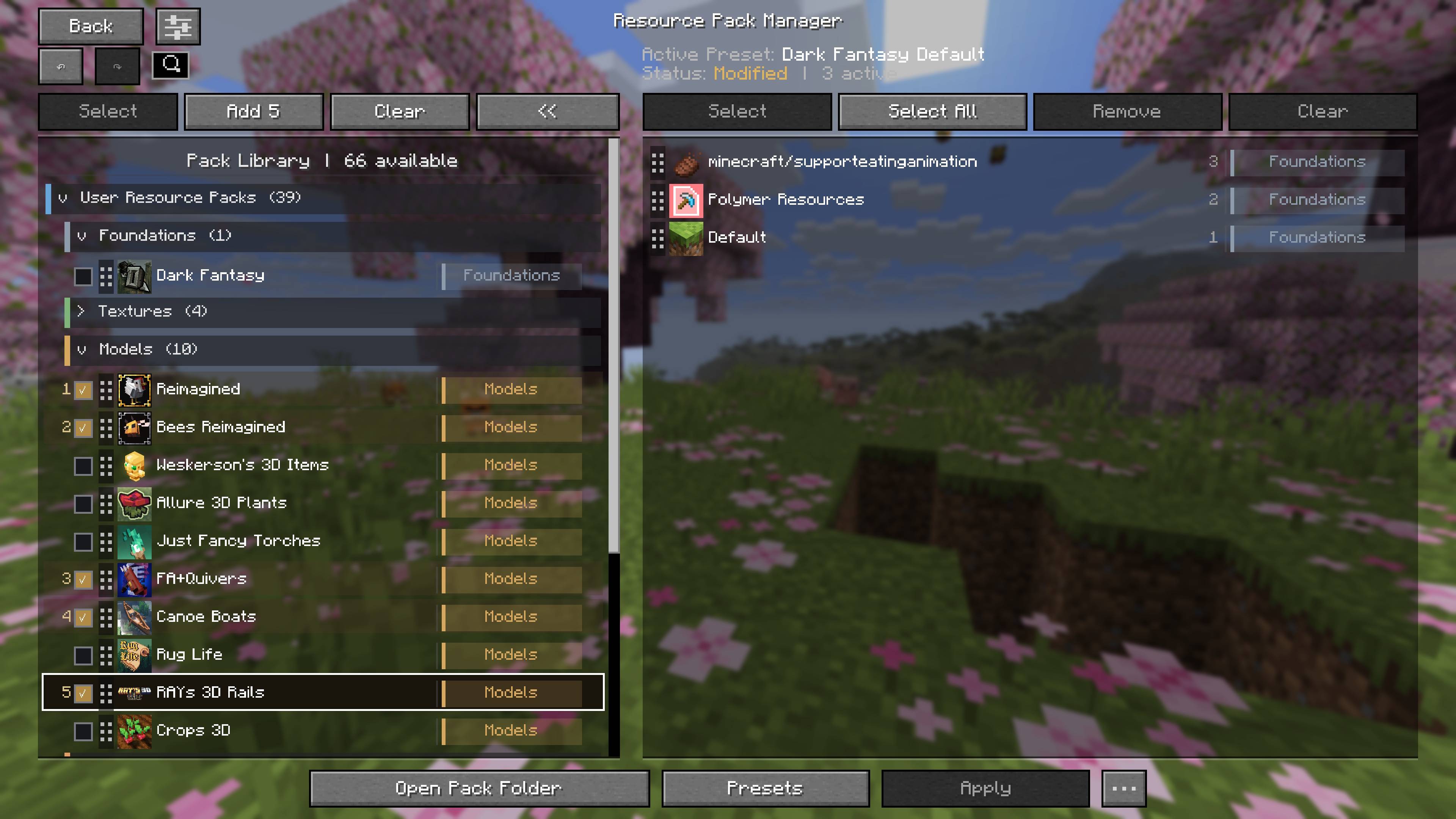
Organized Pack Library
- Browse collapsible content categories, mod-provider groups and Minecraft's built-in packs.
- Search the available library and your active pack stack.
- See pack descriptions, source information, category tags and original filenames.
Load Order and Bulk Actions
- Drag packs between columns to enable or disable them.
- Reorder active packs with a floating row, placement line and edge scrolling.
- Select multiple packs and add them in numbered order, or remove them together from the active stack.
- Undo and redo load-order changes, and apply them without leaving the manager.
Load-Order Presets
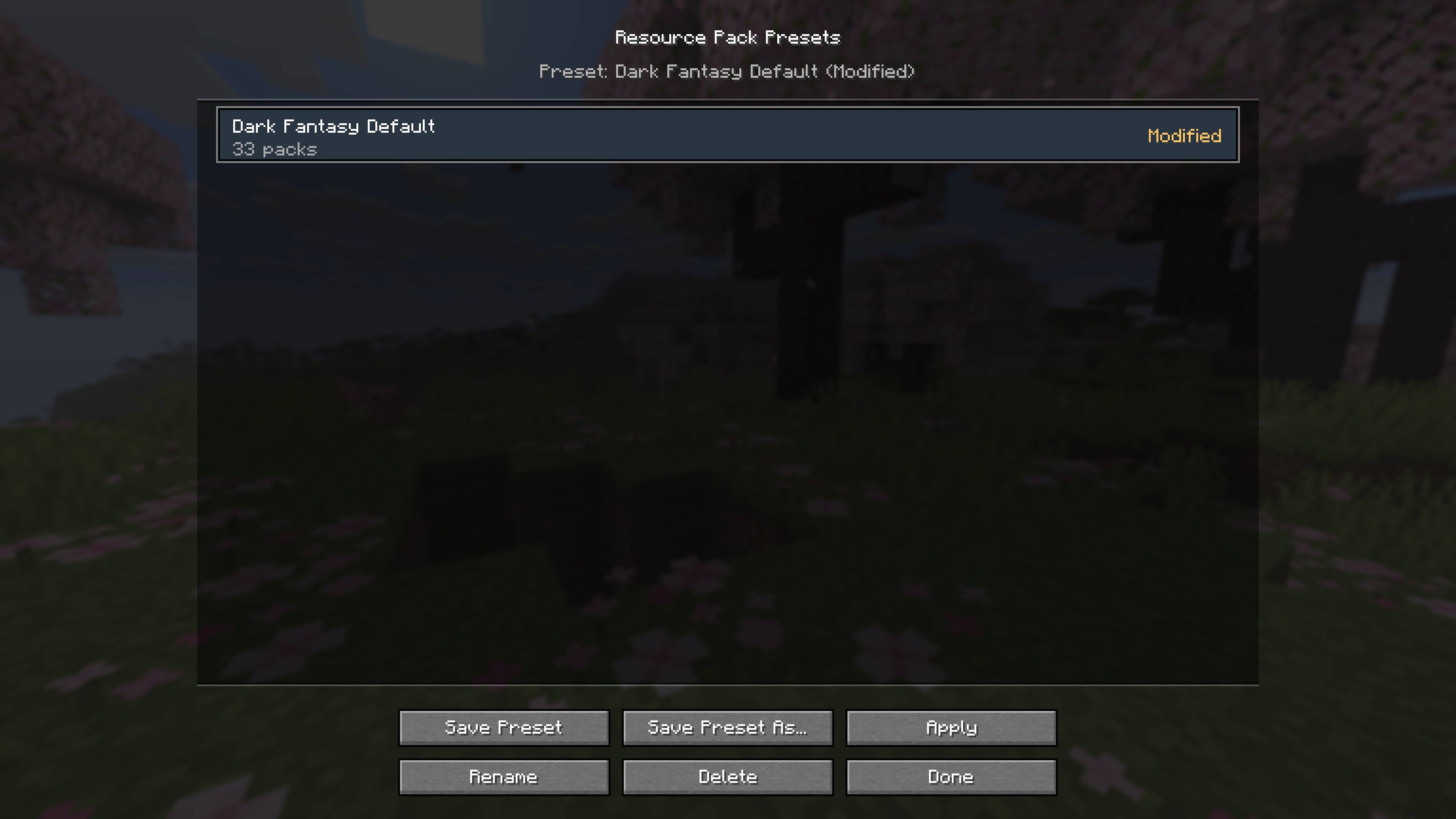
- Save named setups and switch between them.
- Rename, overwrite or delete saved presets.
- Review missing packs and compatibility warnings before applying a preset.
- See whether the active setup matches a saved preset or has unsaved changes.
Duplicate Detection and Safe Removal
- Identify identical pack downloads and possible duplicate versions.
- Delete user-installed ZIP packs after confirmation.
- Keep required, built-in and mod-provided resources protected from deletion.
Customize Your Workspace
- Adjust card size, pack details, category tags and source grouping.
- Control compatibility warnings globally or for individual packs.
- Access controls supplied by other mods through the Others menu.
- Review unapplied changes before leaving the screen.
Usage
Open Options > Resource Packs. Browse or search the available library, add the packs you want, and arrange their priority in the active column. Use Apply to reload your resources, or Presets to save and switch setups.
Compatibility
This is a client-side interface mod; multiplayer servers do not need it. It manages resource packs already installed in your game and does not download packs or alter their contents. Category and compatibility labels help organize the library but do not guarantee that different packs work together visually.
Project description from CurseForge.
Pick your setup
Bloom UI - Resource Pack Manager by Minecraft version and loader
Choose the version and loader you play, then open the matching release.
Minecraft version
26.2
2 loader buildsMinecraft version
26.1.2
2 loader buildsCheck the dependencies, then try the file in a copied instance before changing a world you care about.
Recent files
Bloom UI - Resource Pack Manager versions and loaders
GAROSUI-ResourcePackManager-NeoForge-26.1.2-v1.1.1.jar
2 Aug 2026
Client Source doesn’t say Server Source doesn’t say Dependencies No extras listed Listed on Release listing
Check the 26.1.2 · NeoForge setup NeoForge26.1.2 release
GAROSUI-ResourcePackManager-Fabric-26.1.2-v1.1.1.jar
2 Aug 2026
Client Source doesn’t say Server Source doesn’t say Dependencies No extras listed Listed on Release listing
Check the 26.1.2 · Fabric setup Fabric26.1.2 release
GAROSUI-ResourcePackManager-NeoForge-26.1.2-v1.1.0.jar
1 Aug 2026
Client Source doesn’t say Server Source doesn’t say Dependencies No extras listed Listed on Release listing
Check the 26.1.2 · NeoForge setup NeoForge26.1.2 release
GAROSUI-ResourcePackManager-Fabric-26.1.2-v1.1.0.jar
1 Aug 2026
Client Source doesn’t say Server Source doesn’t say Dependencies No extras listed Listed on Release listing
Check the 26.1.2 · Fabric setup Fabric26.1.2 release
GAROSUI-ResourcePackManager-NeoForge-26.1.2-v1.0.1.jar
29 Jul 2026
Client Source doesn’t say Server Source doesn’t say Dependencies No extras listed Listed on Release listing
Check the 26.1.2 · NeoForge setup NeoForge26.1.2 release
GAROSUI-ResourcePackManager-Fabric-26.1.2-v1.0.1.jar
29 Jul 2026
Client Source doesn’t say Server Source doesn’t say Dependencies No extras listed Listed on Release listing
Check the 26.1.2 · Fabric setup Fabric26.1.2 release
Looking for an older file? The official CurseForge project page is in Resources.
 mod
CurseForge · Minecraft
Breed faster Happy Ghasts
Breed faster Happy Ghasts, boost flight speed with Speed Potions or Snowballs, and inspect mount stats with a Book and Quill.
 mod
CurseForge · Minecraft
Profet's Veinminer
Sneak, mine one ore, and the whole vein comes out in a chain reaction. Respects Fortune, Silk Touch, tool tier and durability. Only needed on the server.
 mod
CurseForge · Minecraft
Modern port of Auto Fishing+
Automatically reel in when a fish bites, with junk filtering and rod-safety options. Ported to 1.12.2 Forge and 1.20.1 Fabric/Forge.