Minecraft version
Back to mods 
CurseForge · Minecraft mod
Universal Container
Turn any configured decorative block into a fully functional, resizable container while preserving its original appearance.
Choose a version Pick your version below, then grab the matching file.
Quick answer
Which Universal Container release should I use?
Latest stable file universal_container-1.3.jar
Game version 1.20.1
Loader Forge
Universal Container universal_container-1.3.jar targets 1.20.1 with Forge. The project page does not say whether this file belongs on the client, dedicated server, or both. No extra mods listed for this file.
Where it goes
Is Universal Container required on the client, server, or both?
The project page does not say whether this file belongs on the client, dedicated server, or both.
Client Source doesn’t say
Dedicated server Source doesn’t say
Loader for this release Forge
Required install it here Optional supported, not mandatory Not supported do not install here Source doesn’t say do not assume
The source does not explicitly classify this release as client-only or server-only.
What else does Universal Container universal_container-1.3.jar need?
universal_container-1.3.jar. Change the file and its required mods may change too.
This file does not list any required mods. Do not add a library just because a different file uses it.
This file does not list any required or optional mods.
Before you install it
Add Universal Container without breaking your instance.
Built for Universal Container universal_container-1.3.jar. Pick another file and the loader, install side or required mods may change.
- 01
Stick to this file
Use universal_container-1.3.jar. It targets 1.20.1 with Forge; another release may have different loader, side or dependency requirements.
- 02
Bring the mods it needs
This file does not list any required mods. Do not add a library just because a different file uses it.
- 03
Put it on the correct side
The project page does not say whether this file belongs on the client, dedicated server, or both.
- 04
Pick the file you checked
Use the “Get this file” button beside universal_container-1.3.jar. It opens that exact file at the source.
About this project
What does Universal Container add?
Universal Container is a configurable Forge mod that creates functional container variants of existing blocks while preserving their original models, colors, shapes, and render layers.
Define the source block, registry ID, display name, and inventory dimensions in a simple configuration file. Generated containers support custom GUI sizes, item persistence, comparator output, hoppers, pipes, and other Forge item capabilities.
Oversized block shapes are handled automatically using invisible proxy blocks, allowing every occupied section to open the same inventory and interact with automation systems.
Features
- Forge 1.20.1 support
- Configurable source blocks
- Automatic or custom registry IDs
- Custom names and translation keys
- Inventories from 1–6 rows and 1–12 columns
- Up to 72 inventory slots
- Source model, color, shape, and render-layer preservation
- Resizable textured container interface
- Hopper and modded pipe compatibility
- Comparator output
- Automatic proxy support for oversized block shapes
- Dedicated creative mode tab
- Client and server support
Configuration changes require a game restart, and multiplayer clients must use the same configuration as the server.
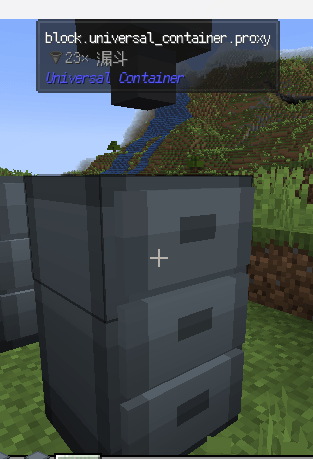
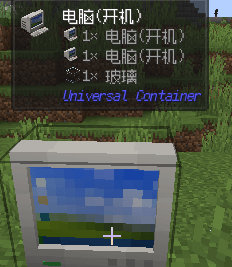
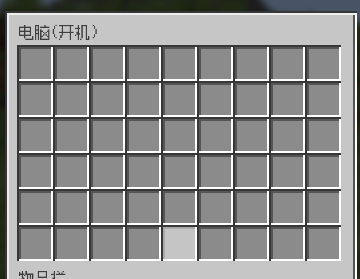
Project description from CurseForge.
Pick your setup
Universal Container by Minecraft version and loader
Choose the version and loader you play, then open the matching release.
Check the dependencies, then try the file in a copied instance before changing a world you care about.
Recent files
Universal Container versions and loaders
universal_container-1.3.jar
8 Aug 2026
Client Source doesn’t say Server Source doesn’t say Dependencies No extras listed Listed on Release listing
Check the 1.20.1 · Forge setup 1.20.1Forge release
universal_container-1.2.4.jar
7 Aug 2026
Client Source doesn’t say Server Source doesn’t say Dependencies No extras listed Listed on Release listing
Check the 1.20.1 · Forge setup 1.20.1Forge release
universal_container-1.2.3.jar
1 Aug 2026
Client Source doesn’t say Server Source doesn’t say Dependencies No extras listed Listed on Release listing
Check the 1.20.1 · Forge setup 1.20.1Forge release
universal_container-1.2.0.jar
30 Jul 2026
Client Source doesn’t say Server Source doesn’t say Dependencies No extras listed Listed on Release listing
Check the 1.20.1 · Forge setup 1.20.1Forge release
universal_container-1.1.0.jar
29 Jul 2026
Client Source doesn’t say Server Source doesn’t say Dependencies No extras listed Listed on Release listing
Check the 1.20.1 · Forge setup 1.20.1Forge release
universal_container-1.0.0.jar
29 Jul 2026
Client Source doesn’t say Server Source doesn’t say Dependencies No extras listed Listed on Release listing
Check the 1.20.1 · Forge setup 1.20.1Forge release
Looking for an older file? The official CurseForge project page is in Resources.
 mod
mod CurseForge + Modrinth · Minecraft
Horse Powered
Hand-cranked and animal-powered machinery focusing on early game grinding, chopping, pressing, drying, and crushing. Leash horses, donkeys, or llamas to automate the line or generate Forge Energy. Data-driven recipes with full JEI, EMI, and Jade support.
 mod
mod Modrinth · Minecraft
Litematica Material HUD & Chest Finder
Displays a list of materials and the chests in which they are located
 mod
mod CurseForge · Minecraft
Nookworks
Climb ropes, string café lights, print posters, cook udon and karaage, and open one door to every dimension - vanilla-style, for NeoForge 26.3 and 26.2.